Video editors need dependable storage tools for cloning project drives, creating working copies, and moving large media libraries without unnecessary setup. The right duplicator can simplify backups while reducing downtime between shoots, edits, and deliveries.
This roundup compares 10 standalone duplicators and docking stations across drive formats, copy speeds, bay counts, and workflow flexibility. Whether you work with SATA SSDs, 3.5-inch hard drives, or newer M.2 NVMe media, the best choice depends on how often you clone drives and how many devices you need to process at once.
Best 10 Hard Drive Duplicators for Video Editing Picks for 2026
Best Value Dual-Bay Dock
SABRENT USB 3.0 HDD/SSD Cloner

- Supports 2.5-inch and 3.5-inch SATA drives
- Offline cloning requires no drivers
- USB 3.0 transfers up to 5Gbps
Best For: Affordable SATA drive access and occasional cloning
Fast SATA Cloning Pick
StarTech Dual-Bay SATA Duplicator

- Clones SATA drives without a computer
- Copies at up to 28GB per minute
- Works with SATA drives of any capacity
Best For: Full-drive SATA migration and studio workflows
Most Versatile Three-Bay Dock

- Supports NVMe and 2.5/3.5-inch SATA drives
- Three bays connect multiple drives
- USB 3.2 Gen 2 reaches up to 10Gbps
Best For: Mixed NVMe and SATA editing storage
Professional Multi-Format Tool

- Clones M.2 and 2.5/3.5-inch SATA drives
- Provides configurable duplication modes
- Includes NIST SP 800-88 secure erase support
Best For: Professional mixed-format cloning and sanitization
Best Standalone 1:1 Duplicator

- Standalone copying without a computer
- Supports 2.5-inch and 3.5-inch SATA drives
- Includes drive sanitization mode
Best For: Simple drive copying, upgrades, and erasure
Best Multi-Bay Dock

- Five bays for SATA HDDs and SSDs
- Offline cloning without a computer
- Supports up to 120TB of expansion
Best For: Managing multiple media drives and backups
Best High-Volume Duplicator
Systor 1:11 HDD/SSD Duplicator
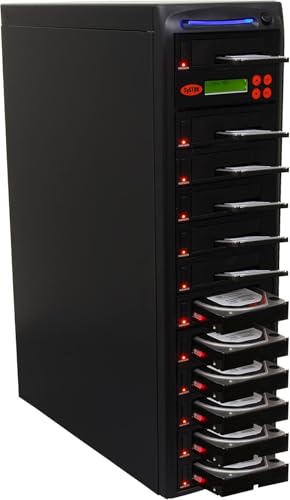
- Copies to 11 drives simultaneously
- Runs at up to 150MB per second
- Includes standalone sanitization
Best For: Studios and teams making multiple drive copies
Professional 4-Bay Choice

- Clones one drive to three targets
- Supports 2.5/3.5-inch SATA and IDE drives
- Includes secure erase and docking modes
Best For: Studios and IT teams managing multiple editing drives
High-Volume Production Pick

- Duplicates one source to five targets
- Supports drives over 8TB
- Offers several secure sanitization modes
Best For: Batch drive preparation in post-production departments
Compact Desktop Option

- Clones drives offline without a computer
- Supports up to 24TB per bay
- Adds three USB 3.0 hub ports
Best For: Individual editors and small-team backup workflows
Best Value Dual-Bay Dock – SABRENT USB 3.0 HDD/SSD Cloner
For shoppers comparing hard drive duplicators for video editing, the SABRENT EC-HD2B is a straightforward dual-bay option for cloning or accessing 2.5-inch and 3.5-inch SATA HDDs and SSDs. It supports drives up to 10TB and connects over USB 3.0 for file transfers.
Best For: Editors and content creators who need an affordable dock for SATA drive access, backups, and occasional offline cloning.
Pros:
- Supports both 2.5-inch and 3.5-inch SATA HDDs and SSDs.
- Offline cloning works without drivers or a computer.
- USB 3.0 transfer speeds reach up to 5Gbps.
- Supports hard drives up to 10TB.
Cons:
- Limited to two SATA drives and does not list M.2 NVMe support.
- Offline cloning is specified at up to 60Mbps, which is slower than its USB transfer rating.
The EC-HD2B is a practical choice when your editing workflow relies on standard SATA media. Its plug-and-play design keeps drive swapping simple, while the dual bays make source-and-target cloning convenient.
Fast SATA Cloning Pick – StarTech Dual-Bay SATA Duplicator
The StarTech SDOCK2U313R is a strong candidate among hard drive duplicators for video editing when you need standalone, sector-by-sector copying. It accepts 2.5-inch and 3.5-inch SATA drives of any capacity and can also function as a USB-connected SATA dock.
Best For: Editors, IT teams, and studios that need full-drive duplication, 4Kn compatibility, and a reusable SATA docking station.
Pros:
- Copies SATA drives without a computer or special software.
- Supports 2.5-inch and 3.5-inch SATA HDDs and SSDs of any capacity.
- Duplicates at speeds up to 28GB per minute.
- Includes USB 3.2 Gen 2 connectivity, TRIM support, and 4Kn compatibility.
Cons:
- Sector-by-sector duplication also copies empty sectors and requires a target drive equal to or larger than the source.
- Does not support M.2 drives without an additional solution.
With its tool-free bays, eject buttons, and standalone operation, this StarTech dock is well suited to repeatable SATA migration tasks. It is especially useful when cloning entire media drives matters more than selective file copying.
Most Versatile Three-Bay Dock – ICY BOX NVMe/SATA Cloner
The ICY BOX triple-bay station expands the options available in hard drive duplicators for video editing by supporting M.2 PCIe NVMe, 2.5-inch SATA, and 3.5-inch SATA drives. Its three independent slots let you connect multiple drive types at once, while USB 3.2 Gen 2 provides up to 10Gbps host transfer speeds.
Best For: Editors managing mixed NVMe and SATA storage who want one tool for drive access, migration, and offline cloning.
Pros:
- Supports cloning between NVMe and SATA drive types.
- Three independent bays allow simultaneous access to multiple drives.
- One-touch offline cloning avoids software installation.
- Includes USB-C and USB-A connectivity through its combo cable.
Cons:
- Its plastic enclosure may be less rugged than a metal professional duplicator.
- Drive compatibility and cloning speed can vary by source and target type.
This is the most flexible option in the group for mixed-storage editing environments. The tool-free triple-bay layout is convenient when projects move between NVMe working drives and larger SATA archive drives.
Professional Multi-Format Tool – StarTech M.2/SATA Duplicator
For professional workflows evaluating hard drive duplicators for video editing, the StarTech SM2DUPE11 combines M.2 NVMe, M.2 SATA, and 2.5-inch or 3.5-inch SATA duplication in one standalone unit. Its on-screen controls support configurable copy modes as well as multiple drive-erasure options.
Best For: Production teams and IT professionals that need cross-format cloning, drive sanitization, and detailed control over duplication settings.
Pros:
- Clones between M.2 NVMe, M.2 SATA, and 2.5/3.5-inch SATA drives.
- Offers system/file, partition, whole-drive, and percentage duplication modes.
- Includes five erase modes, including secure erase aligned with NIST SP 800-88 Rev. 1.
- Supports M.2 sizes from 2230 through 22110 and provides an on-screen display.
Cons:
- Its 1-to-1 design supports two drives at a time.
- Additional adapters are required for IDE or mSATA drives.
- It is more specialized than a basic consumer docking station.
The SM2DUPE11 is the most feature-rich choice here for teams handling varied storage formats and sensitive project data. Its configurable duplication and erasure modes add control, though they may be unnecessary for simple drive docking.
Best Standalone 1:1 Duplicator – Systor SYS101HS-DP
For buyers comparing hard drive duplicators for video editing, the Systor SYS101HS-DP is a straightforward standalone option for copying or sanitizing SATA drives without a computer or software. It supports both 2.5-inch and 3.5-inch HDDs and SSDs, with transfer speeds up to 90MB per second.
Best For: Editors, studios, and small businesses that need simple 1:1 drive copying, upgrades, or drive erasure.
Pros:
- Standalone operation requires no computer or software.
- Supports 2.5-inch and 3.5-inch SATA HDDs and SSDs without an adapter.
- Copies full drives or data-only files and supports DoD 5220.22-M-compliant sanitization.
- Hot-swappable design and a metal enclosure support practical bench use.
Cons:
- Its 90MB-per-second speed is slower than the faster Systor model in this roundup.
- It is a 1:1 duplicator, so it is less suited to producing many copies at once.
The SYS101HS-DP is a practical choice when dependable, uncomplicated drive handling matters more than high-volume duplication. Its broad SATA drive compatibility and sanitization mode add flexibility for video-production workflows.
Best Multi-Bay Dock – MAIWO 5-Bay SATA Cloner
The MAIWO 5-Bay docking station gives video editors a flexible way to connect, read, write, and clone multiple SATA drives. Its offline clone function works without a computer, while USB 3.1 connectivity and UASP support help with connected file-transfer tasks.
Best For: Video teams managing several 2.5-inch or 3.5-inch SATA HDDs and SSDs for backups, transfers, and offline cloning.
Pros:
- Five bays support simultaneous reading and writing across compatible SATA drives.
- Offline cloning works without a computer, and the display tracks progress from 0% to 100%.
- Supports up to 120TB of expanded capacity based on five 24TB drives.
- Tool-free open-bay design promotes installation ease and heat dissipation.
Cons:
- It is a larger desktop dock rather than a compact dedicated 1:1 duplicator.
- Offline cloning is described for source-to-target use, so it is not a multi-target duplicator.
- Drive bays are for SATA HDDs and SSDs; other interfaces are not listed as supported.
Choose the MAIWO when your workflow involves rotating several SATA drives rather than making one-off copies. The five-bay layout, capacity expansion, progress display, and offline cloning make it especially useful for organized media management.
Best High-Volume Duplicator – Systor 1:11 HDD/SSD Duplicator
For production environments that need multiple copies, the Systor 1:11 is the most purpose-built choice among these hard drive duplicators for video editing. It can copy multiple SATA HDDs or SSDs simultaneously at up to 150MB per second, or 9GB per minute, without requiring a computer or software.
Best For: Studios, IT teams, and businesses producing several identical SATA drive copies at a time.
Pros:
- 1:11 architecture is designed for high-volume simultaneous duplication.
- Up to 150MB-per-second transfer speed remains consistent as the number of loaded drives increases.
- Copies complete drives or data-only files and supports DoD 5220.22-M-compliant sanitization.
- Standalone operation and hot-swappable functionality simplify repeated workflows.
Cons:
- Its listed compatibility is limited to SATA drives and desktop use.
- The supplied details identify a 3.5-inch form factor, so buyers needing 2.5-inch drive support should verify fit before purchase.
- Its high-volume design may be more than needed for occasional personal duplication.
The Systor 1:11 stands out when duplication volume and throughput are priorities. It is a strong fit for repeatable studio or business workflows, especially where standalone operation and drive sanitization are valuable.
Professional 4-Bay Choice – StarTech 1:3 SATA Duplicator
For video editors managing multiple SATA HDDs or SSDs, the StarTech SATDOCK4U3RE combines standalone duplication, drive erasing, and computer-connected docking in one four-bay unit. It supports sector-by-sector cloning at up to 4.2 GB/min, with USB 3.2 Gen 1 or eSATA connectivity for file access and transfers.
Best For: Video editors, studios, and IT teams that need multi-drive cloning plus secure erasing and occasional dock use.
Pros:
- Duplicates one source drive to up to three targets without an operating system.
- Supports 2.5- and 3.5-inch SATA drives, with included IDE adapters.
- Offers quick erase and NIST SP 800-88 Rev. 1 Purge secure erase modes.
- Includes USB-A and eSATA cables, a universal power adapter, and a two-year warranty.
Cons:
- The target drive must be equal to or larger than the source.
- Its 1:3 capacity is less than dedicated five-target duplicators.
- IDE drives require the included adapters and cables.
This is a versatile hard drive duplicator for video editing workflows that need both rapid media cloning and drive lifecycle management. Its four-bay design is especially useful when preparing several working or backup drives at once.
High-Volume Production Pick – DupliM 1:5 SATA Duplicator
DupliM 1:5 SSD HDD SATA Duplicator and Hard Drive Sanitizer Stand-Alone Cloner Copier Burner
Check Price On AmazonThe DupliM 1:5 is designed for high-volume drive preparation, making it a practical hard drive duplicator for video editing teams that need several identical media copies. This standalone unit supports 3.5-inch SATA HDDs and SSDs, handles drives over 8TB, and provides multiple sanitization choices.
Best For: Production houses, post-production departments, and IT operations that duplicate many SATA drives in batches.
Pros:
- Copies one source to up to five target drives simultaneously.
- Supports 3.5-inch SATA HDDs and SSDs with capacities over 8TB.
- Provides quick, secure, one-pass, three-pass, verified, and DoD 7-pass sanitization.
- Uses a metal enclosure and switchable 115/230V power.
Cons:
- The listed transfer rate is up to 120 MB/s, slower than the StarTech unit’s stated maximum.
- 2.5-inch drives need optional adapters that are not included.
- It weighs 19 pounds and has a one-year parts-and-labor warranty.
The DupliM stands out when throughput volume matters more than compactness. Its five-target layout and broad sanitization menu suit professional environments preparing large batches of editing or archive drives.
Compact Desktop Option – MAIWO Dual-Bay SATA Cloner
The MAIWO dual-bay dock offers a straightforward hard drive duplicator for video editing backups and drive access. It clones SATA drives offline without a computer, supports 2.5- and 3.5-inch HDDs or SSDs up to 24TB per bay, and also works as a USB 3.0-connected reader with three additional USB ports.
Best For: Individual editors and small teams that need simple offline cloning, high-capacity drive support, and a desktop USB hub.
Pros:
- Performs offline source-to-target cloning without drivers or a computer.
- Supports 2.5- and 3.5-inch SATA drives up to 24TB per bay.
- Provides USB 3.0 bandwidth and three USB-A hub ports.
- Uses LED indicators to show 25%, 50%, 75%, and 100% cloning progress.
Cons:
- Its dual-bay design supports only one target during cloning.
- It does not list standalone sanitization or secure-erase modes.
- The enclosure is ABS plastic and the warranty is one year.
This MAIWO is a convenient choice for editors who want cloning and everyday drive access in a compact desktop device. It is better suited to occasional backups and transfers than to large-scale duplication or certified drive erasure.
How We Picked the Best Hard Drive Duplicators for Video Editing
We focused on features that matter in real editing and production workflows: supported drive types, standalone cloning capability, rated transfer speed, number of bays, erase and sanitation functions, host connectivity, and ease of use. The selection includes compact dual-bay docks for occasional backups, multi-bay systems for studios, and dedicated duplicators designed for repeated source-to-target copying.
Because advertised speeds depend on the source drive, target drive, interface, file size, and workload, treat throughput figures as maximum or rated values rather than guaranteed real-world performance. A duplicator also does not replace a complete backup strategy: keep at least one additional copy stored separately.
Quick Comparison
| Best For | What to Look For |
|---|---|
| Occasional drive cloning | Simple dual-bay SATA dock with one-touch operation |
| Mixed modern storage | M.2 NVMe and SATA support with USB-C connectivity |
| Frequent studio backups | Multiple bays, strong cooling, and high sustained throughput |
| IT or production fleets | Standalone 1:3, 1:5, or 1:11 duplication |
| Secure reuse or disposal | Verified erasure and sanitation modes |
Key Buying Factors for Hard Drive Duplicators for Video Editing
Drive Compatibility
Check whether the unit supports 2.5-inch and 3.5-inch SATA drives, M.2 SATA, M.2 NVMe, or a combination. M.2 support is especially useful for newer laptops, compact workstations, and fast scratch-drive workflows, but SATA-only docks can be more practical for large archive disks.
Copy Speed and Connection
Look at both the duplicator’s internal rating and its computer connection. USB 3.0 is adequate for many HDD backups, while USB 3.1 or USB-C can better support faster SSD transfers. For standalone duplication, the source and target drives still determine much of the actual speed.
Capacity and Bay Layout
More bays help when preparing several copies or managing multiple media drives, but they also increase desk space and power requirements. Confirm the maximum supported capacity if you use high-capacity archive disks.
Standalone Controls and Erasure
Choose a standalone copier with clear status indicators and source-to-target safeguards if you want to clone without a computer. Eraser functions are valuable for rental drives, client returns, and retired media, but verify the available erase method before relying on it for compliance.
Who Should Buy Which Hard Drive Duplicators for Video Editing?
Choose a basic dual-bay SATA dock if you mainly clone or inspect one drive at a time. Pick an M.2-capable model if your editing system uses NVMe scratch or project drives. Studios handling several copies should prioritize four- or five-bay hardware, while IT teams and production houses may benefit from dedicated 1:3, 1:5, or 1:11 duplicators. If secure reuse is part of your workflow, select a model with explicit erasure features rather than relying on ordinary formatting.