Small solder joints, surface-mount components, and damaged PCB traces are easier to inspect when your view is enlarged, well lit, and displayed at a comfortable working angle. The best soldering microscopes under $100 combine useful magnification with a stable stand, adjustable lighting, and a screen that keeps your hands free.
This roundup compares 10 affordable digital microscopes suited to electronics repair, soldering, coin inspection, and other precision work. Use the buying guide below to match display size, camera quality, stand design, and connectivity to your bench setup.
Best 10 Soldering Microscopes Under 100 Picks for 2026
Best Budget C-Clamp Pick
5-Inch LCD Soldering Microscope

- C-clamp keeps both hands free
- 5-inch IPS screen with flexible arm
- PC viewing works through built-in camera apps
Best For: PCB repair and solder-joint inspection
Most Versatile Lens Kit
Andonstar AD246S-M 3-Lens Microscope

- Three lenses cover soldering, coins, and slides
- 2160P recording with HDMI output
- Adjustable metal boom arm and included 32GB card
Best For: Multi-purpose workshops and demonstrations
Best Large-Screen Option
TOMLOV DM10 Digital Microscope

- 10.1-inch IPS screen for comfortable viewing
- 10 adjustable lights help reduce shadows
- Includes Micro SD card and wireless remote
Best For: Electronics hobbyists and coin collectors
Best Straightforward 7-Inch Model
Dcorn 1200X Digital Microscope

- 7-inch HD display with 12MP photo support
- Eight LEDs plus two adjustable side lights
- Metal base and Windows/Mac PC viewing
Best For: Beginners and general electronics inspection
Portable Budget Pick
PalliPartners Digital Microscope

- 4.3-inch HD screen with 50X–1000X magnification
- Rechargeable battery for approximately 4–5 hours
- Includes metal bracket, adjustable LEDs, and 32GB card
Best For: Portable PCB inspection and general close-up viewing
Large-Screen Hobby Pick

- 7-inch screen for comfortable close-up viewing
- Metal base and adjustable stand support steady work
- Gooseneck lights, PC connection, and 16GB storage included
Best For: Stable hobby electronics, soldering, and coin inspection
Best Portable Starter Pick
Elikliv EDM4 Digital Microscope

- 4.3-inch 720P display for comfortable viewing
- Eight adjustable LEDs and height-adjustable stand
- Rechargeable battery with Windows/MacBook support
Best For: Beginners and hobbyists handling light soldering, coins, and STEM projects
Best Large-Screen Workbench Pick
7-Inch 1200X Soldering Microscope
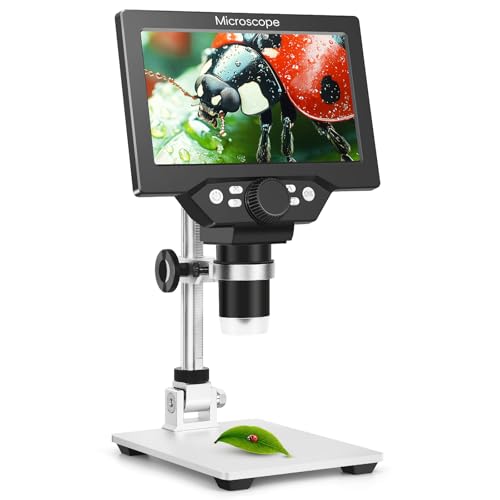
- 7-inch LCD with 50–1200X stated magnification
- Metal stand helps stabilize soldering work
- 12MP photos and 1080P video recording
Best For: PCB repair and electronics work requiring a larger, steadier display
Best Flexible-Arm Pick
Andonstar AD115-Arm Microscope

- 27.5-inch boom arm with space-saving C-clamp
- 5-inch IPS screen and eight adjustable LEDs
- Anti-shake design for soldering and inspection
Best For: Desk-constrained users switching between PCB repair, coins, and watch work
Best Budget C-Clamp Pick – 5-Inch LCD Soldering Microscope
If you want soldering microscopes under 100 for hands-on PCB work, this compact Aikokkl model keeps the display and camera close to your work area. Its C-clamp and flexible arm help leave both hands available for repairs, while focusing is handled manually by changing the lens distance and turning the focus wheel.
Best For: PCB repair, solder-joint inspection, and hobbyists who want a self-contained screen without needing a computer.
Pros:
- 5-inch IPS screen can reduce the need to look through an eyepiece.
- C-clamp and flexible gooseneck arm help keep both hands free.
- Connects to Windows or Mac using built-in camera applications without extra software.
- Includes LED lighting and a one-year manufacturer warranty.
Cons:
- It is not autofocus; physical distance and the focus wheel must be adjusted manually.
- A Micro SD card, required for saving larger batches of photos and 1080P videos, is not included.
- The compact setup is intended for close-up details rather than large objects.
This is a practical low-cost option when your priority is soldering access and a flexible, space-conscious stand. Just plan on manual focusing and buying a compatible Micro SD card if you want to record repairs.
Most Versatile Lens Kit – Andonstar AD246S-M 3-Lens Microscope
Among soldering microscopes under 100, the Andonstar AD246S-M stands out for its interchangeable lenses and larger work envelope. The dedicated soldering lens is joined by lenses for coins and biological slides, making this a broader-purpose digital microscope for workshops, classrooms, and home projects.
Best For: Users who want one microscope for PCB repair, coin inspection, and basic slide viewing.
Pros:
- Includes three lenses, including a lens designed for soldering and repair.
- 2160P video recording and HDMI output support larger-screen viewing.
- Adjustable metal boom arm provides front-to-back, side-to-side, and angle adjustments.
- Includes a 32GB Micro SD card, remote control, HDMI cable, and prepared slides.
Cons:
- Changing lenses requires removing and installing screws.
- Professional measurement software requires a Windows PC download.
- The multi-purpose kit may be more equipment than needed for soldering-only work.
The AD246S-M is appealing if versatility matters as much as soldering. Its included accessories and adjustable stand make it a fuller kit, though lens changes and the added features may be unnecessary for a narrowly focused repair station.
Best Large-Screen Option – TOMLOV DM10 Digital Microscope
For shoppers comparing soldering microscopes under 100, the TOMLOV DM10 offers a notably large 10.1-inch IPS display for viewing solder joints, SMD components, and small mechanical parts. Its adjustable lighting, remote control, and included Micro SD card make it suited to both inspection and documentation.
Best For: Electronics hobbyists and coin collectors who prefer a large screen and want to capture photos or videos.
Pros:
- 10.1-inch IPS screen provides a spacious viewing area with a 178-degree viewing angle.
- Eight lens LEDs and two flexible side lights help manage shadows.
- USB output supports a live view on a computer.
- Includes a pre-installed Micro SD card, wireless remote, and two-year warranty.
Cons:
- Battery use is rated for up to three hours.
- The large display and stand require more workspace than a compact microscope.
- Magnification is adjusted through the physical setup and is not described as autofocus.
The DM10 is a strong fit when comfortable viewing is more important than a tiny footprint. Its large screen and side lighting are useful for detailed work, while the included card and remote make recording straightforward.
Best Straightforward 7-Inch Model – Dcorn 1200X Digital Microscope
The Dcorn 7-inch digital microscope is a straightforward choice among soldering microscopes under 100, combining a built-in HD display with a metal stand for PCB work, coin inspection, and general close-up viewing. It also supports PC viewing on Windows 10 and Mac systems through their default camera applications.
Best For: Beginners and hobbyists who want a stable stand, a larger-than-compact screen, and flexible lighting.
Pros:
- 7-inch display supports up to 1080FHD video and 12MP photos.
- Eight built-in LEDs plus two adjustable side lights provide flexible illumination.
- Metal base helps reduce shaking during observation.
- Works with Windows 10 and Mac through Windows Camera or Photo Booth.
Cons:
- The Micro SD card for saving photos and videos is not included.
- The wired remote is less convenient than a wireless design.
- Actual magnification varies with lens distance and screen size.
This Dcorn model balances a useful screen, stable metal base, and broad application range without requiring specialized computer software. Budget for a memory card if you plan to save your inspection results.
Portable Budget Pick – PalliPartners Digital Microscope
For shoppers comparing soldering microscopes under 100, the PalliPartners model offers a compact, self-contained setup for circuit-board inspection and other close-up tasks. Its 4.3-inch screen, adjustable lighting, rechargeable battery, and included stand make it flexible for hands-free or portable viewing.
Best For: Beginners, hobbyists, and users who want a portable microscope for basic PCB inspection, soldering detail checks, coins, jewelry, and general close-up observation.
Pros:
- Built-in 4.3-inch HD screen provides direct viewing without a separate computer.
- Adjustable LED lighting helps improve visibility around small components and soldering areas.
- Rechargeable battery can provide approximately 4–5 hours of use and supports handheld operation.
- Includes a metal bracket and 32GB microSD card for stable shooting and saving photos or videos.
Cons:
- The smaller screen may be less comfortable for extended precision work than a 7-inch display.
- The supplied notes do not describe a high-clearance stand specifically designed to accommodate soldering irons.
- It is intended for inspection and is not suitable for cell or medical applications.
The PalliPartners is a practical entry-level choice when portability and included accessories matter. For more involved microsoldering, shoppers may prefer a larger-screen model with a stand designed around tool clearance.
Large-Screen Hobby Pick – TOMLOV DM9 Digital Microscope
The TOMLOV DM9 is a strong contender among soldering microscopes under 100 for shoppers who value a larger viewing area and a steady work platform. Its 7-inch screen, metal stand, and heat-resistant base support coin inspection while also accommodating light electronics and soldering tasks.
Best For: Coin collectors, DIY electronics hobbyists, and users who want a stable stand and larger screen for PCB inspection, solder-joint viewing, and documentation.
Pros:
- 7-inch screen offers a more comfortable view for extended inspection and shared demonstrations.
- Metal base and adjustable 8.5-inch stand help reduce shaking during close-up work.
- Eight built-in LEDs plus two flexible gooseneck lights provide adjustable illumination from multiple angles.
- Supports photo and video capture, PC connection, and includes a 16GB memory card.
Cons:
- The product is primarily positioned for coin inspection, so it may be more feature-rich than necessary for simple soldering checks.
- The supplied notes do not specify the exact working clearance for larger soldering tools.
- Its stand-based design is less portable than a handheld microscope.
The DM9 balances a broad, comfortable display with the stability needed for hands-on inspection. It is particularly appealing if you want one microscope for both electronics projects and collection documentation.
Microsoldering-Focused Pick – Aikokkl MK7 Soldering Microscope
For shoppers specifically seeking soldering microscopes under 100, the Aikokkl MK7 is designed around PCB repair rather than general magnification. Its high-clearance stand, 7-inch IPS display, side lamps, and remote control target precision work on small SMD components and logic boards.
Best For: Electronics repairers and microsoldering users inspecting logic boards, SMD components, solder bridges, burnt traces, and reflective PCB surfaces.
Pros:
- High-clearance adjustable stand leaves room for soldering irons and tweezers.
- 7-inch IPS screen provides 1080P feedback with wide viewing angles and color-focused inspection.
- Two flexible gooseneck lamps and a dedicated light wheel help control glare and shadows.
- Remote control enables photo capture, video recording, and digital zoom without touching the unit.
Cons:
- The stand and lighting system make it less suited to handheld or outdoor use.
- PC camera mode is described for Windows and Mac, but compatible software may be needed for measurement features.
- The supplied notes do not mention included memory-card storage.
The MK7 is the most task-specific option here for serious board inspection. Its tool clearance, side lighting, and touch-free controls are useful advantages when image stability and visibility matter during microsoldering.
Best Portable Starter Pick – Elikliv EDM4 Digital Microscope
If you need soldering microscopes under 100 for occasional electronics inspection and general close-up work, the Elikliv EDM4 is a versatile option. Its 4.3-inch display, adjustable LED lighting, height-adjustable stand, and Windows or MacBook connectivity make it useful for viewing circuit boards, coins, jewelry, and other small details.
Best For: Beginners, hobbyists, and users who want a portable digital microscope for light soldering tasks, coin inspection, and STEM projects.
Pros:
- 4.3-inch 720P display provides a direct, more ergonomic viewing experience.
- Eight adjustable LED lights help illuminate dim or shadowed work areas.
- Rechargeable battery provides up to three hours of continuous use.
- Can connect to Windows or MacBook for larger viewing and image sharing.
Cons:
- The supplied notes do not specify a dedicated soldering arm or large working clearance.
- Photo and video storage requires a memory card, which is not included.
The EDM4 stands out as a flexible, portable choice rather than a specialized bench soldering microscope. Its adjustable stand and built-in screen are convenient for basic PCB checks, while the computer connection adds useful flexibility for documentation and group viewing.
Best Large-Screen Workbench Pick – 7-Inch 1200X Soldering Microscope
Among soldering microscopes under 100, this model is aimed most directly at bench work. It combines a 7-inch LCD, a metal stand, 50–1200X stated magnification, adjustable focus, and 1080P video recording for electronics inspection and PCB repair.
Best For: Electronics hobbyists who prioritize a larger display and a stable stand for soldering, circuit-board inspection, and detailed documentation.
Pros:
- Large 7-inch HD screen offers a wider viewing area than typical 4.3-inch models.
- Metal stand is designed to reduce vibration during soldering and PCB repair.
- Captures 12MP photos and records 1080P video for project documentation.
- Eight adjustable LEDs and a smooth focus wheel support detailed inspection.
Cons:
- Its listed 14-inch height may require more workspace than compact microscope designs.
- Computer connectivity is specified for Windows rather than broad operating-system support.
This is the strongest fit for users who want a dedicated, stable setup for electronics work. The large screen and metal stand should be more comfortable for extended viewing, while the camera functions help preserve inspection results and repair records.
Best Flexible-Arm Pick – Andonstar AD115-Arm Microscope
The Andonstar AD115-Arm is a practical choice when shopping for soldering microscopes under 100 and needing flexible positioning. Its desk-mounted C-clamp, 27.5-inch maximum arm extension, 5-inch IPS screen, and adjustable LED lighting support PCB soldering, watch repair, and coin inspection.
Best For: Users with limited desk space who want a portable microscope that can move between soldering, repair, and inspection tasks.
Pros:
- Flexible boom arm extends up to 27.5 inches and mounts to a desk edge with a C-clamp.
- Five-inch IPS screen can show full coins as well as fine details.
- Eight adjustable LEDs help reduce shadows and glare.
- Anti-shake design supports steadier observation, photos, and videos.
Cons:
- The listed maximum magnification is 200X, lower than some digital microscope options.
- Windows compatibility is specified for XP, 7, 8, 10, and 11; other platforms are not noted.
- Battery runtime is listed as more than 2.5 hours, which may require recharging during longer sessions.
The AD115-Arm’s main advantage is positioning flexibility. The clamp-mounted boom arm frees desk space and makes it easier to place the camera over a circuit board, coin, or watch, although its lower stated magnification favors practical inspection over extreme close-up viewing.
How We Picked the Best Soldering Microscopes Under 100
We focused on features that matter during real bench work rather than relying on advertised magnification alone. The comparison considers screen size, image resolution, working distance, lighting controls, stand stability, focus adjustment, camera or computer connectivity, and the amount of room available for a soldering iron and tools.
Models with HDMI or PC support can be useful when you want a larger monitor, screenshots, or recordings. Adjustable LED lighting and a metal or clamp-based stand also received particular attention because glare, vibration, and limited hand clearance can make inexpensive microscopes frustrating to use.
Quick Comparison
| Feature | What to look for | Why it matters |
|---|---|---|
| Display | 5-inch to 10.1-inch LCD | Larger screens are easier to share and view for longer sessions. |
| Resolution | 1080p or higher output | Helps reveal solder bridges, component markings, and fine defects. |
| Stand | Metal base, clamp, or boom arm | Improves stability and can provide more working clearance. |
| Lighting | Adjustable LED brightness and direction | Reduces shadows and reflections on shiny solder joints. |
| Connectivity | HDMI, USB, or PC compatibility | Supports external displays, image capture, or computer viewing. |
Key Buying Factors for Soldering Microscopes Under 100
Working Distance and Hand Clearance
For soldering, the distance between the lens and the workpiece is usually more important than an extreme zoom claim. Look for enough clearance to position a soldering iron, tweezers, and flux without repeatedly bumping the camera or stand. A flexible boom arm or taller stand can be especially helpful on crowded benches.
Magnification and Image Quality
Advertised figures such as 1000x or 2000x are not directly comparable across brands. Prioritize a sharp, stable image at the magnification you will actually use. A clear 1080p view with responsive focus is generally more useful for PCB work than a blurry image at maximum digital zoom.
Lighting, Focus, and Stability
Adjustable LEDs help illuminate recessed components, while side lights can reduce harsh reflections from solder and metal. Manual focus is common in this price range and can provide consistent results. A heavy metal stand or secure clamp helps prevent image shake when probing a board.
Screen and Computer Features
An integrated LCD lets you work without a separate computer, making it convenient for repairs and quick inspections. HDMI or USB support is valuable if you want a larger display, photos, video, or software-based viewing, but confirm operating-system compatibility before buying.
Who Should Buy Which Soldering Microscopes Under 100?
Choose a compact 5-inch model if you need an affordable microscope for occasional repairs or have limited bench space. A 7-inch display is a practical middle ground for frequent soldering because it offers comfortable viewing without taking up as much room as larger units. Choose a 10.1-inch screen when multiple people need to see the image or when extended inspection sessions are common.
Models with clamp or boom-arm stands suit flexible work areas and irregularly shaped boards. A metal-base design is better when stability and repeatable positioning matter. If you also inspect coins, stamps, or small mechanical parts, prioritize adjustable lighting, a broad focus range, and PC or HDMI output. For serious rework, remember that these affordable digital scopes are inspection tools—not replacements for a professional trinocular microscope or laboratory imaging system.