Programmable robot arms make robotics more approachable by combining mechanical assembly, electronics, coding, and hands-on control in one project. The best option depends on whether you want a beginner-friendly Arduino build, a flexible desktop platform, or an advanced AI and imitation-learning system.
Our 2026 roundup covers 10 robot arm kits across several skill levels, with attention to degrees of freedom, controller compatibility, servo performance, software support, expansion potential, and overall learning value.
Best 10 Programmable Robot Arms Picks for 2026
Best DIY Starter
ESP32 4DOF Programmable Robot Arm
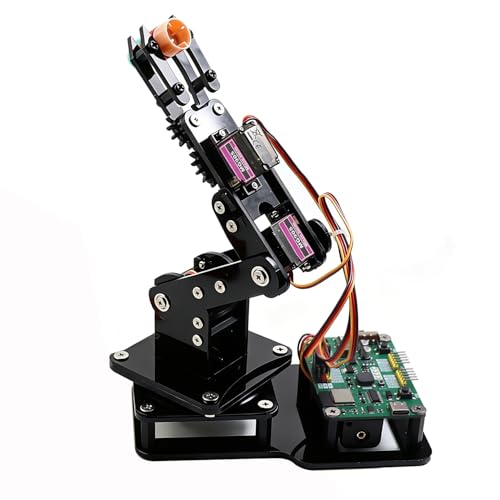
- 4DOF arm with joystick and web-app control
- Arduino and MicroPython compatible
- Records and loops custom motion sequences
Best For: Teens, students, and beginner makers
Best for AI Experimentation

- Compatible with LeRobot imitation learning
- Dual cameras support vision-based projects
- 12 feedback-equipped bus servos
Best For: Researchers and advanced AI hobbyists
Best Arduino Learning Kit
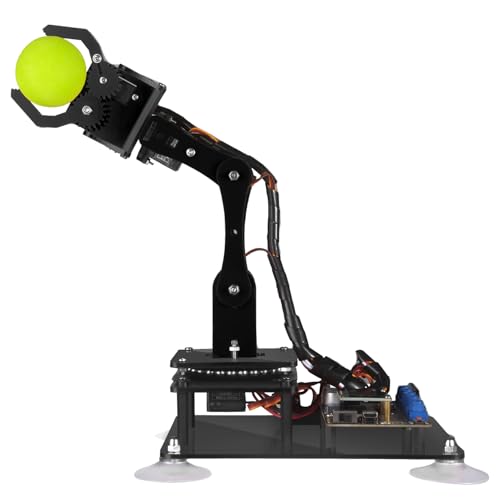
- Five-axis Arduino-compatible design
- Potentiometer and PC software control
- Includes tutorials and sample code routines
Best For: Arduino learners and compact desktop projects
Best Multi-Control Desktop Arm
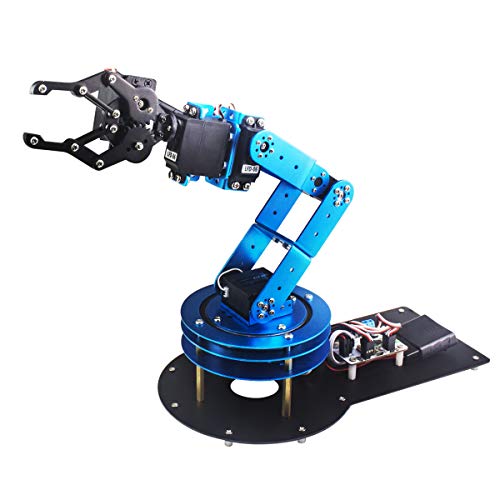
- Six degrees of freedom for flexible movement
- PC, app, mouse, and handle control
- Metal frame with anti-stall protection
Best For: Desktop demonstrations and robotics projects
Best Arduino Starter Kit
miniArm 5DOF Open-Source Robot Arm

- Arduino-compatible Atmega328 platform
- Bluetooth, app, and knob control
- Multiple ports for sensor expansion
Best For: Adult Arduino learners and expandable STEM projects
Best Wireless Expansion Platform
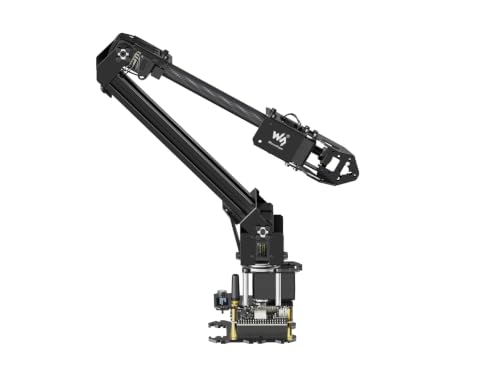
- ESP32 with wireless control modes
- Open-source code and ROS2 support
- Customizable end-of-arm tooling
Best For: Makers building connected and expandable projects
Best Six-Axis Learning Arm
Hiwonder xArm1S 6DOF Robot Arm
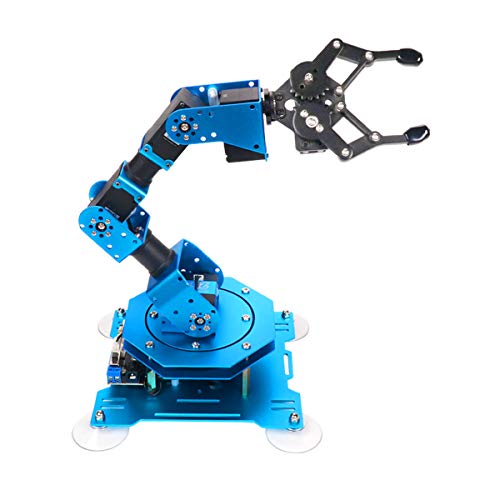
- Six intelligent feedback servos
- PC, app, mouse, and controller operation
- Stated grasping capacity up to 500 g
Best For: Hands-on six-axis programming and tabletop demonstrations
Sensor-Rich Starter
xArmUno 6DOF Arduino Robot Arm

- Includes multiple sensors for interactive projects
- Arduino-compatible with code and tutorials
- Supports several control methods and 500g grasping
Best For: Teens and adults exploring Arduino-based tabletop robotics
Joystick-to-Code Builder

- Starts with responsive joystick control
- Supports Arduino IDE and C/C++
- Metal frame includes wiring guides and sample code
Best For: Adults and learners building servo-based STEM projects
Embodied AI Platform

- Offers 500mm reach, 500g payload, and ±2mm repeatability
- Integrates with LeRobot and VLA workflows
- Adds K230 vision, voice interaction, and open-source tools
Best For: Advanced developers and university AI robotics labs
Best DIY Starter – ESP32 4DOF Programmable Robot Arm
This ESP32-based kit is a practical entry point for programmable robot arms, combining hands-on assembly with joystick, web-app, Arduino, and MicroPython control. Its pre-programmed control board lets you begin experimenting without uploading code first, while open-source support leaves room for more advanced projects.
Best For: Teens, students, and makers learning coding, electronics, and basic robotic-arm automation.
Pros:
- Includes a 4DOF arm with MG90S servos for lightweight picking tasks.
- Offers joystick and browser-based control without requiring app installation.
- Supports motion recording, loop playback, Arduino, and MicroPython projects.
- Open-source code and expandable hardware support encourage continued learning.
Cons:
- Batteries are not included.
- The 4DOF design is intended for lightweight objects rather than demanding manipulation.
Choose this model when building and experimenting matter as much as operation. It is less suited to heavy-duty work, but its approachable controls and programming flexibility make it a strong educational platform.
Best for AI Experimentation – SO-ARM101 6-Axis AI Robot Arm
This assembled SO-ARM101 is a research-oriented choice among programmable robot arms, pairing six-axis movement with dual-camera vision and compatibility with the LeRobot open-source framework. Its bus servos, debugging board, and included 3D-printed parts make it better suited to structured AI and imitation-learning work than casual building.
Best For: Adult researchers, advanced hobbyists, and developers exploring embodied AI, vision, and imitation learning.
Pros:
- Supports end-to-end imitation-learning projects through the LeRobot framework.
- Uses a gripper-mounted camera and an external camera for manipulation and environmental awareness.
- Includes 12 high-torque bus servos with magnetic feedback for smooth, stable motion.
- BusLinker V3.0 software supports servo scanning, monitoring, calibration, and trajectory control.
Cons:
- Its advanced feature set may be excessive for beginners.
- Recommended for ages 16 and up and requires a more technical learning path.
For AI-focused work, this is the most capable and specialized option in the group. Its assembled format reduces mechanical setup, while the cameras and open-source compatibility provide a foundation for sophisticated experimentation.
Best Arduino Learning Kit – Adeept 5DOF Robotic Arm
The Adeept 5DOF kit is a straightforward option for learning how programmable robot arms work through Arduino IDE projects. It combines manual potentiometer control with PC software, while supplied tutorials and code routines support exercises such as self-learning, drawing, and imitation.
Best For: Adults and older learners who want a compact Arduino-based robotics and programming project.
Pros:
- Provides five degrees of freedom for varied arm movement.
- Works with Arduino IDE and includes code routines and PDF tutorials.
- Supports both potentiometer control and graphical PC software.
- Offers projects involving self-learning, drawing, and imitation.
Cons:
- Paper tutorials are not included; the guides are provided digitally.
- The recommended age is 16 years and up.
This is a good fit for buyers who want a focused Arduino practice platform rather than an AI system. Its small footprint and multiple control methods make it suitable for desktop learning and creative demonstrations.
Best Multi-Control Desktop Arm – LeArm 6DOF Robot Kit
The LeArm is a metal desktop platform for buyers who want programmable robot arms with several ways to operate them. It supports PC, app, mouse, and wireless-handle control, along with graphical programming, grasping, object transport, and custom actions.
Best For: Students, engineers, and robotics enthusiasts building and demonstrating mechanical-arm projects.
Pros:
- Provides six degrees of freedom for versatile desktop movement.
- Offers PC, app, mouse, and wireless-handle control options.
- Metal construction, high-torque servos, and industrial-grade bearings support stability.
- Anti-stall protection helps protect the end servos from blocking.
Cons:
- It requires an AC adapter and does not use batteries.
- At 4.2 pounds, it is less portable than lightweight plastic kits.
- The recommended age is 14 years and up.
Consider the LeArm when physical construction, multiple control options, and presentation value are priorities. Its metal structure suits repeated tabletop demonstrations, while the included tutorials and programming software support learning.
Best Arduino Starter Kit – miniArm 5DOF Open-Source Robot Arm
The miniArm is a practical entry point for programmable robot arms, combining a 5DOF aluminum build with Arduino compatibility and open-source materials. Its knob controller, Bluetooth support, and sensor expansion ports make it useful for hands-on coding and secondary development.
Best For: Adult learners, STEM projects, and Arduino users who want an expandable starter platform.
Pros:
- Atmega328 platform supports Arduino programming and open-source development.
- Includes a six-channel knob controller, Bluetooth module, and digital servos.
- Expansion ports support optional sensors and modules such as an ESP32 Cam.
- Offers app control, real-time knob operation, and offline action editing.
Cons:
- The Starter Kit does not include the listed sensors or ESP32 Cam module.
- Its recommended age of 17 years and up may limit suitability for younger learners.
Choose this miniArm if open-source Arduino development and sensor experimentation matter more than an out-of-the-box industrial application. Be sure to verify the kit version if you want the expanded sensor bundle.
Best Wireless Expansion Platform – Waveshare RoArm-M2-S 4DOF Kit
The Waveshare RoArm-M2-S is a lightweight option among programmable robot arms, built around an ESP32 controller and designed for wireless control and secondary development. Its visual WEB application, open-source interfaces, and expansion plate make it approachable for experimentation.
Best For: Makers and developers who need wireless control, custom end-of-arm tooling, or ROS2 compatibility.
Pros:
- ESP32 main controller supports multiple wireless and wired communication modes.
- Open-source control code and communication documentation support secondary development.
- Expansion plate allows customized end-of-arm tooling.
- 360-degree base and three flexible joints provide a broad workspace.
Cons:
- Its 4DOF design offers fewer axes than some six-axis alternatives.
- The listed effective payload is 0.5 kg at 0.5 m, so heavier tasks may be unsuitable.
This kit is a strong fit when connectivity, customization, and software access are priorities. Its sub-850-gram design also makes it easier to mount on mobile platforms, while the supplied tutorials help shorten the learning curve.
Best Six-Axis Learning Arm – Hiwonder xArm1S 6DOF Robot Arm
The Hiwonder xArm1S is a full-metal 6DOF choice for programmable robot arms, offering several ways to control and edit movements. Its intelligent serial bus servos provide feedback and enough stated torque to grasp objects up to 500 g, supporting practical tabletop robotics projects.
Best For: Learners who want six-axis movement, multiple control methods, and hands-on action programming.
Pros:
- Six intelligent serial bus servos provide position, voltage, and temperature feedback.
- Supports PC, app, mouse, and wireless PS2 controller operation.
- Offers graphical programming and PC, app, or offline manual action editing.
- Aluminum construction, high-torque servos, and industrial-grade bearings support stability.
Cons:
- Its many control options may be more involved than a simple beginner setup.
- The product information contains inconsistent age guidance, so buyers should confirm suitability.
Consider the xArm1S if a six-axis layout and flexible control are central to your projects. It is particularly appealing for demonstrating grasping, object transport, and custom programmed actions on a desktop.
Sensor-Rich Starter – xArmUno 6DOF Arduino Robot Arm
The xArmUno is a versatile entry point for programmable robot arms, combining a 6DOF desktop arm with Arduino support and a sensor expansion kit. It is well suited to hands-on projects involving color sorting, distance measurement, voice control, and introductory robotics programming.
Best For: Teens and adults learning Arduino, sensors, and creative tabletop robotics projects.
Pros:
- Includes light, ultrasonic, color, and touch sensors for varied experiments.
- Supports Arduino programming with open-source code and tutorials.
- Offers PC, mobile app, mouse, and wireless PS2 controller operation.
- Six intelligent servos provide position, voltage, and temperature feedback, with a stated 500g grasping capacity.
Cons:
- The 14+ recommended age and programming focus may be demanding for young children.
- Its tabletop design is intended for indoor educational and creative use rather than industrial work.
Choose the xArmUno if you want a feature-rich learning platform with sensors and multiple control methods. Its aluminum-alloy construction and feedback-enabled servos add capability beyond a basic starter arm, while the Arduino examples help shorten the path from assembly to experimentation.
Joystick-to-Code Builder – 6-Axis Metal Arduino Arm
This 6-axis metal robot arm gives learners a practical way to start with joystick control and progress to Arduino programming. Its aluminum-alloy frame, high-torque servos, wiring guides, and sample code make it a useful option for hands-on STEM and servo motor projects.
Best For: Adults and learners who want a straightforward build-and-program kit with manual control first.
Pros:
- Responsive joystick control supports pick-and-place, drawing, and experimentation.
- Compatible with Arduino IDE and C/C++ programming.
- Durable aluminum-alloy construction is paired with high-torque servos.
- Includes metal and electronics parts, wiring guidance, and sample Arduino code.
Cons:
- The supplied notes do not specify a payload, repeatability, or detailed axis range.
- The listed one-month warranty is relatively limited.
- More advanced PC or phone control requires upgrading beyond the initial joystick setup.
This kit is a sensible pick when you value an intuitive physical controller and a clear route into coding. It emphasizes learning through assembly, joystick operation, and Arduino-based servo projects rather than advanced AI features.
Embodied AI Platform – NexArm 6-Axis Development Kit
The NexArm Standard Kit is an advanced choice among programmable robot arms, pairing a full-metal 6-axis structure with ESP32 and AT32 control, magnetic encoder servos, and open-source development tools. It is designed for developers and university-level learners working with inverse kinematics, imitation learning, computer vision, and multimodal AI.
Best For: Adult developers, university AI labs, and advanced robotics education involving LeRobot and embodied AI.
Pros:
- Provides a 500mm reach, 500g payload, and stated ±2mm repeatability.
- Supports LeRobot, imitation learning, ACT and VLA model deployment.
- Includes a 6 TOPS K230 vision module with more than 30 listed AI vision features.
- Offers open-source code, schematics, Arduino programming, tutorials, and PC/app/remote control.
Cons:
- Its advanced AI and development focus may be excessive for beginners.
- The supplied notes identify this as the Standard Kit, so some expansion features may require additional hardware.
- The 15+ recommendation and technical setup make it better suited to serious study than casual play.
NexArm stands out when your goal extends beyond basic motion programming into vision-guided manipulation and embodied AI. Its documented reach, payload, repeatability, and software ecosystem make it the most development-oriented option in this group.
How We Picked These Programmable Robot Arms
We focused on kits that offer meaningful programming access rather than simple remote-controlled movement. The selection includes Arduino- and ESP32-compatible arms, open-source platforms, full-metal designs, and AI-focused systems with vision or imitation-learning capabilities.
We also considered the practical details that affect ownership: assembly complexity, included control methods, software and app support, documentation, servo type, payload expectations, and opportunities for secondary development. Because these kits target different users, the list includes approachable 4DOF and 5DOF models as well as more capable 6-axis arms.
Quick Comparison
| Best For | Recommended Type | What to Look For |
|---|---|---|
| Young learners and beginners | 4DOF or basic 5DOF kit | Clear tutorials, joystick control, and Arduino support |
| DIY coding projects | Arduino or ESP32 arm | Accessible libraries, sensors, and expansion headers |
| More complex positioning | 6DOF arm | Additional joints, stable servos, and PC or app control |
| AI and imitation learning | Open-source AI arm | Vision support, bus servos, compatible software, and strong documentation |
Key Buying Factors for Programmable Robot Arms
Degrees of Freedom
More axes provide greater movement flexibility, but they also increase coding complexity, calibration requirements, and cost. A 4DOF arm is often sufficient for pick-and-place exercises, while a 6DOF model is better for learning pose control and more realistic manipulation.
Controller and Programming Support
Check whether the kit works with the board and language you already use. Arduino support is useful for beginner electronics projects, while ESP32 adds wireless control and greater processing flexibility. Python or MicroPython support can make experimentation easier, especially when connecting the arm to cameras, web apps, or AI tools.
Servos, Materials, and Payload
Metal frames and high-torque serial bus servos generally provide better durability and control than lightweight hobby components, though they may require more careful setup. Do not judge payload by the claw alone; arm reach, extension, joint strength, and power supply all affect what the robot can reliably lift.
Software, Documentation, and Expansion
Good tutorials can matter more than a long feature list. Look for wiring diagrams, example code, calibration instructions, replacement parts, sensor compatibility, and an active user community. Expansion options are especially valuable if you expect to add a camera, gripper, wireless interface, or custom end effector.
Who Should Buy Which Programmable Robot Arms?
Choose a simple Arduino or ESP32 kit if you are learning robotics, teaching STEM concepts, or want a manageable weekend build. Select a 6DOF arm if your priority is broader motion control, mechanical experimentation, or more advanced programming. For computer vision, imitation learning, and embodied-AI development, prioritize an open-source platform with bus servos, camera support, and well-maintained software. Before buying, confirm the required power supply, operating system, assembly tools, and programming environment so the kit matches your workspace and experience level.