The best robot arms for hobbyists make robotics easier to explore, whether you want to learn Arduino programming, experiment with computer vision, or build a more capable AI project.
This roundup compares 10 standout kits across degrees of freedom, control options, software support, hardware design, and expandability so you can choose a platform that fits your skill level and budget.
Best 10 Robot Arms for Hobbyists Picks for 2026
Best Open-Source Starter Arm

- Arduino and Python programming support
- Wi-Fi, Bluetooth, and sensor expansion
- Inverse kinematics with suction nozzle
Best For: Beginners and STEM-focused makers
Best AI Development Platform

- 6DOF metal arm with 500 mm reach
- K230 vision and voice interaction module
- LeRobot and imitation-learning support
Best For: Advanced AI and robotics developers
Best for Robotics Research

- Assembled 6DOF arm with gripper
- 2.5 kg payload and ±0.1 mm repeatability
- ROS 2, simulation, and LeRobot support
Best For: Advanced manipulation and AI research
Best Lightweight Expansion Kit
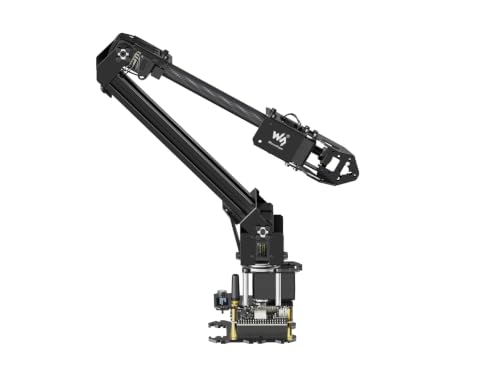
- Lightweight 4DOF ESP32 arm
- Wireless and wired control options
- Expansion plate for custom tooling
Best For: Portable maker projects and mobile platforms
Open-Source Starter Pick
miniArm 5DOF Arduino Robot Arm

- Arduino-compatible Atmega328 platform with open-source resources
- Bluetooth, knob control, and digital servos
- Expansion ports support optional sensors and modules
Best For: Beginners and makers learning Arduino robotics
AI Learning Platform

- LeRobot-compatible platform for imitation learning
- Dual cameras support manipulation and environmental awareness
- Twelve high-torque bus servos with magnetic feedback
Best For: Advanced hobbyists and developers exploring AI robotics
Feature-Rich Build Kit
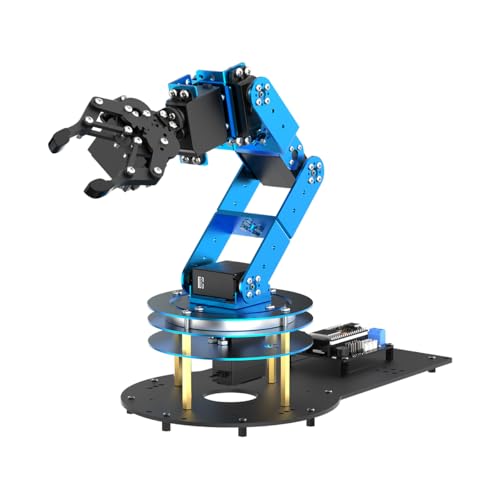
- ESP32 and Arduino-compatible open-source controller
- Six smart servos with inverse-kinematics support
- App, PC, and wireless control plus 200-plus tutorials
Best For: Makers and students building progressively advanced projects
Advanced AI Pick

- 500 mm reach and 500 g payload
- LeRobot and VLA model support
- Built-in AI vision and voice interaction
Best For: Advanced hobbyists and AI robotics developers
Open-Source Development Pick

- Assembled arm with included gripper
- Python SDK and ROS1/ROS2 support
- Leader-follower training functionality
Best For: AI robotics learners and ROS developers
Beginner Coding Pick

- Arduino-compatible open-source platform
- Six-channel knob and Bluetooth control
- Ports for multiple sensor expansions
Best For: STEM learners and Arduino beginners
Best Open-Source Starter Arm – MaxArm Arduino and ESP32 Kit
For hobbyists looking for approachable robot arms for hobbyists projects, the MaxArm combines Arduino and Python programming with wireless control and a tabletop aluminum design. Its inverse-kinematics support and included suction nozzle make it a practical platform for learning motion control and basic automation.
Best For: Beginners, STEM learners, and makers building programmable desktop robotics projects.
Pros:
- Supports Arduino and Python programming, plus app, PC, mouse, and wireless-controller operation.
- ESP32 controller includes Wi-Fi, Bluetooth, sensor ports, buzzer, LED, and expansion interfaces.
- Uses inverse kinematics and trajectory planning for programmed movement across the x, y, and z axes.
- Includes a suction nozzle and three precision smart bus servos.
Cons:
- Manufacturer recommends it for users age 16 and up, so younger beginners may need guidance.
- The compact arm is intended for tabletop indoor use rather than larger workspaces.
The MaxArm is a strong entry point for learning robotics fundamentals without giving up room for sensor and wireless experimentation. Choose it when programming flexibility and expandability matter more than advanced AI features.
Best AI Development Platform – NexArm 6DOF Embodied AI Arm
The NexArm is aimed at advanced users who want robot arms for hobbyists projects involving computer vision, voice interaction, and machine learning. Its metal 6DOF construction, K230 vision module, and LeRobot integration provide a substantially deeper development platform than a basic programmable kit.
Best For: Experienced makers, university labs, and developers exploring imitation learning and embodied AI.
Pros:
- Offers a 500 mm reach, 500 g payload, and stated ±2 mm repeatability.
- K230 module provides more than 30 built-in AI vision features, including object, color, gesture, and face recognition.
- Supports voice control, hand-eye coordination, and multimodal large-model applications.
- Integrates with LeRobot, open-source code, Arduino programming, and PC, app, and remote control.
Cons:
- Its advanced AI and imitation-learning features may be excessive for casual beginners.
- The manufacturer recommends it for users age 15 and up, reflecting its development-oriented design.
NexArm stands out when the goal is to experiment with vision-guided manipulation and AI models rather than simply learn servo control. It is the most capable choice here for ambitious research-style projects, provided you are comfortable with a more complex software ecosystem.
Best for Robotics Research – Seeed Studio reBot B601-RS
The assembled reBot B601-RS is designed for serious experimentation with robot arms for hobbyists, especially motion planning, ROS 2, simulation, and physical AI. Its stated payload and repeatability make it a research-oriented option, though the setup expects compatible software, power, and supporting hardware.
Best For: Advanced makers and developers testing manipulation algorithms, ROS 2 workflows, and learned robotic policies.
Pros:
- Assembled 6DOF arm includes a gripper and manufacturer-rated 2.5 kg payload.
- Offers approximately 754 mm reach and stated ±0.1 mm repeatability.
- Open-source hardware designs, bill of materials, and Python code support customization.
- Supports ROS 2, Pinocchio, MuJoCo, NVIDIA Isaac Sim, and LeRobot workflows.
Cons:
- Power supply is not included.
- LeRobot demonstration learning requires a compatible leader arm, cameras, and computing hardware, also not included.
- Its Linux-based software stack and research tools may be demanding for first-time users.
The reBot B601-RS is best viewed as a compact research platform rather than a simple educational toy. Its assembled format reduces mechanical setup, while the open-source and simulation support leaves considerable room for advanced development.
Best Lightweight Expansion Kit – Waveshare RoArm-M2-S
The Waveshare RoArm-M2-S is a lightweight option for robot arms for hobbyists who want wireless control, visual tutorials, and an open platform for custom tools. Its 4DOF layout and expansion plate suit mobile-platform experiments and straightforward desktop automation.
Best For: Makers learning arm control and building lightweight, expandable robotics projects.
Pros:
- ESP32 controller supports multiple wireless and wired communication methods.
- Open-source control code and communication documents support secondary development in multiple languages and devices.
- 360-degree base and three joints create a workspace with a stated 1-meter diameter.
- Weighs less than 850 g and has a stated 0.5 kg payload at 0.5 m.
Cons:
- Its 4DOF design provides less movement flexibility than the 6DOF arms in this roundup.
- It is supplied as a kit, so some users may need more setup than with an assembled research arm.
RoArm-M2-S offers a useful balance of portability, documentation, and expandability. Pick it if you want to mount an arm on a mobile platform or prototype custom end-of-arm tooling without moving to a heavier research system.
Open-Source Starter Pick – miniArm 5DOF Arduino Robot Arm
For hobbyists seeking robot arms for hobbyists projects, the miniArm is a compact Arduino-compatible starter kit focused on programming, hands-on experimentation, and sensor expansion. Its open-source resources and knob-based controls make it approachable for learning and prototyping.
Best For: Adult beginners and makers who want an Arduino-based educational arm with room for secondary development.
Pros:
- Atmega328 platform supports Arduino programming and open-source development.
- Includes a six-channel knob controller, Bluetooth, and digital servos.
- Provides expansion ports for optional sensors and modules.
- Compact aluminum design measures 13 x 5 x 8 inches.
Cons:
- The Starter Kit does not include the listed ultrasonic, touch, acceleration, or ESP32 Cam modules.
- Its five-axis design is less capable than the six-axis alternatives in this roundup.
- Recommended for ages 17 and up.
The miniArm is a practical entry point when Arduino compatibility and open-ended experimentation matter more than advanced vision or imitation-learning features. Choose the Standard Kit if you want the additional sensor bundle and accessories.
AI Learning Platform – Hiwonder SO-ARM101 6-Axis Arm
The Hiwonder SO-ARM101 is aimed at experienced hobbyists and developers exploring robot arms for hobbyists alongside embodied AI and imitation learning. Its assembled advanced kit combines dual-camera vision, high-torque bus servos, and compatibility with the open-source LeRobot framework.
Best For: Adult researchers, developers, and advanced hobbyists who want a ready-to-use platform for vision-guided manipulation and AI experimentation.
Pros:
- Compatible with the LeRobot open-source framework and shared models and templates.
- Dual-camera setup supports gripper-level manipulation and broader environmental awareness.
- Twelve high-torque bus servos use magnetic feedback for stable motion.
- Includes a BusLinker V3.0 board and PC tools for calibration, monitoring, and trajectory control.
Cons:
- The advanced feature set may be more than beginners need.
- Uses a combination of plastics and metals rather than an all-aluminum construction.
- Recommended for ages 16 and up.
With its assembled configuration and AI-focused software compatibility, the SO-ARM101 is the strongest choice here for experimentation beyond basic servo control. It is particularly compelling if camera feedback and LeRobot integration are central to your projects.
Feature-Rich Build Kit – LeArm 6DOF ESP32 Robot Arm
The LeArm Open Source is a versatile option for people comparing robot arms for hobbyists projects that combine assembly, Arduino programming, and expandable controls. Its ESP32 controller, six smart servos, inverse-kinematics support, and extensive tutorials provide a broad learning path.
Best For: Students, makers, and adult hobbyists who want multiple control methods, guided projects, and sensor-expansion potential.
Pros:
- ESP32 controller includes Bluetooth and supports Arduino programming.
- Six smart PWM servos and inverse kinematics support smoother path planning.
- Can be operated through an app, PC software, or wireless controller.
- Includes 200-plus tutorials, experiments, open-source code, and schematics.
Cons:
- Its extensive features and resources may require a meaningful setup and learning commitment.
- Additional AI vision, voice, ultrasonic, and acceleration capabilities depend on supported sensor expansion.
- At 2.37 kg, it is heavier than the miniArm.
LeArm stands out as a balanced build-and-program platform: it offers more axes and control options than the miniArm while remaining centered on accessible Arduino-style development. It is a strong fit for structured learning and progressively more advanced experiments.
Advanced AI Pick – NexArm 6-Axis Embodied AI Arm
For hobbyists seeking robot arms for hobbyists projects that extend into embodied AI, the NexArm offers a substantial, open-source platform with full-metal construction, magnetic encoder servos, and a 500 mm reach. Its vision and voice features make it suited to more ambitious experimentation than basic desktop arms.
Best For: Advanced hobbyists, university labs, and developers exploring imitation learning, computer vision, and multimodal AI.
Pros:
- 6-axis metal arm with 500 g payload and ±2 mm repeatability.
- Supports LeRobot, ACT, VLA, Arduino, PC, app, and remote control workflows.
- Includes a 6 TOPS K230 vision module with numerous built-in AI vision features.
Cons:
- Its advanced AI capabilities may be more than beginners need.
- Recommended for ages 15 and up, indicating a relatively technical learning curve.
The NexArm is a strong choice when programming, sensing, and AI model deployment matter as much as mechanical movement. It is less of a simple starter toy and more of a serious development platform.
Open-Source Development Pick – reBot B601-DM AI Arm
The reBot B601-DM is a practical option for robot arms for hobbyists users who want assembled hardware plus a developer-focused software stack. Its gripper, Python SDK, ROS compatibility, and leader-follower functions support hands-on experimentation with training and grasping tasks.
Best For: AI robotics enthusiasts, ROS users, and developers building imitation-learning or reinforcement-learning projects.
Pros:
- Assembled 6+1 DoF arm includes a gripper kit.
- Compatible with Python SDK, ROS1, ROS2, LeRobot, and Hugging Face workflows.
- Leader-follower tracking enables real-time human correction during training.
Cons:
- 3D-printed parts are not included.
- Its broad software compatibility may require familiarity with Linux, ROS, or development tools.
Choose the reBot when the main goal is learning how robotic data collection and model training work. The assembled format reduces mechanical setup, while the open-source ecosystem leaves room for substantial customization.
Beginner Coding Pick – miniArm Arduino 5DOF Kit
For approachable robot arms for hobbyists projects, the miniArm focuses on Arduino programming, hands-on controls, and sensor expansion. Its five-axis design, knob controller, Bluetooth module, and open-source examples provide a clear starting point for coding and small robotics experiments.
Best For: Beginners, STEM learners, and hobbyists who want an Arduino-compatible arm with room for sensor-based projects.
Pros:
- Arduino-compatible Atmega328 platform with open-source programs and tutorials.
- Includes a six-channel knob controller, Bluetooth, and digital servos.
- Expansion ports support additions such as an ESP32 Cam, accelerometer, touch sensor, and ultrasonic sensor.
Cons:
- Its 5DOF design is less capable than the six-axis options in this roundup.
- Recommended for ages 16 and up, so younger learners may need supervision.
The miniArm is the most approachable choice for learning core programming and experimenting with inputs. It makes a sensible first platform if you value Arduino compatibility and expandable hardware over advanced AI features.
How We Picked the Best Robot Arms for Hobbyists
We compared these kits based on the features that matter most in a home workshop or learning environment: mechanical design, degrees of freedom, actuator quality, programming support, documentation, control methods, and upgrade potential. We also considered whether each arm supports common hobbyist platforms such as Arduino, ESP32, Python, Wi-Fi, Bluetooth, ROS, or AI-vision software.
A good hobby robot arm should offer more than movement. It should provide a practical way to test code, understand motion control, and gradually add accessories or intelligent behaviors. Kits with open-source software, SDKs, tutorials, and active ecosystem support generally offer more long-term value than closed systems.
Quick Comparison
- Best for beginner coding: Arduino- and ESP32-based kits with tutorials and simple PC or app control.
- Best for advanced AI projects: Full-metal six-axis platforms with vision, imitation learning, or large-model support.
- Best for open-source development: reBot and similar arms offering Python SDKs, ROS compatibility, and expansion options.
- Best for flexible experimentation: Kits with interchangeable end effectors, bus servos, and accessible mounting points.
Key Buying Factors for Robot Arms for Hobbyists
Degrees of Freedom and Reach
Four- and five-axis arms are often easier to set up and less expensive, making them suitable for basic pick-and-place routines. Six-axis models provide more natural wrist orientation and are better for complex poses, camera-guided tasks, and advanced manipulation. Check the arm’s working reach and payload rather than judging capability by axis count alone.
Programming and Connectivity
Arduino and ESP32 support can be ideal for learning embedded control, while Python and ROS support are more useful for computer vision, automation, and research-style projects. Wi-Fi, Bluetooth, USB, and app control add convenience, but confirm which functions work locally and which depend on proprietary software or cloud services.
Build Quality and Servo Performance
Metal frames and high-torque serial bus servos typically provide better stiffness, position feedback, and durability than lightweight hobby servos. They can also increase cost and power requirements. Look for included power supplies, replacement parts, calibration tools, and clear limits for payload and operating time.
Software, Documentation, and Expansion
Documentation often determines whether a project is enjoyable or frustrating. Prioritize kits with wiring diagrams, example code, tutorials, active repositories, and a supported SDK. Grippers, suction nozzles, cameras, and compatible sensors can extend the arm’s usefulness, but verify that accessories are included rather than optional.
Who Should Buy Which Robot Arms for Hobbyists?
Choose a basic Arduino or ESP32 kit if you are new to robotics, teaching STEM concepts, or want a manageable platform for servos and Python projects. Choose a four- or five-axis arm for affordable desktop automation and straightforward pick-and-place experiments.
Choose a six-axis full-metal AI arm if you want imitation learning, vision-guided movement, or ambitious embodied-AI experiments. Choose an open-source reBot-style platform if ROS, Python integration, and long-term software customization matter more than the lowest purchase price.
Before buying, confirm the kit’s assembly status, included accessories, operating system requirements, power needs, and software compatibility. Those details can matter as much as the arm’s headline specifications.