The best USB-C hard drive enclosures make it easy to reuse SATA drives, upgrade storage, recover files, or build a flexible external backup system without buying a complete new drive.
This roundup covers compact 2.5-inch cases, tool-free SSD enclosures, single-drive 3.5-inch options, and multi-bay USB-C DAS units. The right choice depends on your drive size, speed requirements, capacity plans, and whether you need portability or desktop expansion.
Best 10 USB C Hard Drive Enclosures Picks for 2026
Best Aluminum 2.5-Inch Option

- Up to 6Gbps with UASP
- Aluminum heat-dissipating enclosure
- Tool-free support for drives up to 6TB
Best For: Portable 2.5-inch SATA SSD or HDD storage
Best Protective Budget Pick
POSUGEAR 2.5-Inch USB-C Enclosure

- Sliding tool-free drive installation
- UASP and TRIM support up to 6Gbps
- Protective shell with EVA cushioning
Best For: Everyday 2.5-inch drive transfers and backups
Best Multi-Drive Dock
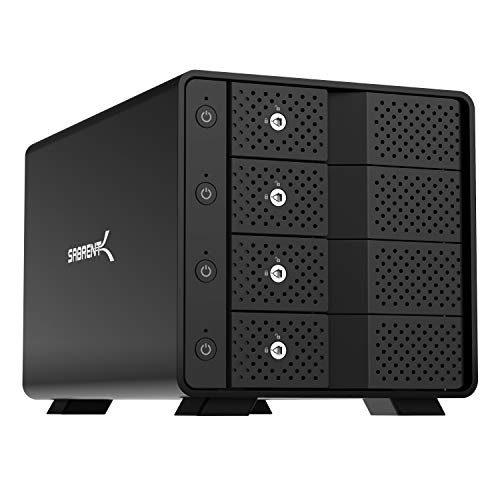
- Four independent 3.5-inch SATA bays
- 10Gbps USB-C connectivity
- Hot-swap bays with active cooling
Best For: Desktop JBOD storage with multiple drives
Best Dual-Cable Value
BENFEI 2.5-Inch SATA Enclosure

- Type-C and Type-A connection options
- Tool-free support for drives up to 6TB
- UASP support with 18-month warranty
Best For: Flexible 2.5-inch storage across USB port types
Best Compact Value
BENFEI Tool-Free 2.5-Inch Enclosure

- Tool-free installation for one 2.5-inch SATA drive
- UASP support with speeds up to 6Gbps
- Includes USB-C/USB-A cable and supports major operating systems
Best For: Portable single-drive upgrades and file transfers
Best Hub Features
MAIWO Dual-Size USB-C Enclosure

- Works with 2.5-inch and 3.5-inch SATA drives
- 10Gbps connectivity with up to 24TB support
- Adds two USB-A and one USB-C hub ports
Best For: Desktop users needing flexible drive and USB expansion
Best Compact Pick
iDsonix 2.5-Inch USB-C SATA Enclosure

- Tool-free 2.5-inch SATA drive installation
- UASP support with USB-C to USB-C cable
- Protection features and up to 4TB support
Best For: Portable 2.5-inch SATA SSD or HDD conversions
Best Multi-Drive Pick
Yottamaster 5-Bay USB-C DAS Enclosure

- Five bays for 2.5-inch and 3.5-inch SATA drives
- 10Gbps USB-C and daisy-chain support
- Hot swap, cooling fan, and 120TB stated capacity
Best For: High-capacity desktop SATA storage setups
Best 3.5-Inch Single-Drive Pick

- Supports 2.5-inch and 3.5-inch SATA drives up to 24TB
- Includes USB-A/USB-C cable for flexible host compatibility
- Aluminum housing with stand, vents, and sleep mode
Best For: Single large SATA drive desktop use
Best Aluminum 2.5-Inch Option – UGREEN USB-C SATA Enclosure
If you want a fast, portable solution for a 2.5-inch SATA drive, this UGREEN model is a strong choice among USB C hard drive enclosures. Its USB 3.1 Gen 2 USB-C connection, UASP support, aluminum housing, and tool-free installation make it well suited to SSD upgrades, backups, and data transfers.
Best For: Users who want a durable aluminum enclosure for a 2.5-inch SATA SSD or HDD up to 6TB.
Pros:
- Supports up to 6Gbps transfer speeds with UASP acceleration.
- Aluminum construction helps dissipate heat without a cooling fan.
- Tool-free, plug-and-play design includes a USB-C to USB-C cable.
- Works with Windows, macOS, Linux, consoles, routers, and smart TVs.
Cons:
- Designed for one 2.5-inch SATA drive rather than multiple drives.
- USB-C to USB-A connectivity requires a separate compatible cable.
The UGREEN enclosure combines fast SATA performance with a compact aluminum design and broad compatibility. It is a practical pick when cooling, portability, and a 6TB capacity ceiling matter.
Best Protective Budget Pick – POSUGEAR 2.5-Inch USB-C Enclosure
For an affordable way to reuse a 2.5-inch SATA drive, the POSUGEAR is one of the more user-friendly USB C hard drive enclosures. Its sliding, tool-free design, USB 3.1 transfer support, and protective PC+ABS shell make drive installation and everyday portability straightforward.
Best For: Buyers seeking a simple 2.5-inch enclosure with impact protection and support for drives up to 4TB.
Pros:
- Sliding tool-free installation requires no driver or extra power supply.
- Supports up to 6Gbps transfer rates with UASP and TRIM acceleration.
- PC+ABS shell, EVA cushioning, and protection against overcurrent, overvoltage, and overheating.
- Includes an LED status indicator and supports Windows, macOS, and Linux.
Cons:
- Capacity support is limited to 4TB.
- Plastic construction is less premium than an aluminum enclosure.
The POSUGEAR emphasizes easy installation and added physical protection while retaining USB-C performance. It is a sensible option for occasional backups, drive transfers, and console or router storage use.
Best Multi-Drive Dock – SABRENT 4-Bay USB-C Enclosure
If one drive bay is not enough, the SABRENT DS-SC4B is a substantially larger alternative to single-drive USB C hard drive enclosures. It provides four independent bays for 3.5-inch SATA HDDs or SSDs, 10Gbps USB-C connectivity, hot-swapping, and active cooling for extended operation.
Best For: Users who need direct-attached access to multiple 3.5-inch SATA drives, with capacity up to 80TB total.
Pros:
- Four independent bays support up to four 3.5-inch SATA drives.
- 10Gbps USB-C connection is backward compatible with USB 3.0 and USB 2.0.
- Trayless hot-swap design includes per-bay power switches and activity LEDs.
- Aluminum-and-metal housing includes a 92mm fan and 100–240V power adapter.
Cons:
- Drives are not included.
- This is JBOD direct-attached storage, not a hardware RAID enclosure.
- Its desktop form factor and external power adapter are less portable than single-drive cases.
The SABRENT is designed for capacity and multi-drive access rather than simplicity or portability. Independent drive connections, hot-swap bays, and active cooling make it appropriate for a desktop storage setup that needs frequent drive access.
Best Dual-Cable Value – BENFEI 2.5-Inch SATA Enclosure
The BENFEI enclosure offers a flexible, low-fuss way to connect a 2.5-inch SATA drive to different devices. Its USB Type-C/Type-A plug design, tool-free installation, UASP support, and compatibility with drives up to 6TB make it a versatile choice among USB C hard drive enclosures.
Best For: Users who need a portable 2.5-inch enclosure with convenient Type-C and Type-A connection options.
Pros:
- Integrated Type-C/Type-A plug design supports connection flexibility.
- Tool-free, plug-and-play installation with hot-swapping support.
- Supports 7mm and 9.5mm 2.5-inch SATA I/II/III drives up to 6TB.
- Includes UASP support and an 18-month unconditional warranty.
Cons:
- Transfer performance is rated up to 5Gbps rather than 10Gbps.
- Designed for one 2.5-inch drive and uses an integrated cable design.
The BENFEI stands out for connection convenience and broad 2.5-inch drive compatibility. It is a practical fit for moving files between computers, attaching storage to compatible devices, or reusing an older SATA drive.
Best Multi-Drive Expansion – WAVLINK 4-Bay USB-C Enclosure
For shoppers comparing USB C hard drive enclosures, the WAVLINK 4-Bay is a substantial desktop option for managing several SATA drives at once. It supports four 3.5-inch or 2.5-inch SATA HDDs and SSDs, offers USB 3.2 Gen 2 speeds up to 10Gbps, and adds HDMI connectivity and USB-C expansion.
Best For: Users building a high-capacity desktop storage setup with multiple SATA drives, cooling, and display connectivity.
Pros:
- Four bays support up to 4x22TB of 3.5-inch or 2.5-inch storage.
- USB-C 3.2 connectivity supports transfer speeds up to 10Gbps.
- Aluminum construction and temperature-controlled fans help manage heat.
- Independent bay power switches support convenient drive management.
Cons:
- 2.5-inch drives require separate 2.5-to-3.5-inch mounting brackets.
- HDMI video output requires a compatible host USB-C port and USB-C-to-C connection.
- Its four-bay desktop design is less portable than a single-drive enclosure.
The WAVLINK stands out when capacity and flexibility matter more than compact size. Its extra connectivity and active cooling make it suited to heavier storage workflows, provided your host supports the required USB-C video functionality.
Best Compact Value – BENFEI Tool-Free 2.5-Inch Enclosure
The BENFEI is a compact choice among USB C hard drive enclosures for turning one 2.5-inch SATA drive into portable external storage. Its tool-free design accepts compatible HDDs and SSDs, includes a USB Type-C/Type-A cable, and supports UASP for faster transfers than traditional USB 3.0.
Best For: Users who want an easy, portable enclosure for a single 2.5-inch SATA HDD or SSD.
Pros:
- Tool-free installation requires no driver or screwdriver.
- Supports 2.5-inch SATA I/II/III drives up to 6TB and 7mm or 9.5mm thickness.
- UASP support and the JMS580 chipset provide theoretical speeds up to 6Gbps.
- Works with Windows, Linux, and MacOS 8.0 and above.
Cons:
- Supports only one 2.5-inch drive.
- Its listed 6Gbps transfer rate is below 10Gbps USB-C enclosures.
- Compatibility is limited to 2.5-inch drives rather than 3.5-inch models.
Choose the BENFEI for straightforward drive access, upgrades, or file transfers without tools. It is a practical, lightweight solution, though users with larger 3.5-inch disks or a need for maximum USB-C bandwidth should consider a different enclosure.
Best Hub Features – MAIWO Dual-Size USB-C Enclosure
The MAIWO combines a SATA drive enclosure with a three-port USB hub, making it a versatile option in the USB C hard drive enclosures category. It accommodates 2.5-inch and 3.5-inch SATA HDDs or SSDs, supports up to 24TB, and provides USB 3.1 Gen 2 connectivity with theoretical speeds up to 10Gbps.
Best For: Users who need one enclosure for different SATA drive sizes plus extra USB-A and USB-C ports.
Pros:
- Supports both 2.5-inch and 3.5-inch SATA HDDs and SSDs.
- Offers up to 24TB capacity and 10Gbps USB 3.1 Gen 2 connectivity.
- Includes two USB-A hub ports and one USB-C hub port.
- Aluminum alloy shell and included 12V 3A power adapter suit desktop use.
Cons:
- It supports one installed drive at a time.
- The enclosure uses an ABS bracket, rather than an all-metal internal structure.
- Maximum performance depends on UASP and a compatible operating system and host port.
The MAIWO is a strong middle ground for mixed-drive households or workspaces that need additional USB ports. Its single-drive layout keeps it simpler than a multi-bay enclosure, while the dual-size support and hub functionality add everyday flexibility.
Best Compact Pick – iDsonix 2.5-Inch USB-C SATA Enclosure
If you need a straightforward USB C hard drive enclosure for a 2.5-inch SATA SSD or HDD, the iDsonix PW25-1C3 is a compact, tool-free option. It supports 7mm and 9.5mm drives, USB 3.1 connectivity, UASP, and plug-and-play use without additional drivers.
Best For: Users converting a spare 2.5-inch SATA drive into portable storage for a laptop, PC, TV, or game console.
Pros:
- Tool-free installation supports 7mm and 9.5mm 2.5-inch SATA SSDs and HDDs.
- USB-C to USB-C cable, UASP support, and backward compatibility with USB 2.0 and 1.1.
- Built-in over-current, over-voltage, and overheating protection, plus an EVA foam pad.
- Supports Windows, Mac, and Linux, with a stated capacity of up to 4TB.
Cons:
- Limited to one 2.5-inch drive.
- Designed for SATA drives rather than M.2 or other form factors.
- Actual transfer performance depends on the host devices and drive.
The iDsonix is a sensible choice when portability and simple installation matter more than multi-drive capacity. Its protective features and detachable USB-C cable add convenience for everyday storage upgrades and drive reuse.
Best Multi-Drive Pick – Yottamaster 5-Bay USB-C DAS Enclosure
For users building a larger desktop storage setup, the Yottamaster FS5C3 is a five-bay USB C hard drive enclosure for 2.5-inch and 3.5-inch SATA drives. It offers dual 10Gbps USB-C ports, hot-swapping, active cooling, and support for up to 120TB across five drives.
Best For: Desktop users who need several SATA drives in one powered enclosure and may want to expand storage through daisy chaining.
Pros:
- Five bays support 2.5-inch and 3.5-inch SATA HDDs and SSDs.
- Dual 10Gbps USB-C ports allow daisy chaining with compatible devices.
- Hot-swappable drive support and removable metal trays simplify drive changes.
- Aluminum housing, cooling fan, and built-in 150W power supply support extended use.
Cons:
- It is diskless, so drives must be purchased separately.
- No hardware RAID function; the four or five installed disks operate individually.
- Larger desktop design is less portable than a single-drive enclosure.
The FS5C3 is the strongest fit here for centralized, high-capacity storage. Its cooling system, power supply, and hot-swap design make it practical for a frequently accessed desktop array, though buyers should note that it does not provide hardware RAID.
Best 3.5-Inch Single-Drive Pick – RSHTECH USB-C SATA Enclosure
The RSHTECH RSH-339STC is a practical USB C hard drive enclosure for a single 3.5-inch SATA drive, while also accommodating 2.5-inch SATA disks. Its aluminum housing, vertical stand, power controls, and included USB-A/USB-C cable make it well suited to desktop use with computers, consoles, and compatible smart TVs.
Best For: Users who want to reuse a large 3.5-inch SATA drive with both USB-C and USB-A host devices.
Pros:
- Supports one 2.5-inch or 3.5-inch SATA drive up to 24TB.
- Includes a detachable 3.3-foot 2-in-1 USB-A/USB-C cable.
- UASP support and an ASM1153E chip are designed for faster, stable transfers.
- Aluminum housing, vents, removable stand, and automatic sleep function aid desktop use.
Cons:
- Supports only one drive at a time.
- Requires external power for the 3.5-inch drive enclosure.
- Its stated standard transfer rate is up to 5Gbps, with UASP support up to 6Gbps.
Choose the RSHTECH when compatibility with both USB-C and USB-A computers matters, especially for a larger 3.5-inch drive. The stand and aluminum construction give it a stable desktop footprint, while the sleep function can reduce unnecessary drive activity.
How We Picked the Best USB C Hard Drive Enclosures
We compared these USB C Hard Drive Enclosures by drive compatibility, USB standard, stated transfer rate, installation method, cooling, power requirements, capacity support, and overall practicality. The selection includes compact enclosures for 2.5-inch SATA SSDs and laptop hard drives, as well as powered multi-bay models for several 3.5-inch or 2.5-inch drives.
Advertised speeds are theoretical interface limits. Actual performance depends on the installed drive, computer port, cable, file sizes, operating system, and enclosure controller. SATA SSDs generally benefit more from a 10Gbps connection than older mechanical hard drives.
Quick Comparison
| Best For | Recommended Type | What to Look For |
|---|---|---|
| Portable laptop drive | 2.5-inch tool-free enclosure | USB-C, UASP, compact aluminum body |
| Fast SATA SSD transfers | 10Gbps single-drive enclosure | USB 3.2 Gen 2 or equivalent, quality cable |
| One 3.5-inch desktop HDD | Powered 3.5-inch enclosure or dock | External power adapter and ventilation |
| Several drives | 4- or 5-bay DAS enclosure | Independent bays, cooling, capacity support |
| Occasional drive access | Open-style docking enclosure | Easy insertion and broad SATA support |
Key Buying Factors for USB-C Hard Drive Enclosures
Drive Size and Interface
Confirm whether your drive is a 2.5-inch or 3.5-inch SATA model. A 2.5-inch HDD or SSD usually needs only USB power, while a 3.5-inch HDD requires a dedicated power adapter. These products are designed for SATA drives, not M.2 NVMe SSDs, unless the listing explicitly says otherwise.
USB Speed and Connector
USB-C describes the connector, not necessarily the speed. USB 3.1 Gen 1 or 5Gbps models are adequate for many hard drives, while 10Gbps enclosures are a better match for SATA SSDs and large file transfers. Check whether the package includes USB-C-to-C, USB-C-to-A, or both cables.
Cooling, Power, and Capacity
Aluminum can help transfer heat, but multi-drive units also benefit from active fans or temperature-controlled cooling. Check the enclosure’s maximum supported capacity, especially when using several high-capacity disks. A powered enclosure is essential for desktop drives and multi-bay storage.
Installation and Data Protection
Tool-free trays simplify drive swaps, while secure screws can provide a firmer long-term installation. Look for UASP support, status indicators, sleep behavior, and a stable controller. An enclosure is not a backup by itself, so keep important files on another device or service.
Who Should Buy Which USB C Hard Drive Enclosures?
Choose a compact 2.5-inch tool-free model if you are reusing a laptop drive, carrying an SSD, or need an inexpensive external disk. Select a 10Gbps enclosure for frequent transfers from a SATA SSD. For a 3.5-inch HDD, choose a powered case or dock with adequate ventilation. Buyers building a desktop storage pool should consider a four- or five-bay enclosure, but verify whether it offers RAID, JBOD, or simple independent-disk operation before purchasing.