Running bare SATA drives externally can mean extra heat, cable clutter, and limited protection. A hard drive enclosure with cooling fan adds airflow while turning one or more internal HDDs or SSDs into accessible external storage.
These 10 options range from compact single-drive docks to multi-bay and RAID enclosures. The right choice depends on drive size, bay count, connection speed, redundancy needs, and how often you swap disks.
Best 10 Hard Drive Enclosure with Cooling Fan Picks for 2026
Best Multi-Drive Pick
CENMATE 2-Bay Enclosure with Cooling Fan

- Holds two 2.5-inch or 3.5-inch SATA drives
- Tool-free, hot-swappable design with USB 3.0
- Cooling fan and aluminum-alloy housing manage heat
Best For: Two-drive desktop storage expansion
Best Docking Station
SABRENT USB 3.0 SATA Dock with Fan
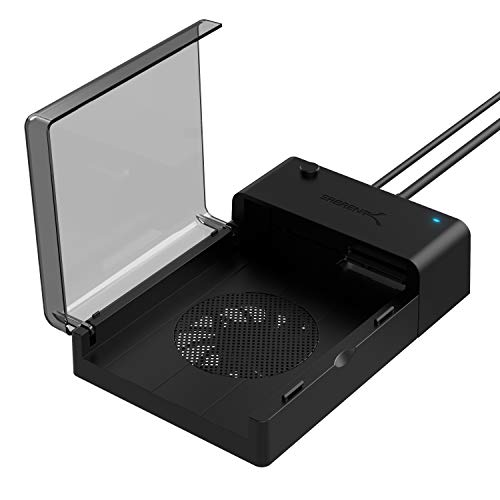
- Accepts one 2.5-inch or 3.5-inch SATA drive
- Hot-swappable and plug-and-play
- Supports drives up to 22TB with cloning software
Best For: Single-drive swaps and backups
Best Adjustable Fan
Vantec NexStar HX 3.5-Inch Enclosure

- Large 60mm fan with variable-speed control
- Ventilated aluminum enclosure for 3.5-inch SATA drives
- USB 3.0 and hot-swappable plug-and-play operation
Best For: 3.5-inch drives needing configurable cooling
Best Simple Single-Drive Option
FIDECO SATA Enclosure with Fan

- Supports 2.5-inch and 3.5-inch SATA drives
- Includes cooling fan and 12V power adapter
- Tool-free USB 3.0 enclosure with UASP
Best For: Straightforward single-drive SATA access
Maximum-Capacity Pick

- Holds up to 10 SATA drives
- Supports eight RAID modes
- Two cooling fans and USB/eSATA connectivity
Best For: Large-capacity DAS and RAID setups
Quiet-Cooling Choice
Yottamaster PS500C3 5-Bay Enclosure

- Supports five SATA HDDs or SSDs
- Includes an 80mm low-noise fan
- Uses USB-C and does not provide hardware RAID
Best For: Five-drive non-RAID DAS expansion
Simple Expansion Pick
CENMATE 4-Bay Tool-Free Enclosure

- Holds four SATA HDDs or SSDs
- Supports hot swapping and tool-free installation
- USB 3.0 DAS design with active cooling
Best For: Straightforward four-drive desktop expansion
Best RAID Capacity Pick
4-Bay RAID Enclosure with Cooling Fan
- Four SATA HDD/SSD bays with up to 80TB total capacity
- Supports RAID 0, RAID 1, Normal, and JBOD
- USB 3.0 with aluminum cooling and built-in fans
Best For: High-capacity external storage with flexible RAID modes
Best Hot-Swap Value
3-Bay DAS Enclosure with Cooling Fan

- Three tool-free bays for 2.5-inch or 3.5-inch SATA drives
- Hot-swappable design with no RAID or NAS complexity
- USB 3.0 and daisy-chain expansion support
Best For: Simple multi-drive storage and frequent drive changes
Best High-Speed Option
2-Bay 10Gbps Enclosure with Cooling Fan

- USB 3.2 Gen 2 connectivity with up to 10Gbps transfer rates
- Two hot-swappable, tool-free SATA drive bays
- Aluminum cooling and daisy-chain expansion support
Best For: Fast two-drive external storage using USB-C
Best Multi-Drive Pick – CENMATE 2-Bay Enclosure with Cooling Fan
For shoppers seeking a hard drive enclosure with cooling fan and room for more than one drive, the CENMATE 2-bay model supports both 2.5-inch and 3.5-inch SATA HDDs and SSDs. Its aluminum-alloy housing, tool-free trays, USB 3.0 connectivity, and USB-A/C cables make it a practical desktop storage expansion option.
Best For: Users who need two-drive capacity, hot swapping, and expandable external storage without RAID or NAS functionality.
Pros:
- Supports two 2.5-inch or 3.5-inch SATA HDDs or SSDs, with up to 20TB per drive.
- Built-in 2-inch cooling fan and aluminum-alloy construction help manage heat.
- Tool-free installation, hot swapping, and USB 3.0 transfer speeds up to 5Gbps.
- Includes USB-A and USB-C connectivity plus daisy-chain expansion support.
Cons:
- The fan operates at approximately 40–50 decibels, which may be noticeable in quiet spaces.
- This is a DAS enclosure and does not provide RAID or NAS functionality.
The CENMATE stands out when flexibility and capacity matter more than silent operation. It is a strong fit for consolidating two SATA drives on one desktop, provided you are comfortable with its audible fan and direct-attached storage design.
Best Docking Station – SABRENT USB 3.0 SATA Dock with Fan
The SABRENT EC-DFFN is a straightforward hard drive enclosure with cooling fan for accessing one 2.5-inch or 3.5-inch SATA drive. Its lay-flat dock design, hot-swappable plug-and-play setup, USB 3.0 interface, and support for drives up to 22TB make it convenient for backups and drive transfers.
Best For: Users who regularly swap a single desktop or laptop SATA drive and want a simple, fan-cooled dock.
Pros:
- Supports standard 2.5-inch and 3.5-inch SATA HDDs and SSDs.
- Built-in cooling fan helps keep the installed drive cool.
- Hot-swappable, plug-and-play operation requires no drivers.
- Supports up to 22TB drives and includes downloadable Acronis cloning software.
Cons:
- Holds only one drive at a time.
- Uses USB Type-A rather than USB-C connectivity.
Choose the SABRENT when quick, occasional drive access is more important than a permanent multi-drive enclosure. It combines broad SATA drive compatibility with a compact docking format and useful cloning support.
Best Adjustable Fan – Vantec NexStar HX 3.5-Inch Enclosure
Vantec NexStar HX, 3.5" SATA III Hard Drive Enclosure USB 3.0 With Fan (NST-387S3-BK)
Check Price On AmazonThe Vantec NexStar HX is a hard drive enclosure with cooling fan designed specifically for 3.5-inch SATA drives. It pairs USB 3.0 transfer speeds with ventilation and a large 60mm fan featuring on/off and variable-speed controls, giving users more control over cooling and noise.
Best For: 3.5-inch drive owners who want adjustable fan control and a conventional aluminum enclosure.
Pros:
- Large 60mm fan offers on/off and variable-speed control.
- Ventilation helps exhaust hot air and draw in cooler air.
- Supports SATA III drives and USB 3.0 transfer rates up to 5Gbps.
- Hot-swappable, plug-and-play operation works with Windows, macOS, and Linux systems.
Cons:
- Supports 3.5-inch drives only, not 2.5-inch models.
- The listed design is intended for Windows, macOS, and Linux computers and is not compatible with phones.
- Power-saving mode requires connection to a working computer system.
The NexStar HX is a sensible choice if fan adjustability is a priority. Its 3.5-inch-only format limits flexibility, but the variable fan switch and ventilated aluminum design are useful for users managing heat on a larger SATA drive.
Best Simple Single-Drive Option – FIDECO SATA Enclosure with Fan
The FIDECO P3U-U3 is a practical hard drive enclosure with cooling fan for one 2.5-inch or 3.5-inch SATA HDD or SSD. It includes a 12V power adapter, supports USB 3.0 speeds up to 5Gbps and UASP, and offers tool-free plug-and-play setup with Windows, Mac, and Linux.
Best For: Users who want an uncomplicated, powered enclosure for one SATA drive across common computer platforms.
Pros:
- Supports both 2.5-inch and 3.5-inch SATA HDDs and SSDs.
- Built-in cooling fan and included 12V power adapter support desktop-drive use.
- USB 3.0 and UASP provide transfer speeds up to 5Gbps.
- Tool-free, plug-and-play design works with Windows, Mac, and Linux without drivers.
Cons:
- Supports one drive only and uses a plastic enclosure.
- Does not support IDE drives.
- New drives may need to be initialized before the computer recognizes them.
FIDECO offers broad form-factor compatibility in a compact single-drive enclosure. It is a good everyday option for SATA drive access, especially when you need included external power and UASP support, but IDE drive owners will need a different solution.
Maximum-Capacity Pick – CENMATE 10-Bay RAID Enclosure
If you need a hard drive enclosure with cooling fan for a large multi-drive setup, this 10-bay CENMATE model offers substantial expansion and multiple RAID configurations. It supports 2.5-inch and 3.5-inch SATA HDDs and SSDs, with USB 3.0 and eSATA connectivity.
Best For: Users who need up to 10 drive bays, high-capacity external storage, and hardware RAID options in a desktop-attached storage enclosure.
Pros:
- Supports up to 10 SATA HDDs or SSDs and up to 200TB total capacity, subject to drive compatibility.
- Offers eight RAID modes, including RAID 0, RAID 5, RAID 50, RAID 00, clone, and standard modes.
- Aluminum construction and two 2.7-inch fans help with heat management.
- Includes USB A/C 3.0 and eSATA connectivity, plus a 12V power adapter.
Cons:
- At least two drives are required for the 10-bay enclosure, with one drive in each five-bay group.
- Changing RAID modes requires a specific power-off, switch, and reset-button procedure and can erase data.
- Fan noise is approximately 40–50 decibels, so it may not suit noise-sensitive spaces.
This is the most expansive option of the three, but it is best approached as a careful RAID and storage project rather than a simple plug-in drive dock. Back up data before configuring RAID and test drives individually when troubleshooting.
Quiet-Cooling Choice – Yottamaster PS500C3 5-Bay Enclosure
The Yottamaster PS500C3 is a practical hard drive enclosure with cooling fan for adding up to five SATA drives to a computer through USB-C. Its aluminum shell, ventilation openings, and internal 80mm fan are designed for sustained multi-drive use.
Best For: Users who want a five-drive, non-RAID DAS enclosure with USB-C connectivity for storage expansion, media work, backups, or file archiving.
Pros:
- Supports five 2.5-inch or 3.5-inch SATA HDDs or SSDs, with up to 110TB total capacity based on five 22TB drives.
- Includes removable trays, a push-latch front door, and drive screws for installation and replacement.
- Aluminum construction and an 80mm low-noise fan promote airflow and heat dissipation.
- USB 3.1 Gen 1 Type-C provides up to 5Gbps interface speed and supports Windows and Mac systems.
Cons:
- This PS500C3 version does not support hardware RAID; RAID must be configured through operating-system software.
- Total drive power consumption must remain within the 78W adapter limit.
- New drives may need formatting and partitioning before the computer recognizes them.
Choose this model when straightforward individual-disk access matters more than built-in RAID. It balances five-bay capacity with a familiar USB-C connection, while the power limit is worth checking against the drives you plan to install.
Simple Expansion Pick – CENMATE 4-Bay Tool-Free Enclosure
For a smaller desktop storage setup, this CENMATE hard drive enclosure with cooling fan provides four bays for 2.5-inch or 3.5-inch SATA drives. It supports hot swapping, tool-free installation, and USB A/C 3.0 connectivity without adding RAID or NAS complexity.
Best For: Home and small-business users who want plug-and-play access to several SATA drives with a compact, straightforward DAS design.
Pros:
- Supports up to four 2.5-inch or 3.5-inch SATA HDDs or SSDs and up to 80TB total capacity.
- Hot-swappable, tool-free design simplifies drive installation and replacement.
- Aluminum construction and a 2-inch fan help manage heat during multi-drive operation.
- USB 3.0 supports up to 5Gbps under UASP, with USB A/C cable compatibility and a 12V power adapter.
Cons:
- It does not support RAID or NAS functionality.
- Fan noise is approximately 40–50 decibels and may be noticeable in quiet rooms.
- Capacity is limited to four drives and 80TB based on the supplied specifications.
This is the most accessible choice for users who simply need several external drives in one enclosure. Its tool-free, hot-swappable design is convenient, while buyers seeking redundancy or network access should consider a RAID or NAS-capable alternative.
Best RAID Capacity Pick – 4-Bay RAID Enclosure with Cooling Fan
If you need a hard drive enclosure with cooling fan for a larger desktop storage setup, this CENMATE model combines four drive bays with four RAID modes. Its aluminum construction, dual 2-bay design, and USB 3.0 connectivity make it suited to users who want flexible external storage and RAID options.
Best For: Users building a high-capacity external storage system with RAID 0, RAID 1, Normal, or JBOD modes.
Pros:
- Supports up to four 2.5-inch or 3.5-inch SATA HDDs or SSDs, with up to 80TB total capacity.
- Offers RAID 0, RAID 1, Normal, and JBOD modes.
- Aluminum-alloy enclosure and built-in 2-inch fans help manage heat.
- Includes USB-A and USB-C 3.0 connectivity and supports Windows, Mac, and Linux.
Cons:
- Fan noise is rated around 40–50 decibels.
- RAID configuration may result in data loss if set up incorrectly, and Mac OS has no RAID software support.
- USB 3.0 transfer speeds are up to 5Gbps rather than 10Gbps.
This is the most versatile option here for users who prioritize bay count and RAID flexibility. Keep the stated fan noise and RAID setup considerations in mind before choosing it for a quiet workspace or critical data.
Best Hot-Swap Value – 3-Bay DAS Enclosure with Cooling Fan
For a practical hard drive enclosure with cooling fan and room for three drives, this CENMATE DAS enclosure focuses on easy expansion rather than RAID. Tool-free trays, hot swapping, USB 3.0, and daisy-chain support make it a convenient choice for managing multiple SATA drives.
Best For: Users who want simple multi-drive storage, hot-swappable disks, and expansion without RAID or NAS features.
Pros:
- Holds up to three 2.5-inch or 3.5-inch SATA HDDs or SSDs, with up to 20TB per drive.
- Tool-free installation and hot swapping simplify drive changes.
- Includes a 2.7-inch fan and aluminum-alloy construction for heat management.
- USB 3.0 connectivity and daisy chaining can expand storage through up to three devices.
Cons:
- Does not support RAID or NAS functionality.
- Fan noise is around 40–50 decibels.
- USB 3.0 transfer speeds are limited to up to 5Gbps.
This enclosure is a straightforward fit for users who want several accessible drives without configuring an array. It offers useful expansion and drive-swapping features, but buyers seeking RAID, NAS, or quieter operation should look elsewhere.
Best High-Speed Option – 2-Bay 10Gbps Enclosure with Cooling Fan
When transfer speed is the priority, this CENMATE hard drive enclosure with cooling fan pairs two drive bays with USB 3.2 Gen 2 connectivity. It supports hot swapping, tool-free installation, and daisy-chain expansion while providing compatibility with USB-C systems and Thunderbolt 3 or 4 interfaces.
Best For: Users who need faster external transfers for two SATA HDDs or SSDs and have a compatible USB 3.2 Gen 2 host.
Pros:
- USB 3.2 Gen 2 supports transfer rates up to 10Gbps.
- Supports two 2.5-inch or 3.5-inch SATA drives, up to 20TB per drive.
- Hot swapping and tool-free installation make drive replacement convenient.
- Aluminum construction, a 2-inch fan, and daisy-chain support add practical flexibility.
Cons:
- Fan noise is around 40–50 decibels.
- Does not provide RAID or NAS functionality.
- Actual read and write speeds depend on the drives and computer hardware.
This is the strongest choice for speed-focused two-drive setups, especially when paired with capable SSDs and a compatible host port. Its lack of RAID and stated fan noise make it less suitable for users seeking redundancy or a very quiet enclosure.
How We Picked the Best Hard Drive Enclosure with Cooling Fan
We focused on enclosures and docks that explicitly support active cooling and SATA HDDs or SSDs. The lineup covers single-drive models, two- to five-bay direct-attached storage, RAID-capable designs, and a 10-bay enclosure for larger collections. We also considered practical features such as USB-A and USB-C connectivity, USB 3.x transfer support, hot swapping, tool-free installation, aluminum construction, power requirements, and compatibility with both 2.5-inch and 3.5-inch drives.
Because enclosure performance depends on the installed drive, host computer, cable, and filesystem, advertised interface speeds should be treated as maximums rather than guaranteed real-world results.
Quick Comparison
| Best For | Look For | Typical Advantage |
|---|---|---|
| One drive | Single-bay dock or enclosure | Lower cost and simple setup |
| Mixed drive sizes | 2.5-/3.5-inch SATA support | Greater upgrade flexibility |
| Frequent disk swaps | Tool-free design and hot swapping | Faster, easier access |
| Several active drives | Multi-bay enclosure with fan | Centralized storage and cooling |
| Redundancy or pooling | RAID support | Configurable protection or capacity |
Key Buying Factors for a Hard Drive Enclosure with Cooling Fan
Drive Size and Bay Layout
Confirm whether the enclosure accepts 2.5-inch drives, 3.5-inch drives, or both. A 3.5-inch HDD usually requires external power, while a 2.5-inch SSD may use less power but can still benefit from a powered enclosure. Multi-bay products vary in how independently each drive is recognized, so check whether they function as separate disks, a combined volume, or a RAID array.
Cooling and Noise
A fan is most useful when multiple drives run together or when the enclosure handles sustained backups, media transfers, or surveillance workloads. Look for a ventilated chassis, sensible fan placement, and accessible controls. Active cooling may produce more noise than a fanless design, so consider where the enclosure will sit.
Connection Speed and Compatibility
USB 3.0, USB 3.1, USB 3.2 Gen 2, and USB-C labels describe interface capabilities, but the slowest component sets the practical limit. Verify the computer port, included cable, operating-system support, and whether the enclosure requires a dedicated power adapter. eSATA can be useful on compatible systems, while USB is generally more universal.
RAID, Hot Swapping, and Reliability
RAID can improve fault tolerance or capacity, but it is not a substitute for an independent backup. Hot swapping is convenient only when the enclosure, operating system, and storage volume support safe removal. For valuable data, maintain another copy outside the enclosure.
Who Should Buy Which Hard Drive Enclosure with Cooling Fan?
Choose a single-bay dock if you occasionally clone, recover, or access one bare drive. A two-bay model suits home backups and users who want more capacity without a large desktop unit. Select a three-, four-, or five-bay enclosure when you need several independent drives in one organized system. RAID models are better for users who understand array trade-offs and want configurable storage behavior. A 10-bay enclosure is aimed at large media libraries, workstation archives, and other setups where capacity and centralized management matter most.