For remote teaching, a good document camera can make handwritten notes, textbook pages, lab demos, and student work instantly clear on screen. The right model helps you teach smoothly without constantly adjusting lighting, focus, or framing.
In this roundup, we focus on document cameras for remote teaching that balance image quality, compatibility, and practical classroom features so you can choose with confidence.
Best 10 Document Cameras for Remote Teaching Picks for 2026
Ultra HD Classroom Choice
IPEVO V4K 8MP USB Document Camera

- 8MP capture for detailed live demos
- Streams up to 30 fps at Full HD
- Compatible with Mac, Windows, and Chromebook
Best For: Teachers needing a dependable everyday remote teaching camera
Large-Format Presentation Pick
INSWAN INS-2 4K 13MP Document Camera

- 4K capture with 13MP Sony sensor
- Supports A3-size documents and artwork
- Includes LED light and Documate tools
Best For: Educators showing large pages, artwork, or detailed demos
Compact Teaching Utility
TreasLin 10MP USB Document Camera

- 10MP camera with up to 4K support
- Works with Windows, Mac, and Chromebook
- Foldable design with multi-angle adjustment
Best For: Teachers who need a portable, easy-to-use remote teaching camera
Budget-Friendly A3 Visualizer
THUSTAR 8MP Document Camera & Webcam

- 8MP camera with up to 4K output
- Built-in dual microphones for clearer audio
- Foldable A3-size design with LED lighting
Best For: Teachers wanting a flexible camera with built-in audio and lighting
Compact 4K Pick
OKIOCAM T-4K 8MP USB Document Camera

- Compact design for ledger-size and open-book viewing
- 8MP Sony sensor with UHD capture and lag-free streaming
- OKIOPoint and teaching software support remote lessons
Best For: Teachers who want a portable USB camera for detailed pages and online instruction
Flexible A3 Visualiser
4K USB Document Camera with Dual Mics

- Foldable design with A3-size coverage
- 3-level LED light and manual image reversal
- Dual microphones support clearer remote lessons
Best For: Teachers who need a versatile visualiser with built-in audio and lighting control
Premium 4K Choice
OKIOCAM S2 Pro 13MP USB Document Camera
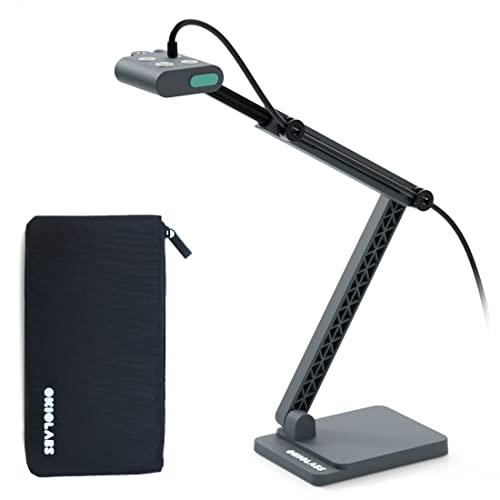
- True 4K capture from a 13MP sensor
- OKIOPoint smart pointer improves presentations
- Durable metal base with integrated LED light
Best For: Teachers and presenters who want a durable 4K camera for frequent remote lessons
Flexible USB Doc Camera for Teachers

- 3-in-1 doc camera and webcam design
- A3 capture area with adjustable arm
- LED fill light plus image invert support
Best For: Teachers who want one flexible camera for remote lessons and live demos
Classic Plug-and-Play Doc Cam

- 8MP camera with smooth 30 fps streaming
- Built-in LED light and autofocus
- Plug-and-play USB with teaching software
Best For: Educators who want a compact USB camera with simple setup and extra software tools
Premium 4K Teaching Camera
16MP Auto-Flip Document Camera

- Up to 16MP stills and 4K UHD video
- Dual autofocus with automatic 180-degree flip
- OCR support for searchable PDFs and text extraction
Best For: Teachers and presenters who want premium image quality and advanced scanning features
Ultra HD Classroom Choice – IPEVO V4K 8MP USB Document Camera
If you want document cameras for remote teaching that balance sharp image quality with straightforward compatibility, the IPEVO V4K is a strong practical pick. Its 8MP sensor, fast autofocus, and up-to-30fps streaming make it well suited for live demos, distance learning, and switching quickly between worksheets, books, and hands-on materials.
Best For: Teachers and presenters who want a reliable, high-resolution camera for everyday remote lessons on Mac, Windows, or Chromebook.
Pros:
- 8MP capture up to 3266 x 2448 for detailed live images
- High frame rate streams up to 30 fps at Full HD for smoother teaching
- Fast autofocus helps reduce interruptions when changing materials
- Works with Mac, PC, and Chromebook for flexible use
Cons:
- No built-in light, so dim rooms may need extra lighting
- Best high-resolution streaming performance depends on a strong system
- More basic than models with advanced presentation software tools
The V4K is a solid choice if your priority is clear image quality and broad software compatibility rather than extra classroom features. It’s especially appealing for teachers who need a simple overhead camera that can keep up with daily remote instruction.
Large-Format Presentation Pick – INSWAN INS-2 4K 13MP Document Camera
For document cameras for remote teaching where larger materials matter, the INSWAN INS-2 is built to handle big visuals cleanly. Its 13MP Sony sensor, 4K capture, A3-size support, and built-in LED make it a practical fit for educators showing artwork, two-page spreads, or detailed classroom demonstrations.
Best For: Educators, art instructors, and presenters who need wide capture, strong lighting, and presentation tools for larger materials.
Pros:
- 4K Ultra HD capture with a 13MP Sony sensor
- A3-size coverage works well for large documents and artwork
- Built-in LED, anti-glare sheet, and brightness control help in difficult lighting
- Documate software adds zoom, annotation, recording, whiteboard tools, and OCR
Cons:
- Heavier and larger than more compact classroom models
- Best OS support requires newer Mac and iPad versions
- May offer more features than a simple plug-in-and-teach setup needs
The INS-2 stands out if you need more room under the camera and more teaching tools in one package. It is a strong pick for instructors who regularly present artwork, lab work, or oversized pages during live lessons.
Compact Teaching Utility – TreasLin 10MP USB Document Camera
If you need document cameras for remote teaching that are easy to move and set up, the TreasLin 10MP USB model is a practical all-rounder. It supports up to 4K capture, plugs into Windows, Mac, and Chromebook systems, and includes foldable, multi-angle hardware for showing textbooks, 2D pages, and 3D objects online.
Best For: Teachers and remote presenters who want a compact, plug-and-play overhead camera with flexible positioning.
Pros:
- 10MP lens with support up to 4K resolution
- Plug-and-play compatibility for Windows, Mac, and Chromebook
- Foldable, multi-joint design makes it easy to position and carry
- Manual image reversal and LED controls add teaching flexibility
Cons:
- Uses a more basic hardware setup than premium classroom models
- Large coverage specs are unusual and may be less straightforward to interpret
- Documentation-focused design may not be ideal if you need advanced software features
The TreasLin is a useful choice for teachers who value portability and flexible setup over extra bells and whistles. It brings a good mix of resolution, compatibility, and practical controls for everyday online instruction.
Budget-Friendly A3 Visualizer – THUSTAR 8MP Document Camera & Webcam
For document cameras for remote teaching that do more than basic overhead capture, the THUSTAR 8MP model mixes webcam and visualizer features in one device. It offers 4K video capture, A3-size coverage, built-in dual microphones, and adjustable LED lighting, making it a flexible option for live demos and distance education.
Best For: Teachers who want an affordable, foldable document camera with webcam-style features and built-in audio.
Pros:
- 8MP capture with up to 4K video output
- Built-in dual microphones can improve audio for remote lessons
- 3-level LED lighting helps in dark or bright rooms
- Foldable A3-size design is handy for classroom and home use
Cons:
- Autofocus and manual focus behavior may require occasional adjustment
- More feature-packed interface can take time to learn
- Best for users who can benefit from its webcam/document hybrid design
The THUSTAR is a versatile choice if you want a teaching camera that can handle visuals and audio without adding separate gear. It is especially appealing for online instructors who need image control, lighting adjustment, and built-in microphones in one compact unit.
Compact 4K Pick – OKIOCAM T-4K 8MP USB Document Camera
If you want a compact option among document cameras for remote teaching, the OKIOCAM T-4K is built for showing ledger-size materials, open books, maps, and other detailed visuals without taking up much desk space. Its 8MP Sony sensor, USB plug-and-play setup, and software tools make it a practical fit for online lessons and live demonstrations.
Best For: Teachers who need a portable, high-detail document camera for large pages and everyday remote instruction.
Pros:
- Captures ledger-size materials or both pages of an open book at once.
- 8MP Sony Exmor R sensor supports UHD capture up to 3264 x 2448p.
- Includes OKIOPoint for smart tracking and easier presentation flow.
- Compatible with Windows, Mac, iOS, Chrome, and interactive displays.
Cons:
- Maximum viewing area is narrower than some larger classroom visualizers.
- Built for USB use, so it is not the most flexible choice for wireless setups.
This is a strong pick if you want a portable document camera with detailed image quality and presentation tools that support remote teaching. It leans more toward compact convenience and teaching software than oversized coverage.
Flexible A3 Visualiser – 4K USB Document Camera with Dual Mics
For document cameras for remote teaching, this foldable visualiser stands out when you need A3-size coverage, adjustable brightness, and easy image correction during live demos. The 8MP camera, dual microphones, and plug-and-play USB-C setup make it a versatile option for classes, web conferencing, and screen-sharing sessions.
Best For: Teachers who want a foldable, A3-capable document camera with built-in audio and adjustable lighting.
Pros:
- Supports A3-size capture with a wide maximum covering area.
- 3-level LED brightness helps in both dark and bright environments.
- Dual microphones can help improve sound quality for remote teaching.
- Manual image reversal and one-touch autofocus add control during demos.
Cons:
- Image resolution tops out at 2448P rather than true 4K output.
- More features may mean more setup adjustments than a basic plug-and-play camera.
This model is a practical choice if you value flexibility over simplicity. The foldable body, lighting controls, and microphone pair make it especially useful for live teaching where both image and audio matter.
Premium 4K Choice – OKIOCAM S2 Pro 13MP USB Document Camera
Among document cameras for remote teaching, the OKIOCAM S2 Pro is aimed at users who want true 4K capture, smart tracking, and a sturdier build for frequent use. Its 13MP sensor, integrated LED light, and OKIOPoint software are well suited to live demos, web conferences, and interactive lessons.
Best For: Teachers and presenters who want a durable 4K document camera with smart pointer features and strong compatibility.
Pros:
- 13MP sensor captures true 4K detail with natural-looking color.
- OKIOPoint helps zoom and focus on the area you point to.
- Integrated LED light improves use in dimly lit spaces.
- Metal weighted base and reinforced arm are designed for durability.
Cons:
- Max viewing area is smaller than some A3-oriented visualisers.
- Premium build and features may be more than casual users need.
This is the most polished option in the group if image quality and presentation control are your priorities. It is especially appealing for teachers who use remote demos often and want a camera that feels built for regular classroom workflows.
Flexible USB Doc Camera for Teachers – 3-in-1 Classroom Visualizer
If you want document cameras for remote teaching that can also double as a webcam, this 3-in-1 USB model is built for exactly that kind of flexibility. It supports A3-sized materials, includes a hose-style adjustable arm for different angles, and offers image invert plus autofocus for live lessons and presentations.
Best For: Teachers who need a versatile USB doc camera for online classes, webinars, and classroom demos.
Pros:
- 3-in-1 design works as a document camera and webcam.
- Adjustable hose structure captures materials from multiple angles.
- A3 capture area handles larger worksheets and handouts.
- LED fill light and exposure controls help in difficult lighting.
Cons:
- Not plug-and-play, so setup requires selecting the USB camera source.
- Focus is button-based rather than fully hands-off continuous autofocus.
- Best performance depends on compatible USB-C or USB systems.
This is a practical pick if you want one device to cover teaching, webcam use, and document sharing without buying separate gear. Its strongest appeal is flexibility, especially for instructors who move between live demos and remote classes.
Classic Plug-and-Play Doc Cam – Compact 8MP Classroom Camera
For document cameras for remote teaching, this INSWAN model focuses on simplicity and dependable image quality. It offers an 8MP sensor, built-in LED lighting, autofocus, and a compact multi-joint design that fits neatly on a desk, making it a straightforward option for live lessons and online meetings.
Best For: Educators who want a compact, easy-to-use USB document camera with strong software support.
Pros:
- 8MP imaging with smooth 30 fps streaming.
- Built-in LED light and anti-glare sheet help in mixed lighting.
- Plug-and-play USB-A setup keeps installation simple.
- Bundled software adds annotation, zoom, rotation, and recording tools.
Cons:
- Viewing area is smaller than some larger A3-capable models.
- iPad support has specific OS and USB-C requirements.
- The design is compact, so it may feel less expansive for larger materials.
This is a well-rounded choice if you value ease of setup and useful teaching software more than maximum capture size. It is especially appealing for educators who want a reliable desk-friendly doc cam that can start working quickly.
Premium 4K Teaching Camera – 16MP Auto-Flip Document Camera
If you need document cameras for remote teaching with higher-end image quality, the Innex DC500 stands out for its 16MP sensor, 4K capture, and 60 fps Full HD mode. It also includes dual autofocus, automatic 180-degree auto flip, and OCR support, giving it a more advanced feature set for lessons, scanning, and presentations.
Best For: Teachers, trainers, and creators who want premium image quality plus advanced scanning and webcam switching.
Pros:
- Delivers up to 16MP stills and 4K UHD video.
- Dual autofocus helps with both moving and stationary subjects.
- Auto flip makes switching from doc cam to webcam seamless.
- OCR support can convert documents into searchable PDFs in over 100 languages.
Cons:
- 4K capture tops out at 30 fps, while 60 fps is limited to Full HD.
- USB audio requires external devices rather than built-in speaker output.
- Feature depth may be more than casual users need.
This model is best if you want the most advanced teaching and scanning features in one portable package. It offers a strong blend of image quality, automation, and software tools for educators who regularly share detailed materials online.
How We Picked These Document Cameras for Remote Teaching
We prioritized models that are easy to set up, work well with common teaching platforms, and offer the kind of clarity teachers need for live demos and hybrid lessons. Key factors included resolution, autofocus or sharp image handling, compatibility with Mac, Windows, and Chromebook, and extras like built-in lighting or microphones.
Quick Comparison
Higher-resolution cameras are better for showing fine details such as handwriting, worksheet answers, or science materials. If you need a simple plug-and-play option, USB models with broad operating-system support are usually the safest choice. For more advanced teaching setups, features like A3 capture, image invert, and built-in mics can be especially useful.
Key Buying Factors for Document Cameras for Remote Teaching
Image Quality
Look for at least 8MP if you want reliable everyday teaching clarity. If you frequently show small text, diagrams, or detailed objects, 13MP or 4K-class options can offer a more polished presentation.
Lighting and Focus
Built-in LED lights help in dim rooms, while good autofocus or fast image correction reduces interruptions during class. This matters most when you move between documents and physical objects.
Compatibility and Ease of Use
The best Document Cameras for Remote Teaching should connect easily to the devices you already use. Broad support for Zoom, Google Meet, Teams, Mac, Windows, and Chromebook can save setup time and avoid frustration.
Extra Teaching Features
Useful additions include image invert for overhead mounting, dual microphones for cleaner audio during demos, and foldable designs for storage and transport. A3 capture is a plus if you regularly work with larger worksheets or sketch paper.
Who Should Buy Which Document Cameras for Remote Teaching?
If you want a straightforward everyday teaching tool, choose a basic USB camera with solid resolution and broad compatibility. If you teach art, science, or math and need fine detail, step up to a higher-resolution model with stronger lighting. If you present often across different rooms or devices, look for a foldable, lightweight camera with easy plug-and-play setup. Teachers who want the most versatile all-in-one solution should consider premium models with built-in mic, smart pointer tools, or 3-in-1 document camera, webcam, and scanner functionality.
For most buyers, the best choice depends on how often you teach live, how much detail you need to show, and whether simplicity or advanced features matters more in daily use.