Choosing the best 3D scanner for clay models depends on more than headline accuracy. Clay sculptures contain organic curves, fine surface details, and sometimes low-contrast areas that can challenge tracking, lighting, and alignment.
We selected 10 scanners across portable, desktop, blue-light, infrared, and hybrid designs to help sculptors, artists, educators, and makers match scanning performance to their workflow, subject size, and budget.
Best 10 3d Scanner for Clay Models Picks for 2026
Best Overall
Creality Pika Portable 3D Scanner

- 0.03mm accuracy with 0.1mm resolution
- Blue laser and NIR scanning modes
- Wireless, marker-free, multi-platform workflow
Best For: Clay artists scanning models of varied sizes
Best Smart Workflow

- 0.05mm blue-light accuracy
- AI visual tracking and point-cloud processing
- Lightweight, quiet design for tabletop work
Best For: Makers prioritizing guided scanning and software tools
Best for Beginners

- One-click scanning workflow
- Anti-shake stabilization for steadier scans
- 24-bit full-color capture
Best For: First-time users scanning general clay sculptures
Best for Fine Detail

- Up to 0.02mm accuracy for small details
- Designed for 10–300mm objects
- Anti-shake and scan-back features
Best For: Small clay models with intricate surface texture
Best Marker-Free Precision

- Marker-free scanning reduces setup time
- 0.03mm stated accuracy with 0.07mm resolution
- AI repair, anti-shake modules, and color capture
Best For: Detailed clay scans with a simpler handheld workflow
Best High-Speed Detail Capture

- Up to 0.02mm accuracy in laboratory conditions
- Scans at up to 60 FPS and 660,000 points per second
- Wireless scanning and full-color mapping supported
Best For: Fast, detailed scanning across varied clay model sizes
Best Smart Scanning Workflow
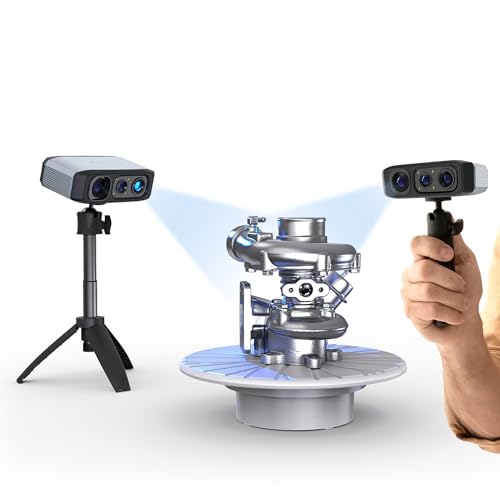
- AI tracking and point-cloud processing simplify scans
- Marker-free capture with anti-shake support
- Exports OBJ, STL, PLY, and ASC files
Best For: Hobbyists wanting guided processing and flexible exports
Large-Object Choice

- 0.1mm single-frame precision
- Up to 18fps scanning
- Full-color capture for large objects
Best For: Large clay sculptures and full-body models
Balanced Detail Pick

- 0.05mm resolution
- Up to 30fps full-color capture
- Includes turntable and calibration accessories
Best For: Small to medium clay models and hobby workflows
Precision Performance Pick

- Up to 0.02mm accuracy
- Scanning speeds up to 60fps
- Handles objects from 5mm to 2m
Best For: Detailed miniatures and demanding clay digitization
Best Overall – Creality Pika Portable 3D Scanner
If you want a versatile 3d scanner for clay models, the Creality Pika combines high stated accuracy with portable, wireless operation. Its blue-laser mode is suited to capturing fine surface details, while NIR structured light covers larger objects.
Best For: Clay artists who want one scanner for detailed small models, larger subjects, and mobile workflows.
Pros:
- Up to 0.03mm accuracy and 0.1mm 3D resolution for detailed model capture.
- Dual scanning modes support objects from small miniatures to life-size scans.
- Marker-free scanning, dark and metallic surface support, and exports to STL, OBJ, PLY, and ASC.
- Portable 260g design with Wi-Fi 6, touchscreen, and two swappable batteries.
Cons:
- The feature-rich workflow may be more than beginners need.
- AI body-completion features are less relevant to ordinary clay-model scanning.
For clay work that ranges from tiny sculptural details to larger pieces, the Pika is the most flexible option here. Its included tripod, turntable, and calibration board also make it easier to build a repeatable scanning setup.
Best Smart Workflow – 3DMakerpro Moose Lite
The 3DMakerpro Moose Lite is a practical 3d scanner for clay models when you want AI-assisted tracking and integrated model processing. Its blue-light system is specified at 0.05mm accuracy, with a scan range suited to many tabletop sculptures.
Best For: Makers who want a lightweight scanner with guided tracking and software that combines scanning, editing, and optimization.
Pros:
- Blue-light scanning offers stated 0.05mm accuracy and 0.1mm resolution.
- AI visual tracking and point-cloud processing help preserve model details.
- Supports objects from 15mm to 1500mm, covering many clay projects.
- Lightweight 250g design and quiet operation make extended sessions easier.
Cons:
- The listed 10FPS scanning speed is slower than some alternatives.
- The supplied notes do not specify included accessories or color-texture capture.
Moose Lite is appealing if software assistance matters as much as scanner specifications. Its size range and low weight make it a comfortable choice for scanning hand-sized clay models without adding much equipment to your workspace.
Best for Beginners – Creality CR-Ferret SE
The Creality CR-Ferret SE offers a straightforward starting point for anyone choosing a 3d scanner for clay models. One-click operation and anti-shake technology are designed to simplify scanning, while its 0.1mm precision is suitable for general modeling and digitization.
Best For: Beginners who want an uncomplicated scanner for general clay sculptures and occasional color capture.
Pros:
- Anti-shake technology helps stabilize scans when hand movement is present.
- One-click scanning is designed for a short learning curve.
- 24-bit full-color capture can preserve the appearance of painted or textured clay.
- Scans dark and metallic objects without spray or markers.
Cons:
- Its stated 0.1mm precision is lower than the higher-accuracy options in this roundup.
- The supplied compatibility information lists Mac and Windows only.
If ease of use is your main concern, the CR-Ferret SE keeps the process approachable. It is a sensible fit for hobby studios that value stable, color-capable scanning more than maximum fine-detail resolution.
Best for Fine Detail – 3DMakerpro Seal Lite
For small clay models where tiny dents and edge textures matter, the 3DMakerpro Seal Lite is a focused 3d scanner for clay models. Its blue LED source is specified at up to 0.02mm accuracy, though the scanner is intended for small objects and indoor use.
Best For: Sculptors digitizing small clay pieces and prioritizing fine surface detail over large-format versatility.
Pros:
- Up to 0.02mm accuracy is designed to capture fine dents and edge textures.
- 10–300mm scanning range fits small clay models and miniatures.
- Scan-back and anti-shake features support more stable handheld results.
- JMStudio includes visual tracking, error correction, auto-alignment, and common export formats.
Cons:
- Limited to small-format objects and recommended for indoor use.
- Captures mono texture only rather than full color.
- Requires a relatively powerful PC and has a learning curve.
Seal Lite is the detail specialist in this group. Choose it when your clay work fits within its compact scanning range and you are prepared to spend time learning the software and setting up a capable computer.
Best Marker-Free Precision – 3DMakerpro Moose Standard
If you want a capable 3d scanner for clay models, the 3DMakerpro Moose Standard stands out for marker-free scanning and detailed capture. Its blue-light system is rated for 0.03mm accuracy, while optical anti-shake modules and AI-assisted repair can make handheld scanning easier for beginners.
Best For: Clay artists and makers who want detailed, color-capable scans without applying markers to every model.
Pros:
- Marker-free structured-light scanning helps save setup time.
- 0.03mm stated accuracy and 0.07mm resolution support detailed model capture.
- AI visual tracking can identify scan gaps and automate model repair.
- 24-bit color capture, anti-shake modules, and up to 100mm scan depth add flexibility.
Cons:
- Compatible systems are limited to Windows and macOS.
- The listed features may be more than needed for simple, low-detail scans.
For clay models with surface detail or complex vertical features, the Moose Standard offers a strong balance of precision, ease of use, and workflow support. Its lifetime OTA software updates are an additional benefit for ongoing projects.
Best High-Speed Detail Capture – Creality Raptor Pro
The Creality Raptor Pro is a high-performance option for anyone comparing a 3d scanner for clay models with speed and precision in mind. It reaches up to 60 FPS and 660,000 points per second, while its blue laser lines are designed for capturing intricate details.
Best For: Experienced makers and studios scanning detailed clay forms where fast acquisition and high stated precision matter.
Pros:
- Up to 0.02mm accuracy under laboratory conditions.
- Fast scanning of up to 60 FPS and 660,000 points per second.
- 22+7 blue laser lines support detailed capture across a broad size range.
- Wireless scanning accessories and full-color mapping improve convenience and texture reproduction.
Cons:
- The complete package is substantially heavier than the other listed options at 12.17 pounds.
- Marker-based alignment is required for stitching multiple scans.
- The stated 0.02mm accuracy applies to laboratory conditions.
With support for objects from 5mm to 2000mm and a generous single-capture range, the Raptor Pro is versatile for larger clay pieces as well as small details. Its performance-focused feature set is best suited to users comfortable with a more involved scanning setup.
Best Smart Scanning Workflow – 3DMakerpro Moose Lite
The 3DMakerpro Moose Lite is a practical 3d scanner for clay models for users who value guided processing as much as capture detail. Its AI tracking, point-cloud algorithms, and JMStudio software are designed to streamline scanning, editing, and optimization, with marker-free surface detection for smoother setup.
Best For: Hobbyists and creators who want AI-assisted scanning, broad file-export options, and a beginner-friendly workflow.
Pros:
- Intelligent pre- and post-processing helps simplify the scanning workflow.
- Marker-free structured-light scanning supports easier setup.
- Optical anti-shake modules and rescanning help accommodate interrupted sessions.
- Supports OBJ, STL, PLY, and ASC exports, plus optional smartphone connectivity through Smart Grip.
Cons:
- The product listing gives conflicting precision details, mentioning 0.05mm in the title and 0.03mm in the feature notes.
- Smart Grip is available separately.
- Compatible systems are Windows 10/11 64-bit and macOS 12/13.
Moose Lite is appealing when the goal is to move efficiently from clay scan to an editable or printable file. Its software and export support make it especially useful for creators who expect to refine scans after capture.
Large-Object Choice – Revopoint RANGE
If you need a 3d scanner for clay models that can also handle larger sculptures, the Revopoint RANGE is designed for broad capture areas and longer scanning distances. Its 0.1mm single-frame precision, up to 18fps scanning, and full-color capture make it a practical option for clay figures, busts, and oversized art projects.
Best For: Large clay sculptures, full-body models, and users who want color scanning across Windows, macOS, iOS, or Android devices.
Pros:
- Designed for large objects with a 360mm x 650mm single capture range.
- Scans at up to 18fps for smoother handheld work.
- Captures nearly lifelike full-color models with its RGB camera.
- Revo Scan software is intended to be approachable for beginners.
Cons:
- Its 0.1mm single-frame precision is less fine than the higher-accuracy Creality options in this roundup.
- Its large-object focus may be more than needed for very small clay details.
The RANGE is a sensible pick when clay work extends beyond tabletop models. Choose it for scanning larger forms and flexible device compatibility rather than maximum small-detail resolution.
Balanced Detail Pick – Creality Otter Lite Basic
The Creality Otter Lite Basic is a compact 3d scanner for clay models when you want detailed close-range capture without giving up the ability to scan larger pieces. It offers 0.05mm resolution, color texture mapping, and included accessories such as a turntable, calibration board, markers, and carrying case.
Best For: Small to medium clay models, hobbyists who want a complete starter kit, and users working with Windows or macOS.
Pros:
- Supports 0.05mm resolution and close-range scanning of objects as small as 20mm.
- Offers close-range and long-range scanning modes from 100mm to 1500mm.
- Captures full-color textures at up to 30fps and exports OBJ, STL, or PLY files.
- Includes a turntable, markers, calibration board, adapters, and carrying case.
Cons:
- Recommended Windows use calls for a dedicated graphics card and 16GB RAM.
- The basic package is listed at 235g, while the package dimensions and weight make it less travel-light than the scanner alone.
For most clay artists, the Otter Lite Basic offers a useful middle ground: finer stated resolution than the RANGE, a 30fps color workflow, and equipment that reduces the need to buy setup accessories separately.
Precision Performance Pick – Creality CR-Scan Raptor
The Creality CR-Scan Raptor is the high-performance 3d scanner for clay models in this lineup, combining blue laser and NIR scanning for objects ranging from tiny details to large forms. With up to 0.02mm accuracy, 0.1mm fine-detail resolution, and scanning speeds up to 60fps, it is suited to artists who need precise geometry and a faster workflow.
Best For: Detailed clay miniatures, production-oriented scanning, reverse engineering, and users who need coverage from 5mm objects to large sculptures.
Pros:
- Blue laser scanning provides up to 0.02mm accuracy and 0.1mm fine-detail resolution.
- Supports objects from 5×5×5mm up to 2000×2000×2000mm.
- Reaches up to 60fps with blue laser scanning and supports marker-free scanning for feature-rich objects.
- Captures 24-bit full-color textures with 12 circular LED texture lights.
Cons:
- Its recommended Windows setup includes an i7 processor, 6GB VRAM GPU, and 16GB RAM.
- It has a shorter one-year warranty than the RANGE’s listed two-year warranty.
The Raptor is the strongest choice when scan precision, speed, and object-size flexibility matter most. Its computer requirements are higher, but the combination of laser accuracy and color capture is well suited to demanding clay digitization.
How We Picked the Best 3d Scanner for Clay Models
We compared these scanners using the factors that matter most when digitizing clay sculptures: stated accuracy, tracking stability, scan speed, working distance, object-size range, color and texture capture, portability, and software support. We also considered whether each model is better suited to small maquettes, medium sculptures, full-body forms, or repeatable studio work.
Published accuracy is a useful benchmark, not a guarantee of finished results. Surface finish, lighting, scanner movement, calibration, texture, and post-processing can all affect the final mesh. A scanner with slightly lower rated accuracy may produce better usable data if it tracks reliably and has simpler software.
Quick Comparison
- Highest-detail options: The Creality Raptor models and 3DMakerpro Seal Lite are aimed at fine surface capture and smaller, controlled subjects.
- Portable all-rounders: Creality Pika, 3DMakerpro handheld scanners, and Creality Otter Lite balance mobility with useful detail.
- Desktop-friendly scanning: The Creality CR-Ferret SE suits users who prefer a more stable setup for small or medium objects.
- Larger sculptures: Revopoint RANGE is designed for bigger subjects and longer scanning distances.
- Color-focused workflows: Models with full-color cameras or texture support can preserve painted details and visual references alongside geometry.
Key Buying Factors for a 3d Scanner for Clay Models
Accuracy and Surface Detail
Choose a finer accuracy rating when you need to preserve tool marks, facial features, fingerprints, or small sculptural transitions. For large studies or rough forms, tracking and coverage may matter more than the smallest quoted increment.
Scanner Technology and Tracking
Blue-light systems can perform well on detailed surfaces, while infrared and structured-light systems may offer convenient tracking across larger areas. Anti-shake features, AI-assisted completion, and multiple scan modes can reduce rescans, but they do not replace careful movement and good lighting.
Object Size, Working Distance, and Portability
Check the scanner’s recommended object range before buying. A compact scanner may excel on a small bust but struggle with a full-size figure; a long-range unit may be less convenient for tiny details. Weight, cabling, wireless support, and battery requirements also affect studio usability.
Color, Texture, and Software
If the scan is only a reference for CAD or 3D printing, geometry may be the priority. For archival work, presentation, or painted clay, a color camera and texture workflow are valuable. Confirm export formats, operating-system compatibility, calibration steps, and whether editing or alignment tools are included.
Who Should Buy Which 3d Scanner for Clay Models?
Choose a high-detail blue-light or multi-line scanner if you scan small-to-medium sculptures and need crisp forms for reproduction or digital sculpting. Choose a portable all-rounder if you work between a studio, classroom, and workshop. Choose a desktop-oriented model when repeatable positioning and a controlled setup matter more than mobility. Choose a long-range scanner for larger busts, figures, or roomier subjects. Finally, select a color-capable model when the visual appearance of the clay is part of the finished record.