The best hard drive enclosures make it easy to reuse internal SATA drives, recover data, expand storage, or build a flexible external backup setup without buying a complete prebuilt drive.
Our 2026 shortlist includes compact 2.5-inch cases, versatile 2.5/3.5-inch docks, and multi-bay enclosures for users who need more capacity and convenient drive management.
Best 10 Hard Drive Enclosures Picks for 2026
Best Compact Pick
Tool-Free 2.5-Inch SATA Enclosure

- Tool-free 2.5-inch SATA drive installation
- USB 3.0, UASP, and up to 5 Gbps
- Plug-and-play with Windows and Mac
Best For: Portable 2.5-inch SATA drives and simple SSD upgrades
Best Multi-Drive Pick

- Four independent SATA drive bays
- USB 3.2 Gen 2 speeds up to 10 Gbps
- Tool-free trays and hot swapping
Best For: Expanding desktop storage with four independent SATA drives
Best Aluminum Pick

- Aluminum housing with vertical stand
- USB 3.0 and UASP up to 5 Gbps
- Supports drives up to 18TB
Best For: 3.5-inch SATA HDDs and SSDs used at a desk
Best Dock-Style Pick

- Supports 2.5-inch and 3.5-inch SATA drives
- UASP-enabled USB 3.0 up to 5 Gbps
- Ventilated lay-flat design with auto-sleep
Best For: Desktop users who want broad SATA compatibility and simple drive access
Simple SATA Dock
Sabrent USB 3.0 Hard Drive Dock

- Accepts one bare 2.5- or 3.5-inch SATA drive
- Tool-free hot-swapping with UASP support
- Includes 12V adapter; USB Type-A host connection
Best For: Frequent swapping of bare SATA HDDs and SSDs
Universal Desktop Case
UGREEN 2.5/3.5-Inch SATA Enclosure
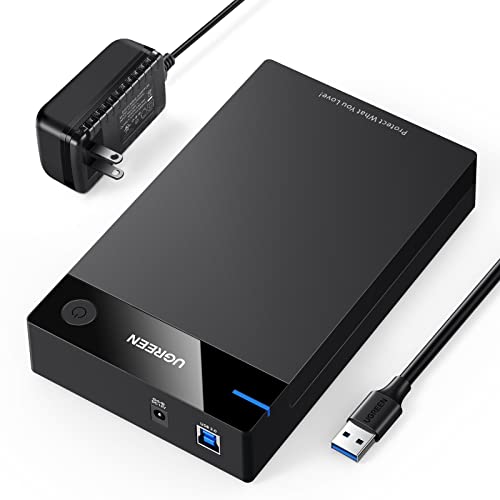
- Holds 2.5- or 3.5-inch SATA drives up to 20TB
- Includes 12V/2A adapter and USB 3.0 cable
- Supports UASP and multiple computers and consoles
Best For: Enclosed desktop storage using a bare SATA drive
Compact SSD Pick
BENFEI 2.5-Inch SATA USB Enclosure

- Fits 7mm and 9.5mm 2.5-inch SATA drives
- Offers Type-C/Type-A connectivity and UASP
- Tool-free, hot-swappable design for drives up to 6TB
Best For: Portable 2.5-inch SATA SSD or laptop-drive use
Best Single-Drive Pick
SABRENT USB 3.0 SATA Enclosure
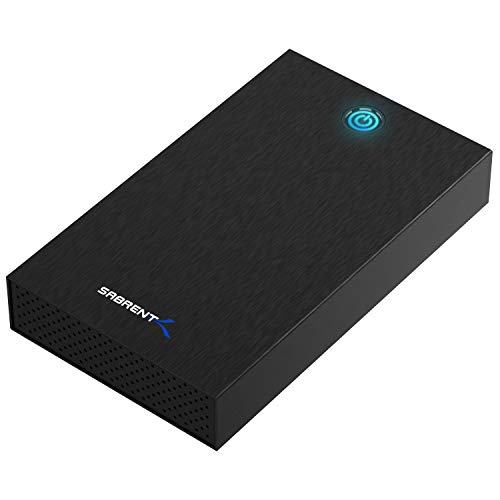
- Fits 2.5-inch and 3.5-inch SATA drives
- Tool-free drive installation
- Requires external 12V power
Best For: Simple single-drive SATA access
Best Dual-Bay Value

- Supports two 2.5-inch or 3.5-inch SATA drives
- Hot-swappable, tool-free trays
- Includes USB-A and USB-C 3.0 cables
Best For: Multi-drive desktop storage
Best High-Capacity Option

- Four bays support up to 80TB total
- Works with 2.5-inch and 3.5-inch SATA drives
- Includes fan, USB 3.0, and 12V power
Best For: Centralizing multiple SATA drives
Best Compact Pick – Tool-Free 2.5-Inch SATA Enclosure
The SABRENT EC-UASP is a straightforward choice for shoppers seeking compact hard drive enclosures for a 2.5-inch SATA HDD or SSD. Its tool-free design, USB 3.0 connectivity, and plug-and-play setup make it useful for upgrading, transferring, or accessing a notebook drive.
Best For: Portable 2.5-inch SATA drives and simple SSD upgrades.
Pros:
- Tool-free installation makes drive insertion quick.
- Supports USB 3.0 transfer rates up to 5 Gbps and UASP SATA III.
- Compatible with 2.5-inch SATA and SATA II hard drives and SSDs.
- Hot-swappable and plug-and-play, with no drivers required.
Cons:
- Only supports one 2.5-inch drive.
- Plastic construction may feel less substantial than aluminum alternatives.
- Not designed for 3.5-inch desktop drives.
Choose this model when portability and easy installation matter more than multi-drive capacity. It is a practical, compact enclosure for common notebook-size SATA storage.
Best Multi-Drive Pick – TerraMaster D4-320 4-Bay DAS
The TerraMaster D4-320 is a four-bay direct-attached storage enclosure for users who need to connect several drives over one USB connection. Among hard drive enclosures, it stands out for USB 3.2 Gen 2 speeds, tool-free trays, hot swapping, and support for both 2.5-inch and 3.5-inch SATA storage.
Best For: Expanding desktop storage with four independent SATA drives.
Pros:
- Holds four individual drives and supports up to 120TB total capacity.
- USB 3.2 Gen 2 Type-C interface provides transmission speeds up to 10 Gbps.
- Tool-free trays and hot swapping simplify drive management.
- Temperature-controlled cooling, sound-absorbing panels, and vibration damping support quieter operation.
Cons:
- Diskless design requires buying compatible drives separately.
- It is a DAS enclosure, not a NAS, and has no RAID function.
- Larger and less portable than single-drive enclosures.
This is the strongest fit for a multi-drive desktop setup rather than occasional drive access. Its independent bays and hot-swap support make storage expansion and maintenance more convenient.
Best Aluminum Pick – GODO 3.5-Inch SATA Enclosure
The GODO 3.5-inch enclosure is a practical option for desktop-size SATA drives that need external access. Its aluminum housing, dedicated 12V/2A power supply, UASP support, and included vertical stand give this hard drive enclosure a stable, desktop-friendly design.
Best For: 3.5-inch SATA HDDs and SSDs used at a desk.
Pros:
- Supports 3.5-inch SATA I, II, and III HDDs and SSDs up to 18TB.
- USB 3.0 with UASP offers transfer rates up to 5 Gbps.
- Aluminum construction helps with heat dissipation and static protection.
- Includes a 12V/2A power adapter, stand, screws, screwdriver, and USB cable.
Cons:
- Supports only one drive at a time.
- Requires a separate power adapter for 3.5-inch drives.
- Installation uses screws, so it is less immediate than a tool-free enclosure.
Consider this enclosure when you want a powered home for a single 3.5-inch SATA drive and value a metal body. The removable stand also lets you use it vertically or carry the main enclosure separately.
Best Dock-Style Pick – CLAVOOP 3.5-Inch SATA Case
The CLAVOOP lay-flat enclosure is designed for accessible desktop use, with a dock-style shape, ventilation openings, non-slip feet, and a dedicated power button. It supports both 3.5-inch and 2.5-inch SATA drives, making it a flexible choice among hard drive enclosures for storage access and data recovery tasks.
Best For: Desktop users who want broad SATA compatibility and simple drive access.
Pros:
- Supports 3.5-inch and 2.5-inch SATA I, II, and III HDDs and SSDs.
- UASP-enabled USB 3.0 supports up to 5 Gbps transfer rates.
- Ventilation holes, shock-proof sponges, and non-slip pads support stable operation.
- Includes a 12V/2A adapter and features LED status indicators and auto-sleep.
Cons:
- Supports one drive at a time.
- Not compatible with IDE, mSATA, or M.2 drives.
- Performance depends on the connected device and drive.
This model is a sensible choice if you regularly switch between 2.5-inch and 3.5-inch SATA drives. Its lay-flat design and power controls make it convenient for a desk, while the compatibility limits should be checked before purchase.
Simple SATA Dock – Sabrent USB 3.0 Hard Drive Dock
For quick access to bare SATA drives, this Sabrent docking station is a practical alternative to enclosed hard drive enclosures. Its open, tool-free bay accepts one 2.5- or 3.5-inch SATA HDD or SSD and supports hot-swapping without a reboot.
Best For: Users who regularly swap bare 2.5- or 3.5-inch SATA drives and want a simple desktop dock.
Pros:
- Supports SATA I/II/III HDDs and SSDs in both 2.5- and 3.5-inch sizes.
- Tool-free, plug-and-play design with hot-swap support and activity LED.
- Includes the required 12V/2A adapter for 3.5-inch drives.
- UASP support and compatibility with Windows 10/11, macOS, and Linux.
Cons:
- Supports SATA drives only—not IDE/PATA, M.2, SAS, or drives already inside a USB enclosure.
- Uses a USB Type-A host connection; a USB-C adapter is needed for USB-C-only computers.
- S.M.A.R.T. diagnostics do not pass through the USB bridge.
This is a flexible drive-access tool rather than a protective portable enclosure. It is a strong fit for frequent drive swaps, provided your computer has a suitable USB-A port and your drive is bare SATA.
Universal Desktop Case – UGREEN 2.5/3.5-Inch SATA Enclosure
This UGREEN model is a full-size option for turning a bare 2.5- or 3.5-inch SATA drive into external storage. Among hard drive enclosures, it stands out for broad device compatibility, a supplied power adapter, and a protective ABS enclosure with ventilation.
Best For: Desktop users who need an enclosed 2.5- or 3.5-inch SATA drive for computers, consoles, routers, or TVs.
Pros:
- Supports 2.5- and 3.5-inch SATA I/II/III HDDs and SSDs up to 20TB.
- Includes a 12V/2A power adapter and USB 3.0 cable.
- UASP support, 5Gbps USB 3.0 transfers, and backward compatibility with USB 2.0 and 1.1.
- Tool-free setup with rubber strips, ABS construction, and heat-emission openings.
Cons:
- Designed for one drive at a time.
- Requires safe removal before unplugging to help avoid data loss.
- Its USB cable specification is USB-A to USB-B rather than USB-C.
The included power supply and 20TB support make this a versatile choice for larger desktop drives. It is especially useful when the enclosure will remain connected to a computer, console, or other supported device.
Compact SSD Pick – BENFEI 2.5-Inch SATA USB Enclosure
For a small laptop drive or SATA SSD, this BENFEI enclosure provides a compact tool-free way to create external storage. Its Type-C/Type-A plug design makes it a convenient choice for newer laptops and compatible phones or tablets.
Best For: Owners of 2.5-inch, 7mm or 9.5mm SATA HDDs and SSDs who want a compact enclosure with flexible host connections.
Pros:
- Tool-free installation with an integrated Type-C/Type-A connection design.
- Supports 2.5-inch SATA I/II/III drives up to 6TB.
- UASP support with transfers up to 5Gbps and backward compatibility with USB 2.0 and 1.1.
- Hot-swappable and compatible with Windows, Linux, and macOS 8.0 or later.
Cons:
- Supports 2.5-inch drives only, not 3.5-inch desktop drives.
- Limited to drives up to 6TB and 7mm or 9.5mm thickness.
- Does not include a separate power adapter; compatibility depends on available USB power.
This is one of the more portable hard drive enclosures in the group, particularly for SSD upgrades and laptop-drive transfers. Check the drive’s size, thickness, and SATA interface before ordering.
Best Single-Drive Pick – SABRENT USB 3.0 SATA Enclosure
This SABRENT hard drive enclosure is a practical choice for accessing one 2.5-inch or 3.5-inch SATA HDD or SSD externally. Its tool-free design makes drive swaps quick, while USB 3.0 with UASP supports fast transfers. Keep in mind that it requires the included 12V/2A wall adapter and uses a USB-A host connection.
Best For: Users who need a simple, single-drive enclosure for SATA storage and occasional drive swapping.
Pros:
- Supports both 2.5-inch and 3.5-inch SATA HDDs and SSDs.
- Tool-free installation allows quick drive changes.
- Aluminum shell, shock-absorbing tray, UASP, and plug-and-play support for Windows, macOS, and Linux.
Cons:
- Not compatible with SAS, M.2, NVMe, or IDE/PATA drives.
- Requires a wall outlet and does not provide USB-C host connectivity without an adapter.
- S.M.A.R.T. diagnostics are unavailable through the USB bridge.
Choose this model when straightforward SATA access matters more than multi-drive capacity. Verify your drive’s physical dimensions, especially with some 4TB-plus 3.5-inch drives, before buying.
Best Dual-Bay Value – CENMATE 2-Bay SATA Enclosure
This CENMATE hard drive enclosure provides two bays for 2.5-inch or 3.5-inch SATA HDDs and SSDs, making it useful for expanding desktop storage or managing multiple drives. It includes USB-A and USB-C 3.0 cables, tool-free trays, hot swapping, and an internal cooling fan.
Best For: Home users and small businesses that need convenient access to two SATA drives in a single DAS enclosure.
Pros:
- Holds two 2.5-inch or 3.5-inch SATA drives, with up to 20TB supported per drive.
- Tool-free installation and hot swapping simplify drive management.
- Aluminum construction, cooling fan, USB 3.0, and USB-A/USB-C cables are included.
Cons:
- This is a DAS enclosure, not a RAID or NAS system.
- The cooling fan produces approximately 40–50 dB of noise.
- External power is required.
The dual-bay layout offers more flexibility than a single-drive enclosure without moving to a larger four-bay unit. Its fan and hot-swap feature are useful for active storage workflows, but noise-sensitive buyers should take the stated fan level into account.
Best High-Capacity Option – CENMATE 4-Bay SATA Enclosure
For users managing several drives, this CENMATE hard drive enclosure offers four bays for 2.5-inch and 3.5-inch SATA HDDs and SSDs. USB 3.0 connectivity, a 12V power adapter, aluminum construction, and an integrated fan make it suited to centralized external storage, though it operates as DAS rather than RAID or NAS.
Best For: Users who need one enclosure for up to four SATA drives and substantial external storage capacity.
Pros:
- Four bays support up to 20TB per drive, for a stated total capacity of up to 80TB.
- Supports both 2.5-inch and 3.5-inch SATA HDDs and SSDs.
- Includes USB-A/USB-C 3.0 connectivity, cooling fan, and a 12V power adapter.
Cons:
- It does not provide RAID or NAS functionality.
- The fan is rated at approximately 40–50 dB and may be noticeable.
- USB 3.0 transfer speeds are capped at up to 5Gbps.
This model is the strongest fit when bay count and capacity are the priorities. It consolidates four SATA drives in one enclosure, but buyers seeking redundancy or network access will need a separate RAID or NAS solution.
How We Picked These Hard Drive Enclosures
We selected models across the most useful enclosure types: portable 2.5-inch cases, 3.5-inch desktop enclosures, docking stations, and multi-bay systems. We prioritized SATA compatibility, USB connectivity, tool-free installation, construction quality, cooling, drive access, and practical capacity support. The list also reflects different use cases and budgets, so shoppers can choose between simple portability and expandable storage.
Before buying, verify the enclosure’s supported drive size and interface. These products are designed for SATA HDDs and SSDs; an NVMe drive requires a different enclosure.
Quick Comparison
| Enclosure Type | Best For | Key Advantage |
|---|---|---|
| 2.5-inch portable case | Laptop drives and SSDs | Compact, bus-powered design |
| 2.5/3.5-inch dock | Occasional drive access | Easy insertion and removal |
| Single 3.5-inch enclosure | Desktop HDD storage | Large-capacity drive support |
| Two-bay enclosure | Flexible home storage | Multiple drives in one unit |
| Four-bay enclosure | Large libraries and backups | Higher capacity and expansion |
Key Buying Factors for Hard Drive Enclosures
Drive Size and SATA Compatibility
A 2.5-inch enclosure fits most laptop HDDs and SATA SSDs, while 3.5-inch models are intended primarily for desktop hard drives and usually require an external power adapter. Dual-format enclosures offer more flexibility if you regularly switch between drive types.
Connection Speed and Port Type
USB 3.0 provides substantially better transfer performance than USB 2.0 for large files and backups. USB Type-C may make connection easier with newer laptops, but check whether the enclosure includes the required cable and whether its actual interface speed matches your computer’s port.
Cooling, Power, and Drive Access
High-capacity 3.5-inch drives can produce heat during long transfers, making ventilation or an integrated fan valuable. Multi-bay units also need reliable external power. Tool-free trays and hot-swappable designs are useful for frequent drive changes, while a sealed compact case is better for portability.
Capacity and Data Protection
Confirm the advertised maximum capacity before installing a newer or unusually large drive. An enclosure is not automatically a backup system or RAID array, so keep important files in at least one additional location.
Who Should Buy Which Hard Drive Enclosures?
- For portable SSD upgrades: Choose a compact 2.5-inch tool-free enclosure with USB 3.0.
- For occasional cloning or data recovery: A 2.5/3.5-inch docking station provides fast, convenient drive access.
- For one large desktop hard drive: Select a powered 3.5-inch enclosure with good ventilation.
- For growing home storage: A two-bay model balances capacity, flexibility, and footprint.
- For multiple backups or media libraries: A four-bay enclosure offers more expansion, but requires greater desk space, power, and cooling.
Match the enclosure to how often you move drives, how much capacity you need, and whether portability or expansion matters most. For sustained workloads, prioritize cooling and dependable power; for simple upgrades, a compact tool-free USB enclosure is usually the most practical choice.