The best planetarium projectors for homeschool turn astronomy lessons into an immersive experience, projecting stars, constellations, planets, and nebulae onto a ceiling or wall. The right model can make space science more engaging without requiring a large telescope or complicated setup.
This roundup includes educational planetarium kits as well as versatile star projectors with astronomy discs, timers, remotes, and rotating displays. Use the guide below to match features, accuracy, and ease of use to your family’s learning goals.
Best 10 Planetarium Projectors for Homeschool Picks for 2026
Hands-On Space Learning
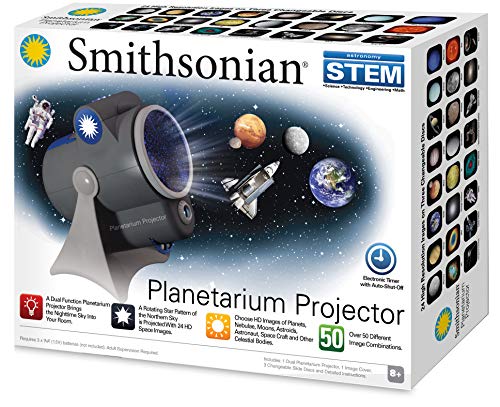
- Rotating Northern Sky pattern
- 24 HD images on four discs
- 50+ image combinations
Best For: Structured astronomy lessons for ages 8–15
Broad Topic Astronomy Display
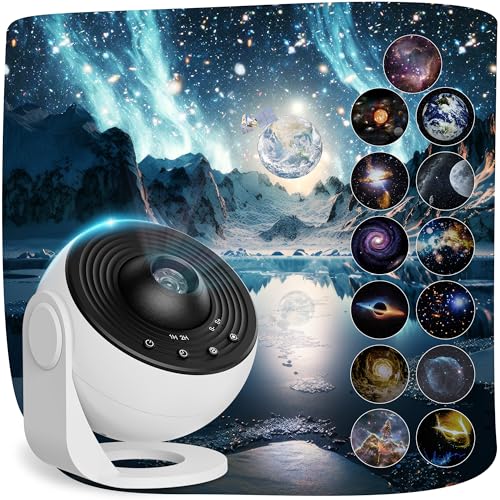
- 13 educational space scenes
- Projects up to 16.4 feet away
- Focus, rotation, and timer controls
Best For: Flexible family astronomy displays and discussions
NASA Image Learning
Brainstorm Deep Space Planetarium

- 24 color NASA photographs
- Three interchangeable slide discs
- Online night-sky learning activity
Best For: NASA-focused lessons and guided space exploration
Immersive Ceiling Lessons

- 13 HD space scenes
- 135–754 square feet of coverage
- Rotation, focus, and timer controls
Best For: Large-area homeschool displays and visual demonstrations
Best STEM Learning Pick

- Rotating maps cover both hemispheres
- Includes four James Webb image disks
- Works as a nightlight with timer
Best For: Structured homeschool astronomy lessons
Best Ambient Option

- Eight nebula effects with green stars
- Remote control and adjustable angle
- Includes 45- and 90-minute timers
Best For: Relaxed room ambiance and space-themed decor
Best Space-Scene Variety

- Includes 13 educational space scenes
- Adjustable focus and 360-degree angle
- Offers two rotation speeds and timers
Best For: Broad, flexible space-themed homeschool activities
Best Multifunction Pick
16-in-1 Galaxy Planetarium Projector

- 16 HD space and dinosaur projection scenarios
- 29 soothing sounds plus Bluetooth 5.3 audio
- Remote control with 1-, 2-, and 4-hour timers
Best For: Homeschool families combining space lessons with bedtime or sensory-friendly use
Best Space-Lesson Focus

- Covers planets, nebulae, black holes, and superclusters
- Projects up to 16.4 feet across 135–754 square feet
- 360-degree rotation with adjustable focus and timers
Best For: Astronomy lessons needing varied topics and large wall or ceiling coverage
Best Disc Variety
25-in-1 Galaxy Planetarium Projector

- 25 discs span astronomy, marine life, and animal themes
- Projects up to 16.4 feet with wide area coverage
- Adjustable stand, 360-degree rotation, and USB power
Best For: Multi-subject homeschool families wanting extensive reusable visual themes
Hands-On Space Learning – Smithsonian Room Planetarium
Smithsonian Optics Room Planetarium and Dual Projector Science Kit, Black/Blue, Age 8 and Up
Check Price On AmazonFor homeschoolers seeking planetarium projectors for homeschool, this Smithsonian kit combines a rotating Northern Sky star pattern with interchangeable educational space images. Its physical discs and age-8-and-up design make it a practical choice for guided astronomy activities.
Best For: Homeschool astronomy lessons for children ages 8 to 15.
Pros:
- Projects a rotating Northern Sky star pattern.
- Includes 24 HD images across four changeable slide discs.
- Offers more than 50 image combinations and can function as a nightlight.
- Includes an auto-shutoff electric timer.
Cons:
- Batteries are not included.
- Recommended for ages 8 and up, so it may not suit younger learners.
- It has no manufacturer warranty listed.
This is the most lesson-oriented option in the group, especially for teaching star patterns and identifying celestial objects. The rotating projection and swappable discs provide more structured learning than a simple ambient galaxy light.
Broad Topic Astronomy Display – 13-in-1 Galaxy Projector
This 13-in-1 model is one of the more versatile planetarium projectors for homeschool, covering subjects from the Solar System and Moon to black holes, galaxies, and superclusters. Brief introductions on the discs can help turn a projection session into a simple astronomy discussion.
Best For: Homeschool families wanting broad space-topic coverage with flexible room projection.
Pros:
- Includes 13 space scenes and introductory information for each subject.
- Projects onto walls, ceilings, or floors from up to 16.4 feet away.
- Provides adjustable focus, 360-degree angle adjustment, and two rotation speeds.
- Offers one- or two-hour timers plus a default four-hour auto-off.
Cons:
- Requires a 5V/2A adapter, which is not included.
- Best image clarity requires a dark room.
- The supplied information does not specify an age recommendation.
Choose this projector when variety and room coverage matter most. Its disc introductions support informal learning, while the focus control and timer make it practical for both lessons and bedtime use.
NASA Image Learning – Brainstorm Deep Space Planetarium
The Brainstorm Deep Space projector is a strong fit for planetarium projectors for homeschool when NASA imagery and guided discovery are priorities. It combines rotating star or constellation patterns with 24 color NASA photographs and an online learning activity.
Best For: Homeschool learners who enjoy NASA imagery and extension activities.
Pros:
- Projects 24 color NASA images from three interchangeable discs.
- Displays rotating star or constellation patterns on walls and ceilings.
- Projects a clear image up to one meter wide in a dark room.
- Includes an online secret code activity with information about the NASA photographs and night sky.
Cons:
- Requires a dark room for clear image projection.
- The supplied notes do not identify a recommended age range.
- Its maximum listed image size is one meter, which may be limiting for larger spaces.
This model stands out for combining visual content with an added online exploration component. It is particularly useful when a homeschool lesson benefits from authentic NASA photographs rather than only decorative star effects.
Immersive Ceiling Lessons – Galaxy Projector Pro
For homeschoolers who want planetarium projectors for homeschool that also work as room decor, this Galaxy Projector Pro offers 13 realistic space scenes, adjustable focus, and broad ceiling coverage. The simple disc-based design can support short demonstrations or visual review sessions.
Best For: Homeschool rooms needing large-area space projections with quiet timer operation.
Pros:
- Includes 13 HD scenes spanning the Solar System, galaxies, nebulae, and superclusters.
- Projects onto walls, floors, or ceilings across a stated 135- to 754-square-foot area.
- Provides 360-degree rotation, adjustable focus, and an optimal projection distance of 9.84 feet.
- Includes one- and two-hour timers with a default four-hour auto-off.
Cons:
- Designed for dark indoor environments for best results.
- Uses USB power, so a compatible power source is required.
- The supplied information does not list an age recommendation or detailed lesson materials.
This is a practical pick when projection size and atmosphere are as important as basic astronomy content. It offers useful controls for demonstrations, though families wanting more explicit teaching guidance may prefer a dedicated science kit.
Best STEM Learning Pick – Dual-Mode Astronomy Set
For homeschoolers seeking planetarium projectors for homeschool lessons, this dual-mode set combines rotating constellation maps with space imagery. It supports hands-on exploration of both hemispheres and includes authentic James Webb Space Telescope images for added visual context.
Best For: Structured STEM lessons and guided astronomy activities for children ages 8 and up.
Pros:
- Includes accurate star maps for the northern and southern hemispheres.
- Offers a second projector with four space-themed image disks.
- Can be placed on a tabletop or hung on a wall.
- Nightlight mode includes reduced brightness and 15-, 30-, or 60-minute auto-off settings.
Cons:
- The educational content is centered on the included maps and four image disks.
- It requires USB-C power and does not use batteries.
This is the strongest choice when astronomy learning matters more than decorative ambiance. Its rotating maps and two projection modes give homeschool lessons more substance than a basic galaxy light.
Best Ambient Option – Astronaut Galaxy Night Light
This astronaut projector is one of the more decorative planetarium projectors for homeschool, offering nebula effects and breathing green stars rather than lesson-focused constellation maps. Remote controls, adjustable projection, and a sleep timer make it useful for room ambiance after study time.
Best For: Relaxing bedroom spaces, movie nights, and casual space-themed room decor.
Pros:
- Provides eight nebula effects with breathing green stars.
- Remote adjusts brightness, rotation speed, and breathing rate.
- Magnetically adjustable astronaut head changes the projection angle.
- Includes 45- and 90-minute auto-off timer settings.
Cons:
- It does not include educational star maps or astronomy image disks.
- The remote does not include a battery.
- An adapter is not included.
Choose this model if your homeschool setup needs a flexible night light more than an instructional tool. Its adjustable effects are convenient, but it offers less direct astronomy content than dedicated slide-based projectors.
Best Space-Scene Variety – 13-Disc Galaxy Projector
For families comparing planetarium projectors for homeschool, this model emphasizes variety: its 13 space discs cover subjects from Earth and the Moon to nebulae, galaxies, a wormhole, and the Laniakea Supercluster. Brief introductions on the slides can help turn projection time into a conversation starter.
Best For: Flexible space-themed lessons and families wanting many changing astronomical scenes.
Pros:
- Includes 13 space scenes with brief introductions.
- Projects up to 16.4 feet away with a claimed 30% wider coverage.
- Adjustable focus and 360-degree projection angle support image setup.
- Offers two rotation speeds and one-, two-, or four-hour auto-off settings.
Cons:
- A 5V/2A power adapter is required but not included.
- Clear images require a darker environment and correct slide placement.
- The supplied notes do not identify a specific recommended age range.
This is a versatile pick for homeschoolers who want a broad set of space topics in one kit. It provides more scene variety than the other options here, though it requires a suitable adapter and darker room for best results.
Best Multifunction Pick – 16-in-1 Galaxy Planetarium Projector
For homeschool families looking for planetarium projectors for homeschool lessons and relaxing bedroom use, this model combines 16 illustrated space and dinosaur projection discs with built-in audio features. The included galaxy introductions can add a simple learning prompt to a space unit, while the remote and timer make everyday operation convenient.
Best For: Homeschoolers who want one projector for space-themed learning, calming sounds, and room ambiance.
Pros:
- Includes 16 HD projection scenarios covering topics such as the Solar System, Earth, Saturn, nebulae, and dinosaurs.
- Each projection card includes a galaxy introduction to support basic space exploration.
- Offers 29 soothing sounds, Bluetooth 5.3 audio, remote control, and 1-, 2-, or 4-hour timers.
- Uses a high-resolution lens and includes FCC, CE, and RoHS certifications according to the supplied notes.
Cons:
- The projector includes only 16 total display cards, with one pre-installed.
- Its sound-machine and Bluetooth features may be unnecessary if you only need a visual teaching aid.
This is a versatile choice when homeschool use overlaps with bedtime or sensory-friendly relaxation. Families focused strictly on astronomy content may prefer a model with more dedicated space discs, but the added audio and dinosaur themes give this projector broader household usefulness.
Best Space-Lesson Focus – 13-in-1 Planetarium Projector
This 13-in-1 model is a practical option for homeschoolers comparing planetarium projectors for homeschool astronomy activities. Its discs cover recognizable objects and larger cosmic structures, and the included introductions can provide starting points for discussions about planets, nebulae, black holes, and superclusters.
Best For: Homeschool lessons that emphasize varied astronomy topics and large-area ceiling or wall projection.
Pros:
- Includes 13 scenarios such as the Solar System, Uranus, Moon, Saturn, black hole, wormhole, and superclusters.
- Projection reaches up to 16.4 feet and covers a stated area of 135 to 754 square feet.
- Offers 360-degree rotation, two rotation speeds, adjustable focus, and a dedicated disc-rotation button.
- Includes galaxy introductions with the projection cards and operates quietly.
Cons:
- With 13 discs, it offers fewer display topics than the 25-in-1 alternative.
- It is USB-powered rather than battery-powered, so classroom placement needs access to power.
- The supplied notes list timed shutoff options, including 1 and 2 hours plus a 4-hour default, but do not describe a continuous-on setting.
The combination of broad coverage and quiet, rotating projection makes this a strong visual supplement for group demonstrations or bedroom study spaces. Its astronomy-focused disc selection is more targeted than a general mood projector, though the collection is smaller than some competing options.
Best Disc Variety – 25-in-1 Galaxy Planetarium Projector
For homeschool buyers seeking planetarium projectors for homeschool units with plenty of visual variety, this 25-disc model offers an unusually broad collection. It includes core astronomy subjects alongside ocean and animal themes, allowing the projector to support space studies as well as broader science or nature activities.
Best For: Families wanting the largest supplied selection of astronomy, marine-life, and animal projection themes.
Pros:
- Includes 25 4K HD discs covering the Earth, Milky Way, Solar System, black hole, observable universe, and multiple superclusters.
- Also includes marine-life and animal themes such as jellyfish, sharks, owls, lions, and flamingos.
- Projects up to 16.4 feet with a stated coverage range of 135 to 754 square feet.
- Features a flexible 0-360-degree stand, 360-degree rotation, focus adjustment, USB connectivity, and 1- or 2-hour auto-off timers.
Cons:
- Only some of the 25 discs are dedicated to astronomy, so the full set may be more than needed for a focused space curriculum.
- The supplied notes specify USB power but do not mention a wireless or battery option.
- The timer options are limited to 1 and 2 hours according to the product notes.
This is the most flexible pick for families who want to reuse a projector across astronomy, ocean, and animal units. Its large disc library adds value for varied homeschooling, while the adjustable stand and wide projection range make it easier to demonstrate images on different surfaces.
How We Picked the Best Planetarium Projectors for Homeschool
We focused on models that can support lessons, demonstrations, and independent exploration. Our comparison considers educational content, included discs or projection modes, ease of setup, brightness, coverage, controls, durability, and age suitability. Dedicated STEM kits generally offer more structured learning, while multi-mode galaxy projectors may work better for families that want both classroom value and ambient lighting.
Because product listings can vary by seller and revision, check the current package contents before buying—especially the number of astronomy discs, activity materials, remote-control functions, and power requirements.
Quick Comparison
| Best For | Look For | Typical Strength |
|---|---|---|
| Structured science lessons | Educational guides, constellation discs, STEM activities | Supports guided instruction |
| Visual demonstrations | Clear focus, wide projection area, rotating display | Makes concepts easier to see |
| Shared bedroom or classroom use | Remote, timer, quiet operation, adjustable brightness | Simple daily operation |
| Varied ages and interests | Multiple discs, sound options, and lighting modes | Flexible entertainment and learning |
Key Buying Factors for Planetarium Projectors for Homeschool
Educational Accuracy and Content
Prioritize accurate constellation and solar-system imagery over purely decorative nebula effects when the projector will be used for lessons. Printed guides, labeled discs, and activity suggestions add meaningful value for younger learners.
Projection Quality and Room Size
Check whether the projector supports focus adjustment and whether it works best in a dark room. A brighter lamp and broader coverage help in larger rooms, but excessive brightness can make labels harder to study. Rotation is useful for demonstrating apparent motion, while a fixed image may be easier for tracing or discussion.
Controls, Power, and Safety
Remote controls and timers are convenient for evening use, and adjustable brightness helps protect sleep routines. Look for stable construction, cool-running operation, and accessible controls. For children, supervise small discs, cords, and any removable parts.
Age Range and Lesson Fit
A younger child may benefit from a simple kit with guided activities; older students may prefer more detailed discs and independent exploration. Consider whether the projector complements your curriculum rather than merely decorating the room.
Who Should Buy Which Planetarium Projectors for Homeschool?
Choose a dedicated science kit if your priority is structured homeschool instruction, hands-on activities, and an astronomy-focused learning path. Choose a multi-disc projector if you want to compare constellations, the solar system, and different space scenes throughout the year. Models with timers, sound options, and remote controls suit families that also want a calming bedroom light, while a compact, straightforward projector is best for occasional lessons or limited space.
Before ordering, verify current disc selections, dimensions, power source, and included learning materials. The best choice is the one that balances educational usefulness with the controls and features your household will actually use.