Adding multiple drives to a desktop setup does not have to mean buying a full NAS. The best hard drive enclosures with hardware RAID provide centralized storage, drive redundancy, and simpler management through a direct USB connection.
This roundup compares 10 multi-bay enclosures across two-, four-, five-, and eight-drive designs, with attention to RAID options, drive compatibility, cooling, capacity, and connection flexibility.
Best 10 Hard Drive Enclosure with Hardware Raid Picks for 2026
Versatile Four-Bay RAID

- Eight selectable RAID modes
- Up to 88TB with four 3.5-inch drives
- 150W supply and active cooling
Best For: High-capacity desktop storage with flexible RAID configurations
Compact Hardware RAID
TERRAMASTER D2-320 2-Bay Enclosure

- Four RAID and disk modes
- USB 3.2 Gen 2 up to 10Gbps
- Supports up to 44TB total
Best For: Fast two-drive storage with optional RAID 1 mirroring
Maximum Desktop Expansion

- Five bays and up to 110TB
- Eight hardware RAID modes
- Built-in 150W power supply
Best For: Large media libraries, workstation backups, and multi-drive expansion
Five-Bay RAID 5 Storage
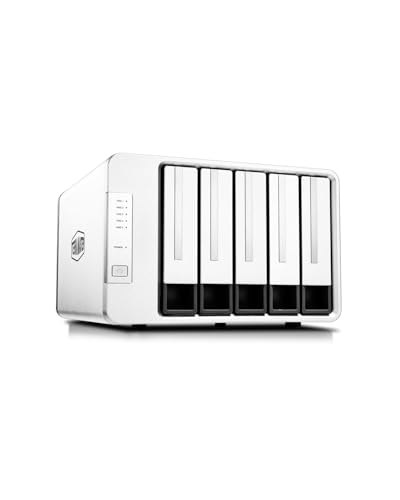
- Supports RAID 5, 10, 1, 0, and Single
- Five bays with up to 120TB capacity
- Hot-spare support in selected RAID modes
Best For: Expandable DAS storage with RAID 5 and recovery-focused features
Best High-Capacity Pick
Yottamaster PS500RC3 5-Bay RAID Enclosure

- Up to 110TB across five SATA drives
- Hardware RAID 0/1/3/5/10, JBOD, and Clone
- USB-C, removable trays, and temperature-controlled cooling
Best For: Large media libraries, backups, and video workflows
Best Four-Bay Value

- Eight RAID and storage modes
- Up to 96TB with four 24TB drives
- USB-A/C connectivity and dual cooling fans
Best For: Desktop SATA storage, backups, and surveillance systems
Best Eight-Bay Capacity

- Up to 160TB across eight SATA drives
- Supports RAID 5, RAID 50, Clone, and more
- USB-A/C, 12V/20A power, and dual fans
Best For: Large personal or enterprise storage systems
Best with Extra Features
CENMATE 4-Bay Hardware RAID Enclosure

- Four bays and up to 80TB total capacity
- Eight RAID and storage modes
- USB 3.0 plus eSATA connectivity
Best For: High-capacity desktop storage and flexible RAID setups
Best Compact Choice
CENMATE 2-Bay Hardware RAID Enclosure

- Two bays with up to 40TB total capacity
- RAID 0, RAID 1, Normal, and JBOD modes
- ASM1156R chip and tool-free drive installation
Best For: Smaller RAID 0 or RAID 1 desktop storage systems
Best Modular Four-Drive Design
CENMATE Dual 2-Bay RAID Enclosure
- Two 2-bay RAID units in one chassis
- Supports four drives and up to 80TB
- USB 3.0 with UASP and four RAID modes
Best For: Four-drive USB storage with separate two-bay RAID units
Versatile Four-Bay RAID – ORICO 4-Bay RAID Enclosure
If you need a hard drive enclosure with hardware RAID for expandable desktop storage, the ORICO 9848RU3 offers four 3.5-inch SATA bays and eight selectable modes, including RAID 0, 1, 3, 5, 10, JBOD, Clone, and Clear. Its 88TB maximum capacity, USB 3.0 connection, and built-in power supply make it practical for backups, media collections, and large project files.
Best For: Users who want broad RAID-mode flexibility and high-capacity 3.5-inch drive expansion.
Pros:
- Supports eight RAID and disk-management modes.
- Accepts up to four 22TB 3.5-inch SATA drives.
- Includes a 150W power supply and 80mm cooling fan.
- Works with Windows, macOS, and Linux.
Cons:
- Uses USB 3.0 rather than a faster USB 3.2 interface.
- Designed for 3.5-inch drives, limiting compact-drive flexibility.
The 9848RU3 is a strong choice when capacity and configuration options matter most. Its tool-free, lockable trays and aluminum cooling design add convenience for regular multi-drive use.
Compact Hardware RAID – TERRAMASTER D2-320 2-Bay Enclosure
The TERRAMASTER D2-320 is a compact hard drive enclosure with hardware RAID for users who need mirrored or striped storage without a NAS. Its USB 3.2 Gen 2 interface supports up to 10Gbps, while RAID 0, RAID 1, JBOD, and Single modes cover common backup and performance setups.
Best For: Home offices and creators needing a fast two-drive DAS with RAID 1 mirroring.
Pros:
- Supports RAID 0, RAID 1, JBOD, and Single modes.
- USB 3.2 Gen 2 provides up to 10Gbps bandwidth.
- Supports two drives up to 22TB each.
- Tool-free trays and temperature-controlled cooling simplify use.
Cons:
- Two-bay design offers less expansion than five-bay alternatives.
- It is diskless, so drives must be purchased separately.
Choose the D2-320 if you want straightforward hardware RAID in a smaller enclosure. RAID 1 provides mirrored protection, while USB 3.2 Gen 2 gives this two-bay unit useful speed headroom.
Maximum Desktop Expansion – ORICO 5-Bay RAID Enclosure
For large-scale storage, this ORICO five-bay model is a hard drive enclosure with hardware RAID that supports eight configuration modes, from RAID 0 and 5 to Clone and JBOD. It accommodates 2.5-inch and 3.5-inch SATA drives, with a listed maximum capacity of up to 110TB and USB 3.0 connectivity for cross-platform file access.
Best For: Video editors, media managers, and backup users building a high-capacity desktop DAS.
Pros:
- Five bays support up to 110TB total capacity.
- Hardware RAID offers eight selectable modes.
- 150W built-in supply supports multiple mechanical drives.
- Aluminum construction, vents, and an 80mm fan aid cooling.
Cons:
- USB 3.0 is slower on paper than USB 3.2 Gen 2 options.
- It is a diskless enclosure and requires separate drives.
This ORICO enclosure emphasizes capacity and versatility rather than the newest host interface. Its five bays and built-in power supply make it well suited to a workstation that needs substantial local storage and multiple RAID choices.
Five-Bay RAID 5 Storage – TERRAMASTER D5-310 Enclosure
The TERRAMASTER D5-310 is a hard drive enclosure with hardware RAID built around five bays and a dedicated rear RAID control knob. It supports RAID 5, 0, 1, 10, and Single modes, plus a hot-spare feature in supported RAID configurations, making it a practical option for expandable local storage and redundancy.
Best For: Users who want five-bay capacity, RAID 5 support, and cross-platform DAS compatibility.
Pros:
- Supports RAID 5, RAID 0, 1, 10, and Single modes.
- Hot-spare support can improve recovery in supported configurations.
- Accepts up to five drives for a listed 120TB maximum.
- Works with Windows, macOS, and Linux without additional drivers.
Cons:
- USB 3.1 Gen 1 is limited to 5Gbps.
- It is diskless and uses an external power adapter.
- RAID mode changes require the dedicated control knob and appropriate setup.
The D5-310 is a sensible pick when RAID 5 and five-drive expansion are priorities. Its 220MB/s listed actual read/write speed, tool-free bays, and included Windows backup software support a practical desktop backup workflow.
Best High-Capacity Pick – Yottamaster PS500RC3 5-Bay RAID Enclosure
If you need a hard drive enclosure with hardware RAID for a large media library or backup system, the Yottamaster PS500RC3 combines five bays, multiple RAID modes, and USB-C connectivity. It supports up to 110TB across 2.5-inch or 3.5-inch SATA drives and can be configured without downloading software.
Best For: Photographers, video editors, and users building a high-capacity desktop DAS.
Pros:
- Supports up to five SATA HDDs or SSDs and 110TB total capacity.
- Offers hardware RAID 0/1/3/5/10, JBOD, and Clone modes.
- Aluminum cooling design includes an 80mm temperature-controlled fan.
- Includes removable trays for easier drive installation and replacement.
Cons:
- Drive power consumption must remain within the stated 78W limit.
- Maximum transfer rate is 5Gbps over USB 3.1.
The PS500RC3 is a flexible choice when capacity and RAID variety matter most. Its five-bay design and hardware RAID controls make it practical for demanding workflows, though users should verify drive power requirements before filling every bay.
Best Four-Bay Value – MAIWO 4-Bay RAID Enclosure
The MAIWO 4-Bay RAID Enclosure is a practical hard drive enclosure with hardware RAID for users who want several 3.5-inch SATA drives in a compact DAS. It supports eight storage modes, up to 96TB, and USB-A/C connections with transfer rates up to 5Gbps.
Best For: Home offices, professionals, surveillance storage, and media libraries using 3.5-inch SATA hard drives.
Pros:
- Supports Normal, RAID 0, 3, 5, 1/10, Clone, and Large/JBOD modes.
- Holds up to four 24TB 3.5-inch SATA drives for 96TB capacity.
- Includes USB-A to USB-C and USB-C to USB-C cables.
- Two built-in fans provide cooling and can be controlled by a switch.
Cons:
- Designed for 3.5-inch SATA drives rather than 2.5-inch drives.
- Fan control is limited to on or off.
With broad RAID support and a 96TB ceiling, the MAIWO is a sensible middle-ground enclosure. It suits users who do not need five or more bays and prefer straightforward cooling and connectivity for desktop SATA drives.
Best Eight-Bay Capacity – CENMATE 8-Bay RAID Enclosure
For maximum drive capacity, the CENMATE is a hard drive enclosure with hardware RAID that accommodates up to eight 2.5-inch or 3.5-inch SATA HDDs or SSDs. It supports up to 160TB, USB-A/C connectivity, and several RAID layouts, making it suitable for larger personal or enterprise storage setups.
Best For: Users who need eight drive bays, high-capacity storage, and RAID configurations such as RAID 5 or RAID 50.
Pros:
- Supports up to eight drives and a stated maximum capacity of 160TB.
- Offers Clone, Large, Normal, RAID 0, RAID 5, RAID 50, and RAID 00 modes.
- Accepts both 2.5-inch and 3.5-inch SATA HDDs and SSDs.
- Includes a 12V/20A power adapter and two aluminum-enclosure fans.
Cons:
- At least two drives are required, with one drive in each four-drive group.
- Fans operate around 40–50 decibels and may be noticeable in quiet spaces.
- Changing RAID modes requires a manual power-off, switch, and reset procedure.
The CENMATE offers the largest capacity and bay count of these options, but its setup requires careful attention to the instructions. It is best suited to users comfortable testing drives individually and planning RAID changes before loading important data.
Best with Extra Features – CENMATE 4-Bay Hardware RAID Enclosure
If you need a hard drive enclosure with hardware RAID and room to expand, this four-bay CENMATE model supports 2.5-inch and 3.5-inch SATA HDDs or SSDs, up to 80TB total. It offers multiple RAID layouts, USB-A/USB-C 3.0 connectivity, and eSATA for compatible systems.
Best For: Users who need four drive bays, high-capacity external storage, and flexible RAID configurations.
Pros:
- Supports RAID 0, 1, 3, 5, and 10, plus Clone, Large, and Normal modes.
- Accepts up to four 2.5-inch or 3.5-inch SATA drives, with up to 80TB total capacity.
- Aluminum construction and built-in cooling fans help manage heat.
- Includes USB-A/USB-C 3.0 and eSATA cables.
Cons:
- Hot-swapping is not supported.
- The fans produce approximately 40–50 dB of noise.
- eSATA access to multiple bays requires a computer with RAID-capable eSATA.
This is the most versatile option in the group for users who want extensive RAID choices and four-bay capacity. Be sure to follow the mode-switching instructions carefully, since changing RAID configurations may cause data loss.
Best Compact Choice – CENMATE 2-Bay Hardware RAID Enclosure
This compact hard drive enclosure with hardware RAID is designed for two SATA HDDs or SSDs and supports up to 40TB total. Its ASM1156R chip, USB-A/USB-C 3.0 connection, tool-free design, and four operating modes make it a straightforward choice for smaller storage setups.
Best For: Desktop or laptop users who want RAID 0 or RAID 1 without moving to a four-bay enclosure.
Pros:
- Supports RAID 0, RAID 1, Normal, and JBOD modes.
- Holds two 2.5-inch or 3.5-inch SATA drives, up to 20TB per drive.
- Uses the ASM1156R chip for stated stability and compatibility.
- Tool-free enclosure with USB 3.0 and plug-and-play support.
Cons:
- The cooling fan produces approximately 40–50 dB of noise.
- Changing the RAID array requires pressing and holding the Reset button for five seconds.
- USB 3.0 is limited to a stated 5Gbps data rate.
With only two bays, this model is easier to fit into a modest workstation than a four-drive enclosure. It offers the essential RAID choices, but users should back up important data before designing or changing an array.
Best Modular Four-Drive Design – CENMATE Dual 2-Bay RAID Enclosure
This hard drive enclosure with hardware RAID combines two 2-bay RAID units in one chassis, supporting up to four 2.5-inch or 3.5-inch SATA drives and up to 80TB total. It connects over USB 3.0 and provides RAID 0, RAID 1, Normal, and JBOD modes for each two-bay unit.
Best For: Users who want four-drive capacity in a dual two-bay configuration with simple USB connectivity.
Pros:
- Combines two 2-bay RAID units into one enclosure.
- Supports up to four drives and 80TB total capacity.
- Provides RAID 0, RAID 1, Normal, and JBOD modes.
- USB 3.0 with UASP supports up to a stated 5Gbps.
Cons:
- It does not offer the broader RAID selection of the four-bay model.
- The cooling fans produce approximately 40–50 dB of noise.
- Changing the RAID array requires pressing and holding Reset for five seconds.
This design offers four-drive capacity while keeping the storage organized as two separate two-bay RAID units. It is a practical fit for users who prefer USB-only setup and do not need RAID 3, 5, or 10.
How We Picked the Best Hard Drive Enclosure with Hardware Raid
We focused on diskless enclosures that accept standard 2.5-inch or 3.5-inch SATA HDDs and SSDs. The selection spans compact two-bay models, versatile four- and five-bay units, and high-capacity eight-bay designs. We compared advertised RAID modes, maximum supported capacity, USB and eSATA connectivity, cooling provisions, installation convenience, and whether the enclosure is suited to backup, media storage, workstation expansion, or larger direct-attached storage setups.
Before buying, verify the manufacturer’s exact RAID implementation. Some enclosures use hardware-assisted RAID through an onboard controller, while others depend partly on operating-system software or require a dedicated utility for configuration.
Quick Comparison
| Bay count | Best suited to | Main advantage | Potential limitation |
|---|---|---|---|
| 2-bay | Home backups and small workstations | Lower cost and smaller footprint | Less capacity and redundancy flexibility |
| 4-bay | General desktop storage | Good balance of capacity and RAID choices | Requires more desk space and power |
| 5-bay | Large media libraries and backups | More usable capacity and configuration options | Higher drive and enclosure cost |
| 8-bay | Power users and high-capacity archives | Maximum expansion potential | Largest footprint and greater cooling needs |
Key Buying Factors for a Hard Drive Enclosure with Hardware Raid
RAID Level and Usable Capacity
RAID 0 maximizes speed and capacity but offers no drive failure protection. RAID 1 mirrors data for redundancy, while RAID 5 and RAID 10 can provide a stronger balance of protection, performance, and usable space when supported. Remember that RAID is not a substitute for an independent backup.
Drive Support and Capacity Limits
Check whether the enclosure supports both 2.5-inch and 3.5-inch SATA drives, the maximum capacity per bay, and the total advertised limit. Large-capacity drives may require current firmware or specific formatting. Mixing drive sizes can also reduce usable capacity depending on the selected RAID mode.
Cooling, Noise, and Connectivity
A cooling fan is important when several hard drives operate continuously, although fan size and control affect noise. USB-C is convenient for newer computers, while USB-A and eSATA can improve compatibility with older systems. Confirm the included cable and the host computer’s actual transfer standard.
Installation and Management
Tool-free trays simplify drive swaps, while removable trays or clearly labeled controls make maintenance easier. Check how RAID modes are selected, whether changing modes erases data, and whether the enclosure works with your operating system without proprietary software.
Who Should Buy Which Hard Drive Enclosure with Hardware Raid?
Choose a two-bay enclosure for straightforward mirrored backups or a compact expansion drive. A four-bay model is the most balanced choice for most desktop users who want more capacity and several RAID options. Pick a five-bay enclosure for growing photo, video, or media collections that need room to expand. An eight-bay unit makes sense for power users managing very large libraries or multiple RAID configurations, provided they have adequate desk space, ventilation, and backup planning.