The best robotics sets for classrooms turn abstract programming and engineering concepts into hands-on challenges students can see, test, and improve. The right kit can support everything from early sequencing activities to advanced autonomous-robot projects.
We selected 10 classroom-ready options across age ranges, teaching styles, budgets, and technical skill levels. Use the guide below to match your students, curriculum, and classroom setup with the most suitable robotics platform.
Best 10 Robotics Sets for Classrooms Picks for 2026
Best LEGO-Based STEM Platform

- LEGO Education interlocking-block format
- Color sensor supports interactive projects
- Battery-powered for flexible classroom use
Best For: Younger learners starting LEGO-based STEM activities
Best Complete Multi-Robot Classroom Set
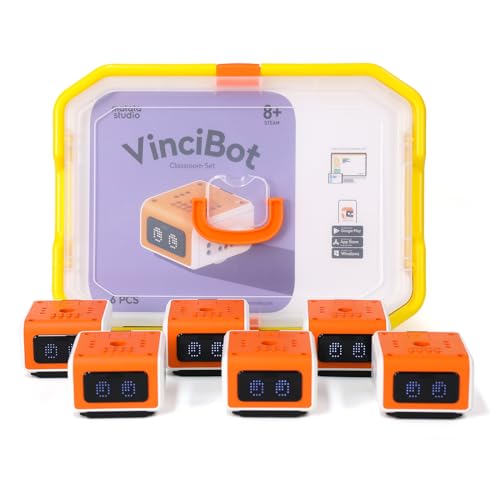
- Includes six programmable coding robots
- Supports Scratch and Python
- Comes with 75 activities and storage bin
Best For: Grade 2-7 group robotics and programming instruction
Best for Advanced Creative Robotics Projects
Hummingbird Robotics Starter Flock

- Four micro:bit-powered robotics controllers
- Supports MakeCode, Python, and Java
- Includes sensors, LEDs, servos, and wheels
Best For: Ages 12+ creative robotics and engineering projects
Best Screen-Free Starter Set

- Screen-free coding for early learners
- Includes two robots and two activity sets
- Supports sequences up to 150 steps
Best For: Ages 5-7 coding centers and beginner STEM rotations
Advanced Classroom Robotics

- 541-piece LEGO construction system
- Supports engineering and math skills
- Rechargeable battery included; charger sold separately
Best For: Advanced hands-on engineering and robotics activities
Early Coding Classroom Pick
Code & Go Robot Mouse Activity Set
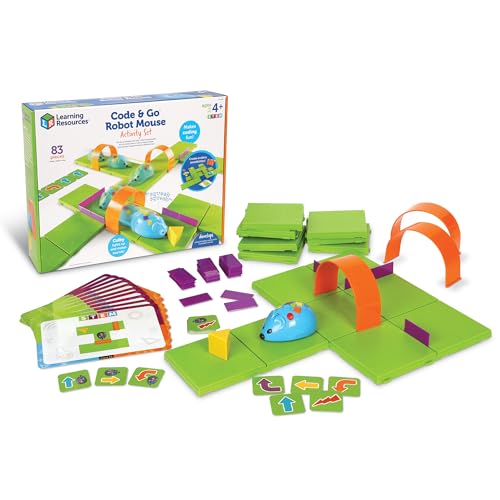
- Screen-free coding for ages 4+
- Includes maze pieces and coding cards
- Supports sequencing and problem-solving
Best For: Early-learning STEM centers and small groups
Expansion for STEM Teams
LEGO Education SPIKE Prime Expansion Set

- Adds a color sensor and large motor
- Includes about 600 pieces
- Requires SPIKE Prime Set 45678 for the stated combination
Best For: Existing SPIKE Prime classrooms and robotics teams
Best Screen-Free Classroom Set

- Two robots support partner or small-group work
- Includes activity cards and obstacle-course pieces
- Screen-free coding for ages 5–8
Best For: Early elementary STEM centers and collaborative coding practice
Best Introductory Maze Kit

- Rechargeable robot mouse for screen-free coding
- Maze grid, walls, tunnels, and challenge cards included
- Designed for early learners ages 5–7
Best For: Individual practice and guided STEM-center rotations
Best Multi-Robot Classroom Pack

- Four rechargeable robots for group activities
- Includes lesson plans, USB cords, and storage
- Designed for STEM rotations and coding labs
Best For: Collaborative elementary coding and maker-space programs
Best LEGO-Based STEM Platform – LEGO Spike Essential
LEGO Spike Essential is a hands-on option for classrooms seeking robotics sets for classrooms with a familiar interlocking-block format. Its education theme, STEM objective, and color sensor support introductory building and coding activities, while battery power makes it practical for flexible classroom use.
Best For: Younger learners beginning STEM and robotics activities with LEGO-based construction.
Pros:
- LEGO Education branding and interlocking blocks support accessible construction activities.
- Includes a color sensor for interactive STEM projects.
- Compact package dimensions and battery-powered operation suit classroom stations.
Cons:
- The supplied details list a unit count of one, so it may be better suited to individual or small-group work.
- The listed manufacturer age range is 6 months to 6 years, which may limit its fit for older students.
Choose this set when a classroom values approachable LEGO construction and basic sensor-based STEM exploration. Teachers planning larger group activities may need additional units.
Best Complete Multi-Robot Classroom Set – VinciBot Classroom Set
The VinciBot Classroom Set is designed for schools that need robotics sets for classrooms and simultaneous student participation. With six coding robots, Scratch and Python programming support, 75 activity cards, tutorials, and a dedicated storage bin, it provides a structured foundation for grades 2-7 STEM instruction.
Best For: Grade 2-7 classrooms running group robotics, programming, and AI-focused activities.
Pros:
- Six robots support team-based or multi-station classroom instruction.
- Scratch and Python programming options allow learning to progress with student ability.
- Includes 75 activities, online tutorials, and a classroom storage bin.
- Features such as line tracking, obstacle avoidance, voice control, and color detection encourage varied projects.
Cons:
- The manufacturer recommends the set for ages 8-12, so it may not suit very young learners.
- Its broad feature set may require teacher preparation to use effectively.
For schools wanting several robots and ready-made learning resources in one package, VinciBot is a particularly classroom-oriented choice. Its expandable design also leaves room for creative building and robotics competitions.
Best for Advanced Creative Robotics Projects – Hummingbird Robotics Starter Flock
The Hummingbird Robotics Starter Flock suits classrooms seeking robotics sets for classrooms that emphasize open-ended design and coding. Four micro:bit-powered controllers, sensors, LEDs, servos, wheels, and multiple programming environments let students turn everyday materials into custom robots.
Best For: Students ages 12 and up exploring creative robotics, engineering, and text-based programming.
Pros:
- Four controllers support small-group classroom projects.
- Works with MakeCode, Python, and Java, offering a progression from block-based to text-based coding.
- Includes a wide selection of sensors, LEDs, servos, wheels, and cables.
- Free online professional development and classroom curriculum integration planning are included.
Cons:
- The recommended audience is ages 12+, making it less suitable for elementary classrooms.
- Open-ended construction may require more teacher planning than activity-led kits.
- The 16-pound package is relatively substantial for storage and transport.
This set is a strong fit when the goal is meaningful, student-designed robotics rather than a single prescribed build. Its component variety and language support give advanced learners room to develop sophisticated projects.
Best Screen-Free Starter Set – Botley 2.0 Classroom Set
Botley 2.0 is a practical entry point for educators comparing robotics sets for classrooms serving early elementary students. The classroom set includes two robots and two activity sets for screen-free lessons in sequencing, logic, critical thinking, object detection, and introductory programming.
Best For: Ages 5-7, small-group rotations, coding centers, and beginner STEM activities.
Pros:
- Screen-free controls make coding approachable for young learners.
- Two robots and two 78-piece activity sets support classroom rotations and group challenges.
- Students can program sequences of up to 150 steps and explore light, sound, and object detection.
- Designed for classrooms, maker spaces, STEM labs, and after-school clubs.
Cons:
- The set is intended primarily for early elementary learners, so advanced students may outgrow it.
- AAA batteries are required for operation.
Botley 2.0 is a sensible choice for teachers introducing coding without screens or complex software. Its two-robot format and activity materials make it especially useful for stations and short, guided classroom challenges.
Advanced Classroom Robotics – LEGO MINDSTORMS EV3 Core Set
The LEGO MINDSTORMS EV3 Core Set is a substantial option for classrooms seeking robotics sets for classrooms with an emphasis on engineering and math skills. Its 541 interlocking pieces support hands-on construction, while the rechargeable battery is included; the charger is sold separately.
Best For: Older or advanced learners working on structured engineering, construction, and math-focused robotics activities.
Pros:
- Includes 541 LEGO pieces for varied construction projects.
- Supports engineering and math skill development.
- Includes a rechargeable battery and uses a multicolor plastic construction system.
Cons:
- Charger is sold separately.
- Product information lists a manufacturer-recommended age of 0–4 years, which may not clearly reflect typical classroom robotics use.
- The set requires six AA batteries according to the supplied details.
Choose this set when your classroom needs a larger LEGO-based construction platform and can accommodate the separate charger purchase. Verify age guidance and power requirements before ordering.
Early Coding Classroom Pick – Code & Go Robot Mouse Activity Set
The Learning Resources Code & Go Robot Mouse Activity Set is a practical choice for robotics sets for classrooms serving young learners. It provides screen-free practice with sequencing and directional coding through maze grids, coding cards, and a programmable robot mouse.
Best For: Ages 4 and up, classroom STEM centers, small-group rotations, and introductory coding activities.
Pros:
- Designed for children ages 4 and up with screen-free coding activities.
- Includes 16 maze grids, 22 walls, three tunnels, and 30 double-sided coding cards.
- Builds sequencing, problem-solving, logic, and directional understanding.
Cons:
- Requires three AAA batteries, which are not included.
- The supplied details list operation mode as manual and the activity is centered on one robot mouse.
- No manufacturer warranty is listed.
This is one of the easiest sets here to deploy in an early-learning classroom because the activities are tactile, repeatable, and screen-free. Its included maze components also make it suitable for guided centers.
Expansion for STEM Teams – LEGO Education SPIKE Prime Expansion Set
The LEGO Education SPIKE Prime Expansion Set is suited to classrooms that already use the SPIKE Prime Set 45678 and want more building options. This robotics sets for classrooms pick adds a color sensor, a large motor, and a maker plate across roughly 600 interlocking pieces.
Best For: SPIKE Prime classrooms, robotics teams, and maker-style construction projects.
Pros:
- Designed to combine with the LEGO SPIKE Prime Set 45678.
- Adds a color sensor, large motor, and unique maker plate.
- Provides approximately 600 plastic interlocking pieces for construction activities.
Cons:
- It is an expansion set, so the SPIKE Prime base set is required for the stated combination.
- The supplied details emphasize construction skills rather than a broader list of learning objectives.
- Its listed model year is 2018, so educators may want to confirm current compatibility and classroom support.
This expansion makes the most sense for schools already invested in SPIKE Prime. It can broaden construction and maker activities, but it is not the best standalone choice for a classroom starting from scratch.
Best Screen-Free Classroom Set – Botley Coding Robot
For classrooms seeking robotics sets for classrooms that work without tablets or smartphones, the Botley Classroom Set offers hands-on coding practice for young learners. Students can use intuitive controls, activity cards, obstacle-course pieces, and secret-code challenges to build sequencing and problem-solving skills.
Best For: Preschool and early elementary classrooms, STEM centers, and small-group activities for children ages 5–8.
Pros:
- Screen-free design introduces programming concepts through hands-on play.
- Includes two Botley robots, two 77-piece activity sets, and a 41-piece accessory set.
- Supports critical thinking, logical reasoning, collaboration, and progressive challenges.
Cons:
- AAA batteries are required and not included.
- The set is recommended for ages 5–8, so advanced students may outgrow the activities.
Botley is a practical choice when a teacher needs multiple robots and flexible, screen-free activities for collaborative introductory coding. Its included challenge materials make setup easier, though battery management should be planned in advance.
Best Introductory Maze Kit – Code & Go Robot Mouse
The Code & Go Robot Mouse Activity Set is one of the more approachable robotics sets for classrooms, using button-based controls and coding cards to teach sequencing and directional logic. Its maze grid, walls, tunnels, and challenge cards give teachers a repeatable activity for STEM rotations or small-group work.
Best For: Young coders ages 5–7, classroom STEM centers, and guided introductory programming activities.
Pros:
- Rechargeable robot mouse avoids routine battery replacement.
- Maze components and challenge cards support repeatable classroom activities.
- Builds sequencing, problem-solving, logic, and directional understanding without screens.
Cons:
- The set is designed around a single robot and is listed as a single-player activity.
- It focuses on introductory maze navigation rather than more advanced programming.
This set fits teachers who want a compact, structured way to introduce coding concepts. The rechargeable mouse and included maze materials simplify classroom use, while the single-robot format is best suited to individual turns or closely supervised small groups.
Best Multi-Robot Classroom Pack – Cooper STEM Robot Set
For teachers comparing robotics sets for classrooms, the Cooper STEM Robot Classroom Pack is built around shared coding activities and easier equipment management. It includes four rechargeable robots, USB charging cords, lesson plans, accessories, and a storage case for STEM rotations, group labs, and maker-space use.
Best For: Elementary classrooms, after-school programs, STEM labs, and collaborative coding lessons for beginner learners.
Pros:
- Four rechargeable robots support group coding and classroom rotations.
- Includes lesson plans, accessories, USB cords, and built-in storage.
- Screen-free challenges reinforce sequencing, logic, and problem-solving.
Cons:
- The pack is intended for beginner coding and may offer limited challenge for advanced students.
- Teachers must manage charging across multiple robots.
Cooper is the strongest option here for classrooms that need several robots available at once. Its rechargeable design and storage case make it more teacher-ready than a single-robot kit, while the included lesson materials help structure collaborative introductory coding.
How We Picked These Robotics Sets for Classrooms
We focused on kits that offer meaningful classroom value rather than simply counting sensors, motors, or included pieces. Our comparisons considered recommended age range, programming approach, build flexibility, lesson potential, durability, group-work suitability, and the amount of teacher support available.
We also included a range of experiences: screen-free coding for younger learners, icon- or block-based programming for beginners, and more advanced robotics systems for students ready to design, code, troubleshoot, and iterate. Because classroom needs vary widely, the list includes individual robots, multi-robot packs, construction-based platforms, and expansion sets.
Quick Comparison
| Classroom need | Best type of set | What to prioritize |
|---|---|---|
| Early coding concepts | Screen-free or simplified robot | Clear controls, activity cards, and immediate feedback |
| Small-group STEM centers | Multi-robot classroom pack | Multiple devices, rechargeable power, and shared lesson materials |
| Engineering and invention | Buildable robotics platform | Reusable components, motors, sensors, and flexible construction |
| Advanced programming | Programmable robotics system | Robust software, sensor support, documentation, and expansion options |
Key Buying Factors for Robotics Sets for Classrooms
Age and Learning Progression
Match the kit to students’ reading, motor, and programming abilities. Younger learners often benefit from physical coding cards and simple directional commands, while older students may be ready for variables, sensors, loops, data, and autonomous decision-making.
Number of Students and Robots
Consider how many students will work together and whether the class needs one robot per pair, per group, or per student. Multi-robot packs can reduce waiting time, but a single flexible platform may be more economical when projects are completed collaboratively.
Programming and Device Compatibility
Check whether the software uses a tablet, computer, or no screen at all. Confirm compatibility with the devices your school already owns, along with account requirements, operating-system support, wireless connectivity, and any internet limitations.
Durability, Charging, and Storage
Classroom equipment needs to withstand repeated building and testing. Look for sturdy parts, replaceable or rechargeable batteries, organized storage, and charging arrangements that fit your schedule. Clearly labeled bins can save substantial setup time.
Curriculum Support and Expandability
Lesson plans, challenge cards, teacher guides, and assessment ideas can make a major difference. Also consider whether the kit supports additional sensors, motors, coding extensions, or increasingly difficult projects as students gain confidence.
Who Should Buy Which Robotics Sets for Classrooms?
Choose a screen-free coding robot or beginner activity set for early elementary learners, coding centers, and classrooms introducing sequencing and algorithms. These options are especially useful when students need fast, low-pressure activities with minimal device management.
Choose a multi-robot classroom pack when several groups must work simultaneously or when collaborative STEM stations are central to the lesson plan. For creative construction and cross-curricular projects, a modular building system is the better fit because students can repeatedly redesign mechanisms and robot bodies.
For middle-school learners, advanced elementary students, or established robotics programs, prioritize a programmable platform with sensors, a strong coding environment, and room to expand. Before purchasing, verify the included hardware and software version, classroom licensing terms, device compatibility, and the availability of replacement parts. The best Robotics Sets for Classrooms are the ones teachers can deploy reliably and students can continue using long after the introductory lesson.