The best robotics sets for middle school students turn coding, electronics, and engineering concepts into projects students can build, test, and improve. The right kit should match the learner’s age, experience, workspace, and appetite for troubleshooting.
This roundup compares classroom-ready systems, modular robot kits, Arduino-compatible cars, hydraulic builds, and multi-project sets to help families and educators choose a productive fit for 2026.
Best 10 Robotics Sets for Middle School Students Picks for 2026
Classroom Coding Lab
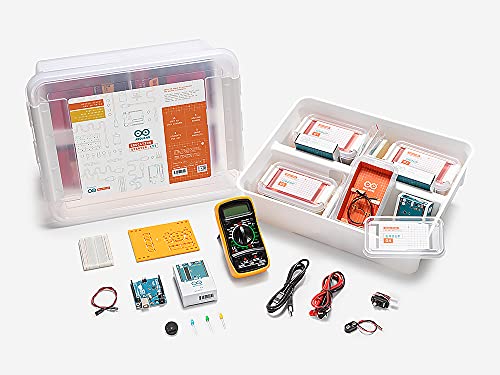
- Supports eight students in pairs
- Includes nine guided lessons and two projects
- Teacher guides and logbooks support progress
Best For: Structured classroom programming and electronics instruction
Sensor-Driven Builder

- Builds eight motorized machines
- Programs robots through an app
- Ultrasonic sensor introduces sonar-style feedback
Best For: Beginner sensor-based robotics projects
Advanced Maker Platform
Makeblock mBot Ultimate 10-in-1

- Builds 10 different robot models
- Progresses from blocks to Arduino and Python
- Uses durable aluminum alloy parts
Best For: Older students pursuing advanced maker projects
Project-Packed Starter
ButterflyEdufields 40-in-1 STEM Kit

- Includes 40-plus hands-on projects
- Offers 100-plus plug-and-play parts
- Uses multiple reusable sensors
Best For: Beginner home, homeschool, and camp activities
Best Advanced Build
ELEGOO UNO R3 Smart Robot Car V4

- FPV camera plus app and IR control
- Line tracking and obstacle avoidance
- Arduino coding with rechargeable battery
Best For: Students ready for a deeper Arduino robotics project
Best Beginner-Friendly Pick

- Builds in about 15 minutes
- Scratch and Arduino programming support
- Line-following and obstacle-avoidance modes
Best For: Younger beginners learning coding and electronics
Best for IoT Learning

- Wi-Fi, Bluetooth, and IR control
- Direct Arduino pin connections
- Includes sensors, charger, and multiple modes
Best For: Older students exploring Arduino, IoT, and science projects
Hands-On Mechanics Pick

- Water-powered arm needs no batteries
- Six axes and 270-degree rotation
- Multi-hour mechanical STEM build
Best For: Students ages 12+ interested in physics and hands-on mechanics
Beginner Coding Growth Pick

- Scratch, Arduino, and Python support
- 16 guided story-based tutorials
- App and IR remote control included
Best For: Learners building coding skills from beginner to advanced
Advanced Modular Build Pick

- Four robot configurations in one kit
- Programmable 5DOF robotic arm
- Arduino and Scratch compatibility
Best For: Students ready for advanced building and coding challenges
Classroom Coding Lab – Arduino Education Starter Kit
For classrooms seeking robotics sets for middle school students, the Arduino Education Starter Kit emphasizes structured programming and electronics practice rather than a single robot build. It supports eight students working in pairs and includes step-by-step lessons, teacher guidance, and group projects.
Best For: Middle school classrooms, educators, and collaborative introductory coding and electronics lessons.
Pros:
- Provides hardware and software for eight students working in pairs.
- Includes nine 90-minute lessons plus two open-ended group projects.
- Teacher guides offer learning objectives, estimated times, and flexible pacing.
- Engineering logbooks encourage reflection and progress tracking.
Cons:
- The supplied notes do not identify the specific included hardware components.
- Its structured curriculum may be better suited to guided classroom use than independent play.
This is a strong choice when collaboration, documentation, and teacher support matter as much as hands-on building. Buyers should confirm the lesson content and hardware fit their planned curriculum.
Sensor-Driven Builder – Smart Machines Robotics Set
Among robotics sets for middle school students, Thames & Kosmos Smart Machines offers an approachable path from mechanical assembly to app-based programming. Students can build eight motorized machines and use ultrasonic feedback to control how their creations behave.
Best For: Beginners ages 8–15 who want guided robot construction with sensor-based coding.
Pros:
- Builds eight different motorized machines.
- Uses an ultrasonic sensor based on sonar principles.
- App interface lets students program robots using sensor feedback.
- Includes a full-color, 64-page illustrated assembly manual.
Cons:
- A compatible iOS or Android smartphone or tablet is required and not included.
- AA batteries are required separately.
- The kit is designed around the included models, offering less stated expansion detail than advanced platforms.
This set balances guided construction with an engaging introduction to sensors and programming. It is particularly practical for learners who benefit from visual instructions and several model options.
Advanced Maker Platform – Makeblock mBot Ultimate 10-in-1
For older middle school students ready for more ambitious robotics sets for middle school students, the Makeblock mBot Ultimate provides ten buildable models and a progression from block coding to text-based programming. Its MegaPi board, aluminum parts, and Arduino and Raspberry Pi compatibility support increasingly complex projects.
Best For: Students ages 12 and up, aspiring engineers, and makers who want a robotics platform that can grow with their skills.
Pros:
- Offers ten models, including a robotic arm and remote-controlled tank.
- Supports mBlock, Arduino IDE, and Python through Raspberry Pi connectivity.
- Compatible with Arduino and Raspberry Pi for expanded projects.
- Aluminum alloy construction is designed for durable, reusable building.
Cons:
- Six AA batteries are required and not included.
- At eight pounds, it is substantially heavier than many introductory kits.
- The advanced features may be more than beginners need initially.
This is the most suitable option here for a student who wants a long-term maker platform rather than a short sequence of guided builds. Its broad programming compatibility gives experienced learners room to advance.
Project-Packed Starter – ButterflyEdufields 40-in-1 STEM Kit
The ButterflyEdufields kit is one of the more project-focused robotics sets for middle school students, with 40-plus activities and more than 100 parts. Its plug-and-play design avoids soldering and does not require prior coding knowledge, making it accessible for home learning, camps, and introductory STEM work.
Best For: Ages 8–12, homeschool projects, and beginners who want many sensor-based activities without soldering.
Pros:
- Includes 40-plus projects, including a line-following car and drawing robot.
- Provides more than 100 parts, sensors, motors, wheels, LEDs, and a pump.
- Plug-and-play construction requires no soldering, tools, or coding knowledge.
- Reusable sensors support touch, flame, motion, light, and other experiments.
Cons:
- AA batteries are required, and Duracell batteries are specifically unsuitable for the provided holder.
- The supplied notes do not specify a programming platform or detailed software support.
- The broad project count may require organization and supervision to manage the many parts.
This kit prioritizes variety and quick experimentation over a single deep robotics curriculum. It is a practical pick for families or educators who want numerous approachable projects and reusable electronic components.
Best Advanced Build – ELEGOO UNO R3 Smart Robot Car V4
For students ready to move beyond basic robotics sets for middle school students, this ELEGOO kit combines hands-on assembly with Arduino programming, camera-based FPV video, and multiple autonomous driving features. It is a substantial project for learning how sensors, motors, and control logic work together.
Best For: Middle school students with adult guidance who want a deeper Arduino robotics and engineering project.
Pros:
- Includes line tracking, obstacle avoidance, FPV video, app control, and IR remote control.
- Keyed connectors and an illustrated tutorial help reduce wiring mistakes.
- Supports creative coding with Arduino IDE and modifiable example programs.
- Includes a rechargeable 2000 mAh lithium-ion battery.
Cons:
- The build and programming experience may be demanding for first-time users.
- Adult guidance is recommended for younger or beginner builders.
With its camera, wireless features, and sensor-driven modes, this is a strong choice for students who want a robotics set that can support increasingly ambitious experiments rather than just simple remote-control play.
Best Beginner-Friendly Pick – Makeblock mBot Coding Robot
The Makeblock mBot is one of the more approachable robotics sets for middle school students, with a quick build, guided coding resources, and straightforward driving functions. It offers a practical introduction to electronics, machinery, and programming without requiring an especially complex assembly.
Best For: Beginners ages 8–12 who want a quick-to-build robot with Scratch and Arduino learning options.
Pros:
- Can be assembled in about 15 minutes using the building instructions.
- Supports Scratch and Arduino programming through mBlock software and apps.
- Offers line-following, obstacle-avoidance, remote-control, and coding activities.
- Open-source design works with many Makeblock modules and LEGO parts.
Cons:
- Four AA batteries are required but not included.
- The remote controller requires a CR2025 battery, also not included.
- Its entry-level design may feel limited for advanced robotics students.
mBot makes a sensible starting point for families, classrooms, and clubs that prioritize a short build time and structured lessons. Its add-on compatibility also leaves room to expand as coding confidence grows.
Best for IoT Learning – OSOYOO Smart Robot Car Kit
For older students comparing robotics sets for middle school students, the OSOYOO IoT Smart Robot Car adds Wi-Fi, Bluetooth, and hands-on Arduino wiring to a classroom-oriented project. Its visible pin connections are designed to help learners connect physical components with the code controlling them.
Best For: Students over 14, homeschool learners, science-fair projects, and classroom groups exploring Arduino and IoT concepts.
Pros:
- Supports Wi-Fi, Bluetooth, IR remote, app, and gravity-sensing control.
- Includes line tracking, obstacle avoidance, object following, and auto-go modes.
- Provides a broad collection of sensors, motors, driver hardware, battery, and charger.
- Direct Arduino pin connections make component-to-code relationships easier to see.
Cons:
- The manufacturer recommends it for ages over 14 and adults.
- Its extensive wiring and modules may be more involved than a basic beginner kit.
- The notes mention that online videos and PDF tutorials are used for guidance.
This kit is best viewed as a learning platform rather than a simple toy. It suits motivated older students who want to understand wiring, Arduino control, wireless communication, and sensor-based behaviors through one project.
Hands-On Mechanics Pick – Hydrobot Hydraulic Arm
For shoppers comparing robotics sets for middle school students, the TEACH TECH Hydrobot offers a focused introduction to mechanical engineering rather than electronic coding. Students assemble a working hydraulic arm, then use water-powered controls to move and grip objects.
Best For: Middle school students ages 12 and up who enjoy hands-on building, physics, mechanics, and a longer STEM project.
Pros:
- Explores hydraulic power without requiring batteries.
- Six axes of movement and rotation up to 270 degrees provide interactive control.
- Includes a gripper and interchangeable suction components for picking up objects.
- Detailed instructions support a multi-hour assembly experience.
Cons:
- It focuses on mechanical and hydraulic principles rather than programmable robotics.
- Assembly requires patience and careful attention to the instructions.
This is a strong choice when the goal is to understand how fluid power, levers, and mechanical movement work. Choose another kit if coding and app-based control are the main priorities.
Beginner Coding Growth Pick – ACEBOTT Smart Robot Car
The ACEBOTT smart robot car is a flexible option for families seeking robotics sets for middle school students with room to advance. It combines a DIY car build with Scratch, Arduino, and Python support, letting learners move from block coding toward text-based programming.
Best For: Beginners and developing coders ages 12 and up who want app control, guided tutorials, and multiple programming options.
Pros:
- Supports Scratch, Arduino, and Python for different skill levels.
- Can be programmed through computers, tablets, and compatible mobile devices.
- Includes 16 story-based tutorials, HD videos, and illustrated assembly guidance.
- Offers both smartphone app and included IR remote control.
Cons:
- Batteries are not included.
- The kit requires assembly, even though no soldering is needed.
Its strongest advantage is the learning path: students can begin with Scratch and continue into Arduino or Python as their confidence grows. It is a practical pick for home learning, classrooms, or independent coding practice.
Advanced Modular Build Pick – ACEBOTT 4-in-1 Robot Arm Tank
For students ready for a more ambitious project, this ACEBOTT kit stands out among robotics sets for middle school students with its modular designs and programmable 5DOF arm. The included parts can form a robot car, tank, robotic arm car, or combined robotic arm tank.
Best For: Students ages 12 and up who want a challenging build involving coding, robotic-arm control, and indoor or outdoor driving.
Pros:
- Four build configurations encourage experimentation and repeat play.
- Five-degree-of-freedom robotic arm can grab, lift, and place objects.
- ESP32 controller works with Arduino and Scratch.
- Tank treads are designed for surfaces such as grass, gravel, slopes, and carpet.
Cons:
- Its modular design may be more involved than a basic robot-car kit.
- Batteries are not specified as included in the supplied notes.
This kit offers the broadest project range of the three, combining construction, programming, arm control, and navigation. It makes the most sense for students who are ready to spend time learning through multiple builds rather than seeking a simple first robot.
How We Picked These Robotics Sets for Middle School Students
We focused on kits that combine physical construction with meaningful programming or electronics practice. The selection covers beginner-friendly guided builds, classroom-oriented learning systems, Arduino-compatible platforms, sensor-based vehicles, robotic arms, and sets that support multiple projects.
We also considered age guidance, project variety, expandability, software compatibility, included components, and the amount of adult or instructor support likely to be needed. Because middle school learners vary widely, no single kit is ideal for every student.
Quick Comparison
| Best for | Look for | Typical advantage |
|---|---|---|
| Beginners | Step-by-step instructions and visual coding | Faster first successful build |
| Classrooms | Multiple-student support and organized lessons | More consistent group instruction |
| Arduino learners | Open hardware and broad documentation | Room to customize and experiment |
| Advanced builders | More sensors, motors, mechanisms, or projects | Greater challenge and replay value |
| Hands-on engineering | Hydraulic or mechanical components | Strong emphasis on physical systems |
Key Buying Factors
Age, Experience, and Guidance
Check the manufacturer’s age range, but treat it as a starting point rather than a guarantee. Younger or first-time builders generally benefit from visual programming, clear diagrams, and structured projects. Experienced students may prefer Arduino compatibility and fewer restrictions.
Programming Platform
Scratch-style interfaces can make concepts such as loops, conditions, and motor control approachable. Arduino-compatible kits offer more flexibility and expose students to text-based code, wiring, libraries, and troubleshooting. Confirm whether a computer, phone, tablet, or separate programming hardware is required.
Build Quality and Project Variety
Look for sturdy connectors, reusable parts, reliable motors, and instructions that explain why each step matters. Multiple projects can extend interest, but only if the kit includes enough distinctive components rather than superficial variations.
Electronics and Expansion
For deeper learning, prioritize kits with sensors, a documented control board, accessible wiring, and compatible add-ons. Also check whether batteries, chargers, tools, and replacement parts are included or sold separately.
Classroom Practicality
Teachers should consider storage, reset time, student-to-kit ratios, lesson documentation, and whether several students can work productively at once. A polished education kit may be easier to manage than a cheaper hobby kit, even when the latter has similar hardware.
Who Should Buy Which Robotics Sets for Middle School Students?
Choose a guided education kit for a school group or a student who needs a structured introduction. A visual-coding robot is a strong choice for younger beginners and quick experimentation. Arduino robot cars suit learners who want to study sensors, wireless control, and text-based programming.
For students who lose interest after one build, choose a multi-project kit with varied mechanisms. A robotic arm or hydraulic system is better for learners drawn to mechanical motion and engineering than to screen-based coding alone. More advanced students should favor expandable platforms with documented boards and accessible code.
Before buying, confirm the software support for your computer or mobile device, review the included power requirements, and plan for supervision during wiring and mechanical assembly. The best Robotics Sets for Middle School Students are the ones that provide an achievable first project while leaving enough room for independent improvements.