The best robotics sets for elementary students turn screen time into hands-on problem-solving. These kits let children build, code, test, and revise working robots while practicing core STEM skills.
Our selection includes beginner-friendly activity sets, construction kits, solar and hydraulic projects, programmable vehicles, and more advanced Arduino-compatible options for growing learners.
Best 10 Robotics Sets for Elementary Students Picks for 2026
Best Entry-Level Coding Pick

- Guided Scratch-to-Arduino learning
- Builds in about 15 minutes
- Line-following and obstacle avoidance
Best For: Beginning coders ages 8 and up
Best Multi-Model Set
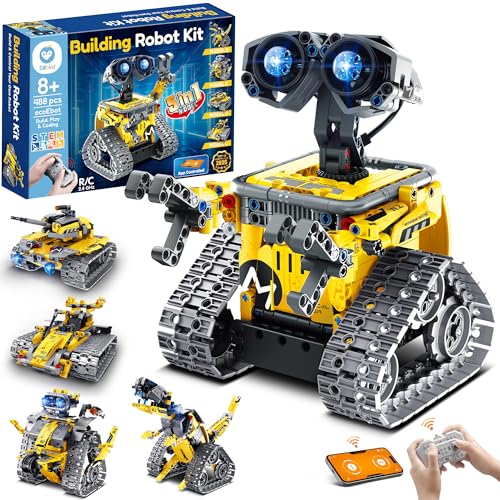
- Builds five different models
- App and remote control modes
- Rechargeable for up to 40 minutes
Best For: Kids who prefer varied builds and interactive play
Best for Hands-On Engineering

- Builds two water-powered robots
- Teaches gears, pistons, and cylinders
- Includes a scoreboard for battles
Best For: Mechanism-focused STEM play with a friend
Best Renewable-Energy Project

- Builds 12 solar-powered models
- Uses sunlight or strong artificial light
- Includes 190 parts and graded challenges
Best For: Solar-energy and engineering exploration ages 10 and up
Best Screen-Free Coding Starter

- Remote-controlled, screen-free coding play
- Includes boards, cards, and obstacles
- Suitable for ages 5–10
Best For: Young beginners learning coding and sequencing
Best Multi-Project Electronics Kit
Butterfly EduFields 10-in-1 Robotics Kit

- Supports 10 hands-on STEM projects
- Includes 100-plus electronic components
- Designed for ages 8–12
Best For: Older elementary students exploring electronics and mechanics
Best Group Activity Value

- Includes four individual robot kits
- Combines drawing with STEM building
- Useful for classrooms and parties
Best For: Group projects for ages 8–13
Best Multilevel Coding Kit

- Scratch, Arduino, and Python support
- 16 guided story-based tutorials
- Mobile, app, and remote control
Best For: Learners who need a robotics kit that grows with their coding skills
Best Hands-On Starter Project

- Introduces circuits and mechanical movement
- Wooden build with motors and wiring
- No soldering required
Best For: Young builders who prefer a tactile engineering project
Best Advanced Modular Build

- Four modular robot configurations
- Programmable 5DOF robotic arm
- Tracks handle varied indoor and outdoor surfaces
Best For: Older students ready for a substantial coding and engineering challenge
Best Entry-Level Coding Pick – Makeblock mBot
For families comparing robotics sets for elementary students, the Makeblock mBot is a practical starting point for learning electronics, construction, and programming. Its guided build can be completed in about 15 minutes, then children can explore Scratch and Arduino projects, remote control, line-following, and obstacle avoidance.
Best For: Kids ages 8 and up who want a first programmable robot with room for more advanced projects.
Pros:
- Step-by-step learning path from Scratch to Arduino.
- Quick assembly with clearly described building instructions.
- Supports remote control, line-following, and obstacle avoidance.
- Open-source design works with many Makeblock modules and LEGO parts.
Cons:
- Four AA batteries for the robot are not included.
- The remote controller requires a CR2025 battery, also not included.
- Additional add-on packs are needed to access the broader expansion ecosystem.
Choose the mBot when coding progression matters more than having multiple physical models. Its metal-and-plastic construction and available tutorials make it a strong foundation for elementary robotics projects.
Best Multi-Model Set – Sillbird 5-in-1 Robot Kit
The Sillbird 5-in-1 kit gives robotics sets for elementary students a build-and-play format with increasing difficulty. Children can assemble models including a robot, dinosaur, car, and tank, then use an app or remote control for basic programming, path control, and movement.
Best For: Kids ages 8 to 13 who enjoy rebuilding one kit into several different models.
Pros:
- 488 pieces support five buildable designs.
- Color, step-by-step instructions are designed for independent or family assembly.
- Offers both Bluetooth app and remote-control operation.
- Rechargeable battery provides up to 40 minutes of play on one charge.
Cons:
- The set is recommended for indoor use.
- Its many pieces may require organization during rebuilding.
- Play time is limited to the stated charge capacity before recharging.
This is a flexible choice for children who may lose interest in a single robot design. The progressive builds and dual controls add variety while keeping the focus on hands-on STEM play.
Best for Hands-On Engineering – Hydraulic Boxing Bots
For robotics sets for elementary students that emphasize mechanical principles, Thames & Kosmos Hydraulic Boxing Bots offers a distinctive battery-free project. Children build two robots and use water-powered cylinders, pistons, and gears to create independent upper- and lower-body movement before competing with a friend.
Best For: Children ages 8 and up who enjoy engineering concepts, physical mechanisms, and two-player challenges.
Pros:
- Explores hydraulics, gears, cylinders, and pistons through construction.
- Includes parts for two working boxing robots.
- Independent body movement enables dodging, jabbing, and punching.
- Requires no batteries.
Cons:
- The kit is centered on one boxing-bot activity rather than multiple models.
- Water-powered mechanisms may require careful setup and handling.
- Its competitive format is most engaging with a second player.
Choose this set when the learning goal is understanding how a working mechanism operates. The included scoreboard and two-robot format also make engineering practice feel like a head-to-head game.
Best Renewable-Energy Project – Sillbird 12-in-1 Solar Robot
The Sillbird 12-in-1 Solar Robot is a useful option for families seeking robotics sets for elementary students that connect building with renewable-energy concepts. With 190 parts, children can assemble 12 models of varying difficulty and power the creations with sunlight or a strong artificial light source such as a flashlight.
Best For: Kids ages 10 and up who are curious about solar power, engineering, and outdoor STEM activities.
Pros:
- Offers 12 buildable models with increasing challenge.
- Introduces solar power and renewable-energy principles.
- Includes a larger solar panel designed to capture more sunlight.
- Clear instructions support independent or family building.
Cons:
- Performance depends on sunlight or a sufficiently strong artificial light source.
- The manufacturer recommends it for ages 10 and up.
- It does not include a battery-powered option.
This kit stands out for turning renewable energy into a hands-on building topic. Its range of models can extend play beyond a single project, though children will need suitable light for consistent operation.
Best Screen-Free Coding Starter – Botley 2.0 Coding Robot
For families or classrooms comparing robotics sets for elementary students, Botley 2.0 offers a screen-free introduction to coding through remote-controlled play. Children ages 5–10 can create command sequences, navigate mazes, and experiment with object-sensing reactions using the included activity materials.
Best For: Young beginners who are ready to explore coding, sequencing, and problem-solving without a screen.
Pros:
- Simple remote programming supports early coding confidence.
- Includes 40 coding cards, six double-sided boards, and stackable obstacles.
- Offers progressively challenging routes, 45-degree turns, and object sensing.
- Lights, sounds, music, and 16 secret code combinations add open-ended play.
Cons:
- Requires five AAA batteries.
- Designed for one player at a time.
- Its focus is early coding rather than hands-on electronics or mechanical construction.
Botley 2.0 is a practical pick when the goal is to make foundational programming approachable and playful. Its activity boards and obstacle pieces also make it easy to create repeatable challenges at home or in a classroom.
Best Multi-Project Electronics Kit – Butterfly EduFields 10-in-1 Robotics Kit
Among robotics sets for elementary students, the Butterfly EduFields kit is geared toward older children who want to build working models and explore basic electronics. Its 100-plus components and step-by-step manual support ten STEM projects involving wires, switches, connectors, LEDs, and robot functions.
Best For: Kids ages 8–12 who enjoy assembling projects and learning about robotics, mechanics, and electronics.
Pros:
- Provides materials for 10 different STEM robotics projects.
- Includes more than 100 components, including wires, switches, connectors, and LED lights.
- Illustrated, step-by-step instructions are intended to simplify building.
- Can support functions such as line-following and obstacle avoidance.
Cons:
- More suitable for older elementary students than early learners.
- Project assembly may require more patience and adult guidance than simple coding toys.
- The supplied notes do not specify batteries or other power requirements.
This kit stands out for variety: children can move beyond a single robot activity and practice construction, circuitry, and mechanical concepts across multiple projects. It is a strong option for a focused STEM activity period or an older child’s independent building time.
Best Group Activity Value – 4-Pack Doodling Robot Kits
For classrooms, clubs, or parties seeking robotics sets for elementary students, this four-pack provides a shared building activity with an artistic result. Each kit lets children assemble a small drawing robot, combining construction, creative experimentation, and simple STEM problem-solving.
Best For: Small groups, classroom activities, STEM parties, and collaborative projects for children ages 8–13.
Pros:
- Includes four separate doodling robot kits for group use.
- Combines robotics construction with drawing and creative play.
- Supports problem-solving, spatial thinking, motor skills, and construction skills.
- Uses materials described as non-toxic and durable.
Cons:
- The drawing robots emphasize a focused activity rather than multiple programmable functions.
- Assembly may require adult supervision for younger participants.
- The supplied notes do not specify battery or power requirements.
This four-pack makes the most sense when several children need their own project at the same time. It is less about extended robotics programming and more about turning a hands-on build into an approachable art-and-engineering activity.
Best Multilevel Coding Kit – ACEBOTT Smart Robot Car
For families comparing robotics sets for elementary students, this ACEBOTT smart car offers a clear path from beginner block coding to more advanced programming. Scratch, Arduino, and Python support lets the kit remain useful as students build skills, while guided tutorials and app control add practical feedback.
Best For: Elementary and middle-school learners ages 8–12 and older students who want a robotics kit that grows with their programming ability.
Pros:
- Supports Scratch, Arduino, and Python for multiple skill levels.
- Includes 16 story-based tutorials plus illustrated assembly guidance and HD videos.
- Can be programmed from computers, tablets, and smartphones, with app and IR remote control.
- No soldering is required for assembly.
Cons:
- Batteries are not included.
- The manufacturer recommends ages 12 and up, despite the listing also targeting ages 8–12.
This is a strong choice when flexibility matters more than a very simple first project. Its wider programming support makes it particularly suitable for shared home, classroom, or club use.
Best Hands-On Starter Project – DIY Wooden Robot Arm Kit
This mechanical robot arm is a hands-on option for shoppers seeking robotics sets for elementary students who enjoy building. The wooden construction, motors, circuit boards, and wiring introduce mechanical movement and basic electronics through a tangible assembly project.
Best For: Students ages 8 and up who enjoy construction projects, science experiments, and learning how circuits control motion.
Pros:
- Combines a 3D-style building project with motors, wiring, and PCB microcontroller boards.
- Wooden pieces and an assembly tutorial encourage patience and problem-solving.
- No soldering is required.
- Suitable for home projects, school science classes, and family STEM activities.
Cons:
- Requires six AA batteries, which are not included.
- Assembly may be more challenging than a simpler, ready-to-run robot toy.
Choose this kit when the building process is as important as the finished robot. It provides a focused introduction to circuits and mechanical engineering, but younger students may benefit from adult guidance during assembly.
Best Advanced Modular Build – ACEBOTT 4-in-1 Robot Arm Tank
For older elementary students and teens ready for a more ambitious project, this ACEBOTT kit combines a programmable 5DOF robot arm with a tank car platform. Among robotics sets for elementary students, it stands out for its modular configurations, guided coding lessons, and ability to operate across indoor and outdoor surfaces.
Best For: Advanced learners ages 12 and up, STEM clubs, classrooms, and families looking for a versatile coding and robotics project.
Pros:
- Offers four build configurations, including a robot arm car, tank robot, and combined arm tank.
- Includes a programmable 5DOF arm, ESP32 controller, and 16 guided tutorials.
- Compatible with Arduino and Scratch, with app and IR remote control.
- Rubber tank tracks are designed for grass, gravel, slopes, and carpet.
Cons:
- The manufacturer recommends ages 12 and up, so it may be too advanced for younger elementary students.
- The extensive modular build may require more time and support than a basic robot kit.
This is the best fit for students who have outgrown simple robot cars and want more mechanical and coding challenges. Its modular design supports repeated rebuilding, while the 5DOF arm adds meaningful control and problem-solving practice.
How We Picked These Robotics Sets for Elementary Students
We focused on kits that combine building with meaningful STEM learning rather than simple push-button play. The selection considers age fit, assembly demands, coding access, project variety, durability, and the amount of adult help a child may need. We also included different formats—such as robot cars, arms, hydraulic machines, solar builds, and screen-free coding toys—because children learn best when the project matches their interests.
Age ranges are useful starting points, but they are not a substitute for judging a child’s patience, reading ability, fine-motor skills, and previous building experience. Check the manufacturer’s instructions and required accessories before buying.
Quick Comparison
| Best For | Look For | Typical Learning Focus |
|---|---|---|
| First-time builders | Pre-coded activities or simple guided assembly | Sequencing, logic, and cause and effect |
| Hands-on makers | Modular parts and multiple projects | Engineering design and iteration |
| Young coders | Scratch, app, or block-based programming | Algorithms, sensors, and debugging |
| Older or advanced learners | Arduino compatibility and programmable hardware | Electronics, coding, and independent design |
Key Buying Factors
Age, Difficulty, and Supervision
Choose a kit that is challenging without becoming frustrating. Younger elementary students usually benefit from visual instructions, fewer small parts, and guided challenges. More advanced sets can be rewarding for older children, but they may require an adult to explain wiring, troubleshoot code, or help with assembly.
Coding and Control Options
Screen-free robots are helpful for introducing commands and sequencing. Block-based apps and Scratch-style programming offer an easier path into automation, while Arduino-compatible kits provide more flexibility for children ready to work with code and electronics. Confirm whether a phone, tablet, computer, batteries, or a separate controller is required.
Project Variety and Parts
Multi-project kits can extend play and demonstrate how the same motors, sensors, or gears solve different problems. However, a high project count does not always mean equal quality. Look for clear instructions, reusable components, and projects that gradually increase in difficulty.
Build Quality and Learning Value
Prioritize secure connections, reliable motors, accessible replacement parts, and instructions that explain why each step matters. The strongest robotics sets encourage children to change a design, observe the result, and improve it—not merely follow a fixed recipe.
Who Should Buy Which Robotics Sets for Elementary Students?
Choose a guided coding robot for a child who is new to robotics or prefers activities over construction. A simple building kit or hydraulic project suits hands-on learners who enjoy mechanical motion. Solar and multi-project sets are good choices for children who like experimenting with different builds.
For children interested in programming, select a robot car or arm with Scratch, an app, or Arduino support. These options offer more room to customize behavior as skills grow. Bulk doodling kits work well for classrooms, parties, siblings, or group STEM activities, while a 5DOF arm or tank-style platform is better suited to older elementary students and confident makers who want a longer-term challenge.