Choosing among robot arms for engineering projects can be difficult because these kits vary widely in construction, programming, control methods, degrees of freedom, and intended age range. The right option depends on whether you want a hands-on mechanical build, an Arduino learning platform, or a more advanced arm with app, voice, or vision controls.
We compare 10 selected robot arm kits across build quality, educational value, programmability, control options, and project potential so you can find a practical match for your classroom, lab, maker space, or home engineering setup.
Best 10 Robot Arms for Engineering Projects 3 Picks for 2026
Best Open-Source Pick
miniArm 5DOF Arduino Robot Arm

- Arduino-compatible, open-source platform
- Supports sensor and module expansion
- App, knob, and offline action control
Best For: Adult makers and engineering students building programmable sensor projects
Best Hydraulic Learning Kit

- Water-powered operation needs no batteries
- Six axes with up to 270° rotation
- Hands-on assembly teaches fluid power
Best For: Ages 12+ exploring hydraulics and mechanical engineering
Best Desktop Programmable Arm
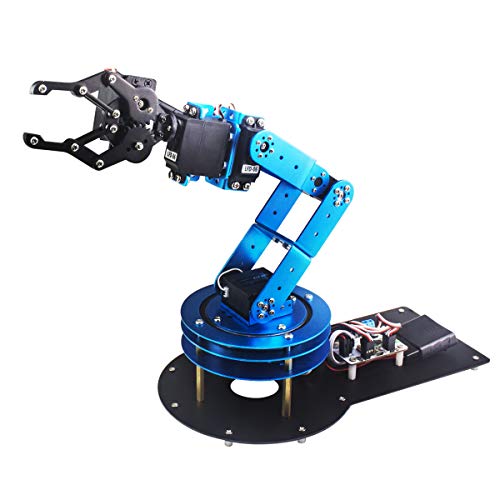
- Six degrees of freedom for varied movement
- PC, app, mouse, and handle controls
- Metal frame with anti-stall protection
Best For: Students, engineers, and hobbyists learning desktop robotics
Best Beginner Construction Project

- Introduces motors and circuit boards
- Offers up to 270° rotation
- Step-by-step wooden construction
Best For: Ages 8–12, families, and classrooms starting with robotics
Versatile Tracked Builder

- 975-piece ABS building set
- Gripper, drill, and bucket heads
- Remote control plus app programming
Best For: Young builders and families exploring mechanical STEM concepts
Advanced AI Learning Platform
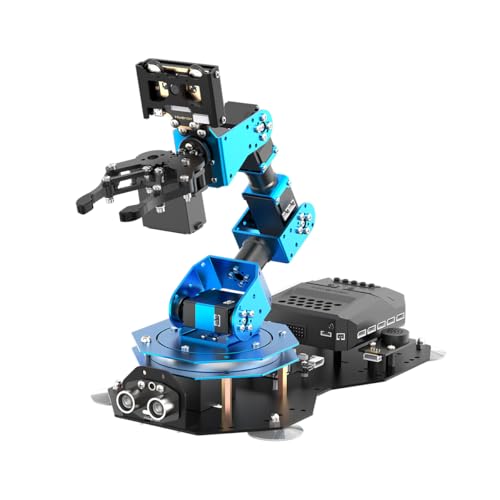
- Arduino, Scratch, and Python support
- Vision and voice interaction modules
- Inverse kinematics and expansion ports
Best For: Teens, students, and developers learning AI robotics
Hydraulic Fundamentals Kit
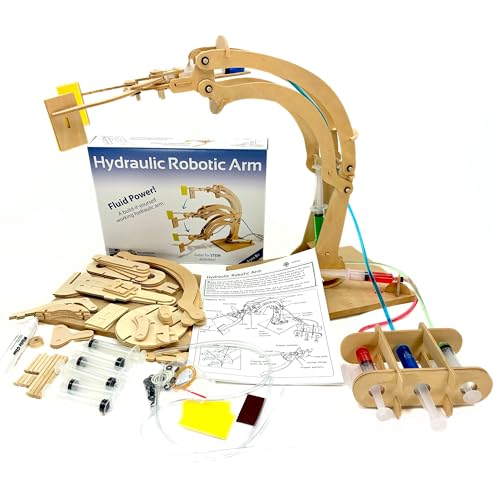
- Explores water-powered movement
- Includes 66 wooden kit components
- Build time is about 45-60 minutes
Best For: Young learners and beginners studying basic mechanics
Best Beginner Build

- Four-axis acrylic arm with flexible joint movement
- Records up to 170 joystick actions
- Includes guided assembly and programming tutorials
Best For: First-time robotics learners and tabletop STEM practice
Best Advanced Platform
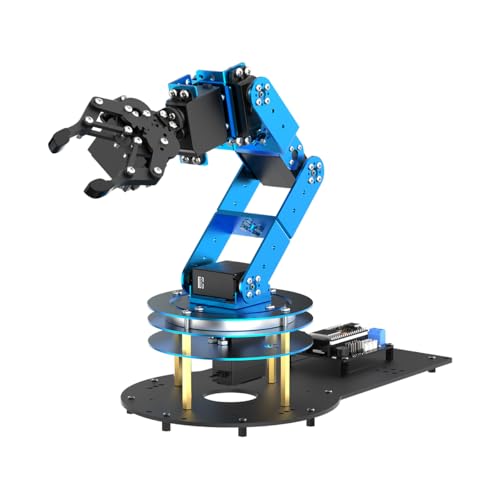
- ESP32 controller with Arduino compatibility
- Six smart servos and inverse-kinematics support
- Includes 200-plus learning resources and open-source code
Best For: Engineering study, secondary development, and sensor expansion
Best Modular STEM Option

- Combines a five-DOF arm with car and tank builds
- Works with Arduino, Scratch, app, and remote control
- Includes 16 guided tutorials and assembly videos
Best For: Classrooms, science projects, and hands-on learning for ages 12+
Best Open-Source Pick – miniArm 5DOF Arduino Robot Arm
For makers comparing robot arms for engineering projects 3, the miniArm stands out as an Arduino-compatible platform for programming, sensor expansion, and hands-on experimentation. Its open-source resources and multiple control options make it a strong fit for users ready to explore secondary development.
Best For: Adult learners, makers, and engineering students who want an Arduino-based arm with room for sensor-focused projects.
Pros:
- Uses the Atmega328 platform and supports Arduino programming.
- Open-source programs, tutorials, and secondary-development examples are available.
- Offers app, knob, and offline action-editing control options.
- Includes expansion ports for compatible sensors and modules.
Cons:
- The listed starter kit does not include the optional sensor modules.
- Its recommended age of 17 years and up makes it less suitable for young beginners.
The miniArm is best viewed as a development platform rather than a simple plug-and-play toy. Choose it when programmability and expansion matter more than a quick, guided build.
Best Hydraulic Learning Kit – Teach Tech Hydrobot Arm
If you want robot arms for engineering projects 3 that demonstrate mechanics without batteries, the Teach Tech Hydrobot uses water-powered hydraulics to create a genuinely hands-on learning experience. The build emphasizes assembly, fluid power, and physical control rather than coding.
Best For: Learners ages 12 and up who want an accessible introduction to hydraulics, mechanical engineering, and robotics.
Pros:
- Uses water-powered hydraulics, so batteries are not required.
- Six axes and up to 270-degree rotation provide varied movement.
- Levers operate a gripper that can open, close, or use suction components.
- Detailed assembly instructions support a multi-hour STEM building project.
Cons:
- It focuses on hydraulic mechanics rather than electronic programming.
- The plastic construction may be less suited to advanced engineering modifications.
The Hydrobot is a practical choice for teaching how fluid pressure and mechanical linkages work. Select it for a guided construction challenge, not for Arduino or software-based experimentation.
Best Desktop Programmable Arm – LeArm 6DOF Robot Arm Kit
Among robot arms for engineering projects 3, the LeArm offers a versatile desktop setup for learning robotics, programming, and mechanical structure. Its metal frame, six degrees of freedom, graphical programming, and multiple control methods make it suitable for demonstrations and creative builds.
Best For: Students, engineers, university courses, and hobbyists seeking a desktop arm with software and manual-control options.
Pros:
- Provides six degrees of freedom for varied arm movement.
- Supports PC, app, mouse, and wireless-handle control.
- Includes tutorials and simple programming software.
- Metal construction, reinforced base, and anti-stall servo protection support stability and durability.
Cons:
- It requires an AC adapter and does not use batteries.
- The recommended age range makes it less appropriate for younger children.
LeArm is a well-rounded option when you want both guided learning and flexible control. Its desktop format and metal structure suit classroom demonstrations, tabletop projects, and introductory programming work.
Best Beginner Construction Project – Wooden STEM Robot Arm Kit
For families and classrooms seeking robot arms for engineering projects 3, this wooden kit combines construction with a basic introduction to motors, microcontrollers, circuit boards, and mechanical movement. Its step-by-step build is designed to make robotics concepts tangible for younger learners.
Best For: Children ages 8 to 12, families, and school groups looking for an introductory electronics and mechanical-engineering project.
Pros:
- Introduces motors, a microcontroller, and circuit boards through building.
- Provides multi-axis movement and up to 270-degree rotation.
- Wooden construction encourages problem solving, patience, and fine motor skills.
- Works well for solo activities, family STEM sessions, or school programs.
Cons:
- The recommended age is 8 to 12, so advanced users may find the project basic.
- The supplied details do not specify software or programming features.
This kit prioritizes an approachable build over advanced control or customization. It is a sensible starting point for younger engineers who learn best by assembling a physical working model.
Versatile Tracked Builder – 3-in-1 Programmable Robot Arm
For shoppers comparing robot arms for engineering projects 3, this 975-piece building set combines mechanical assembly with hands-on remote and app control. Its interchangeable gripper, drill, and bucket heads add variety, while the tracked base supports indoor or outdoor exploration.
Best For: Kids ages 8-14, teens, and adults who want a buildable STEM robot with multiple tools and programmable play.
Pros:
- Includes gripper, drill, and bucket attachments.
- Offers both remote-control operation and app programming.
- Tracked undercarriage is designed for climbing and crossing obstacles.
- Large 975-piece kit provides an involved building experience.
Cons:
- Manufacturer recommends it for ages 8-14, so it may be introductory for advanced engineering students.
- Made from ABS plastic rather than metal.
This is a strong choice for learners who want construction, movement, and coding-style interaction in one package. Choose it over a dedicated educational arm when interchangeable tools and a mobile tracked platform are priorities.
Advanced AI Learning Platform – xArmAI 6DOF Robot Arm
Among robot arms for engineering projects 3, the xArmAI Advanced Kit is the most programming-focused option. It supports Arduino, Scratch, and Python while adding AI vision, voice interaction, inverse-kinematics motion planning, and expansion ports for secondary development.
Best For: Students age 15 and up, beginners in AI education, and developers seeking a programmable arm for coding and sensor experiments.
Pros:
- Supports Arduino, Scratch, and Python programming.
- WonderCam provides color recognition, tag tracking, and facial recognition.
- Voice module enables voice broadcasting and voice control.
- CoreX Controller offers ports for servos, motors, and sensors.
Cons:
- Recommended for ages 15 and up, making it less suitable for younger children.
- At 2.9 kg, it is a relatively substantial kit to set up and handle.
This is the best fit for a serious coding or AI-oriented project rather than simple construction play. Its broad programming support and expandable controller make it the strongest choice here for advanced experimentation.
Hydraulic Fundamentals Kit – Wooden Hydraulic Robotic Arm
For a hands-on introduction to engineering, this hydraulic wooden arm offers a straightforward alternative among robot arms for engineering projects 3. Builders assemble the mechanism and use water-filled syringes and tubing to explore fluid power, lifting, manipulation, and rotation.
Best For: Kids ages 8-14, families, classrooms, and adults seeking an accessible mechanical engineering or desk project.
Pros:
- Demonstrates hydraulics and basic fluid dynamics through direct operation.
- Includes wooden pieces, syringes, tubing, and instructions.
- Assembly takes approximately 45-60 minutes.
- Uses FSC natural untreated wood and is described as ASTM-compliant.
Cons:
- Hydraulic operation is manual rather than programmable or electronically controlled.
- Its capabilities are more introductory than those of an AI or sensor-enabled arm.
This kit is a practical pick when the goal is understanding a visible mechanical principle instead of learning software. It offers a short, approachable build and a clear demonstration of how water can power motion.
Best Beginner Build – Arduino Robot Arm Kit
If you want robot arms for engineering projects 3 that are approachable for first-time builders, this four-axis Arduino kit offers a hands-on introduction to assembly, electronics, and programming. Its joystick control and movement-recording feature add practical experimentation beyond simply building the arm.
Best For: Beginners, teens, and adults learning basic robotics, Arduino concepts, electronics, math, and science.
Pros:
- Includes hardware and tools with step-by-step assembly and programming tutorials.
- Four-axis movement provides a flexible 260-degree-opening clip, rotating wrist, elbow, and base.
- Joystick control can record up to 170 actions and repeat them once.
- Compact acrylic design is suitable for tabletop learning.
Cons:
- Two batteries must be prepared separately.
- Its four-axis design is less advanced than higher-DOF engineering kits.
- The listed warranty is limited to 30 days.
This is a sensible entry point for learning how a robot arm is assembled and programmed. Choose it for guided fundamentals and repeatable demonstrations rather than advanced sensing or autonomous development.
Best Advanced Platform – LeArm 6DOF Open-Source Arm
For robot arms for engineering projects 3 involving more complex programming and expansion, the LeArm Open Source model is the most capable option here. Its ESP32 controller, six smart servos, inverse-kinematics support, and sensor-expansion options provide a stronger foundation for structured experiments and secondary development.
Best For: Older students, engineers, university courses, and robotics enthusiasts working with Arduino-compatible programming and advanced control concepts.
Pros:
- Six-degree-of-freedom design uses smart PWM servos for controlled movement.
- ESP32 controller includes Bluetooth and multiple expansion ports.
- Supports app, PC software, and wireless-controller operation.
- Includes 200-plus tutorials, sample experiments, open-source code, and circuit schematics.
Cons:
- At 2.37 kg, it is less lightweight than a small beginner arm.
- Its advanced features and 16-plus recommended age may be more than casual learners need.
- Sensor-based projects require additional compatible sensor modules.
The LeArm is the strongest choice when your project benefits from open-source access, inverse kinematics, and future sensor integration. It is better suited to serious learning and experimentation than simple joystick-operated demonstrations.
Best Modular STEM Option – ACEBOTT 5DOF Robot Arm
Among robot arms for engineering projects 3 aimed at younger builders, the ACEBOTT combines a five-DOF programmable arm with a modular robot car and tank platform. Arduino and Scratch compatibility, guided tutorials, and app or remote control make it a flexible way to explore mechanics, coding, and navigation together.
Best For: Kids and teens 12 and older, classrooms, science-fair projects, and family STEM learning.
Pros:
- Four-in-one modular setup supports a robot car, tank, arm car, or arm tank.
- Five-DOF arm teaches grabbing, lifting, and placing with an ESP32 controller.
- Compatible with Arduino and Scratch and includes 16 guided tutorials plus assembly videos.
- Offers smartphone app and IR remote control, with tank tracks designed for varied surfaces.
Cons:
- The broad modular design may be less focused than a dedicated engineering arm.
- Its plastic construction is oriented toward STEM learning rather than heavy-duty work.
- Code and tutorial resources are accessed through the manufacturer’s website.
This kit stands out when engagement and versatility matter as much as arm programming. It gives younger users several build paths, although advanced users may prefer the LeArm’s deeper open-source and sensor-expansion focus.
How We Picked the Best Robot Arms for Engineering Projects 3
We focused on kits that support meaningful building, experimentation, and programming rather than simple push-button play. Our evaluation considers the arm’s degrees of freedom, actuator and control system, construction method, included software or learning materials, and how easily users can expand beyond the first project.
We also considered audience and difficulty. Hydraulic wooden kits can teach force, motion, and mechanical advantage without coding, while Arduino-compatible arms offer more flexibility for electronics and automation experiments. App, voice, and vision features can add engagement, but they are most useful when the underlying hardware and documentation are reliable.
Quick Comparison
For younger builders, the hydraulic and mechanical construction sets are approachable introductions to robotic motion. The 3-in-1 and tank-car combinations provide variety for users who want multiple build configurations. Arduino-compatible 5DOF and 6DOF kits are better suited to programming, servo control, and custom engineering challenges.
Advanced learners should look closely at the AI vision and voice-interaction model, as well as kits that support Scratch, Python, PC software, or movement recording. A higher servo count may provide more articulation, but it can also increase setup complexity and calibration time.
Key Buying Factors for Robot Arms for Engineering Projects 3
Degrees of Freedom and Mechanical Reach
More axes generally allow more natural movement and better positioning, but they do not automatically guarantee greater usefulness. Check the arm’s reach, payload, claw design, range of motion, and whether the servos can hold an object steadily.
Programming and Connectivity
Arduino support is valuable for electronics projects and custom code. Scratch can make early lessons accessible, while Python, PC software, app control, and repeat-motion functions create room for more advanced experiments. Confirm the required operating system, cables, controller, and whether software is included.
Build Experience and Documentation
Engineering projects are easier to complete when assembly instructions are clear and replacement parts are available. Younger users may benefit from color-coded components and guided tutorials; adult makers may prefer an open design that can be modified.
Safety, Power, and Project Scope
Review the recommended age, exposed gears, power requirements, servo limitations, and workspace needed for assembly. Consider the kinds of projects you plan to build, such as object sorting, pick-and-place demonstrations, sensor integration, or motion programming.
Who Should Buy Which Robot Arms for Engineering Projects 3?
Choose a hydraulic wooden kit for a screen-free introduction to mechanical engineering, force, and linkages. Choose a basic mechanical or 3-in-1 kit for younger builders who want a varied construction experience.
Choose a 5DOF or 6DOF Arduino kit for teens, students, and makers learning servo programming, robotics, and electronics. Choose an AI-enabled arm when vision, voice interaction, Scratch, Python, or more ambitious demonstrations are central to the project. Before buying, match the kit’s documentation and control ecosystem to the learner’s current skill level and the complexity of the projects you expect to undertake.