Robot arms with AI features are becoming more accessible for classrooms, makers, researchers, and developers. Today’s kits combine programmable joints with computer vision, voice interaction, imitation learning, and open-source software.
We selected 10 options spanning beginner Arduino projects, ROS-based platforms, LeRobot-compatible systems, and more advanced embodied-AI development kits. Use the guide below to match each type of arm to your budget, skill level, and intended workload.
Best 10 Robot Arms with AI Features Picks for 2026
Advanced Embodied AI Pick

- 6DOF metal arm with 500 mm reach and 500 g payload
- K230 vision module with 30+ stated AI features
- Supports LeRobot, VLA, voice, and multimodal AI workflows
Best For: University labs and developers exploring embodied AI
Open-Source Builder's Choice

- LeRobot and Hugging Face compatibility
- Supports imitation and reinforcement learning
- NVIDIA Jetson compatible; 3D-printed parts excluded
Best For: DIY developers and AI robotics learners
Mobile AI Robotics Platform

- 6DOF arm mounted on a mecanum-wheel chassis
- Dual lidar and depth camera support spatial awareness
- ROS2 and multimodal AI with voice and text commands
Best For: ROS2 education and mobile robotics research
Teleoperation and VLA Pick
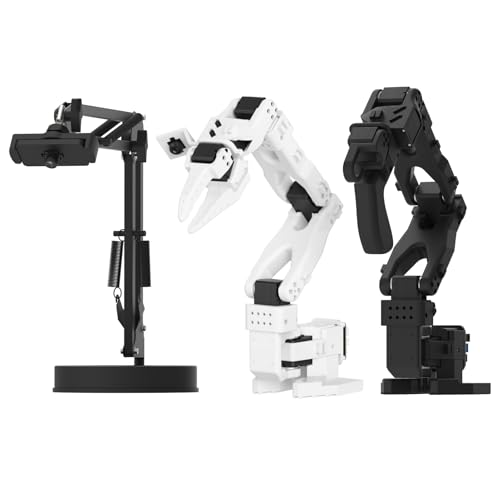
- Leader-follower teleoperation for demonstrations
- Dual cameras support manipulation and scene awareness
- LeRobot-compatible for imitation and reinforcement learning
Best For: VLA dataset collection and learning-based manipulation
Best Open-Source Starter

- ESP32 and Arduino-compatible platform
- 6DOF arm with inverse-kinematics control
- 200+ tutorials plus sensor expansion support
Best For: Beginners and makers learning AI robotics
Best for AI Development

- Python SDK and ROS1/ROS2 compatibility
- Supports LeRobot and Hugging Face workflows
- Leader-follower control for AI training
Best For: Developers and researchers building AI robotics projects
Best Vision Learning System

- Dual cameras for manipulation and environment awareness
- 12 high-torque bus servos with magnetic feedback
- Assembled kit compatible with LeRobot
Best For: Vision-guided imitation-learning projects
Best with Extra Features
miniArm 5DOF Arduino Robot Arm

- Arduino-compatible, open-source programming platform
- App, knob, and offline action controls
- Expansion ports for optional sensors and camera
Best For: Arduino learners and open-ended STEM projects
Best for Embodied AI

- LeRobot-compatible open-source AI platform
- Dual-camera vision and leader-follower control
- 500mm reach with 500g payload
Best For: Embodied AI labs and VLA development
Best Wireless Programming Value

- Python and Arduino programming support
- Wi-Fi and Bluetooth through ESP32
- Sensor expansion for custom AI applications
Best For: Connected STEM projects and robotics practice
Advanced Embodied AI Pick – NexArm K230 AI Robotic Arm
If you want robot arms with ai features for serious experimentation, the NexArm Advanced Kit combines a full-metal 6DOF arm with K230 vision, voice interaction, and support for modern VLA and imitation-learning workflows. Its 500 mm reach, 500 g payload, and stated ±2 mm repeatability make it suitable for hands-on embodied-AI projects.
Best For: University labs, educators, and developers building multimodal AI, vision-guided grasping, or LeRobot projects.
Pros:
- Includes a 6 TOPS K230 vision module with more than 30 stated AI vision features.
- Supports LeRobot, ACT, VLA models, open-source code, and multiple control methods.
- Full-metal construction, magnetic encoder servos, inverse kinematics, and curve smoothing support precise motion.
Cons:
- Recommended for ages 15 and up, so it is more of a development platform than a beginner toy.
- Advanced AI capabilities may require programming, model setup, and additional equipment for expanded scenarios.
The NexArm is the most feature-rich choice here for users who want vision, voice, and large-model experimentation in one platform. Its open design and expansion options make it especially appealing for structured research and education.
Open-Source Builder's Choice – SO-ARM101 Pro Servo Kit
For builders seeking robot arms with ai features at a lower-cost, open-source starting point, the SO-ARM101 Pro focuses on servo hardware and LeRobot integration. It supports imitation and reinforcement learning, but this version does not include 3D-printed parts.
Best For: AI robotics enthusiasts and developers who want to assemble, calibrate, and train an arm using LeRobot, Hugging Face, or NVIDIA Jetson hardware.
Pros:
- Designed for LeRobot and Hugging Face projects, including imitation and reinforcement learning.
- Improved wiring and optimized leader-arm gearing address limitations associated with the earlier SO-ARM100.
- Supports real-time leader-follower operation and NVIDIA Jetson edge devices.
Cons:
- 3D-printed parts are not included.
- Assembly, calibration, wiring, and AI deployment require hands-on technical work.
- The kit is focused on servo motors and components rather than a ready-to-use complete arm system.
This is a practical platform for learning the full AI robotics workflow, from mechanical assembly to dataset collection and deployment. Choose it when customization and open-source development matter more than immediate out-of-box operation.
Mobile AI Robotics Platform – Yahboom ROS2 M3 PRO Arm
The Yahboom M3 PRO extends robot arms with ai features beyond a tabletop arm by combining a 6DOF manipulator with a mecanum-wheel chassis, dual lidar, depth vision, ROS2, and multimodal AI support. It is built for navigation, perception, voice control, and mobile manipulation experiments.
Best For: University research, ROS2 education, and developers exploring autonomous mobile robots with voice commands and 3D grasping.
Pros:
- Combines a robotic arm, mecanum chassis, depth camera, and dual lidar for mobile operation.
- Supports multimodal large models, remote voice and text commands, task breakdown, and decision-making.
- Includes development paths involving Python, YOLO26, OpenCV, MediaPipe, Gazebo, and inverse kinematics.
Cons:
- The broad ROS2 and AI feature set can create a steeper learning curve than a standalone arm.
- Its 90-day manufacturer-defect warranty is shorter than the warranty listed for the SO-ARM101 Pro.
- It is designed primarily for advanced educational and research use rather than casual operation.
The M3 PRO is the strongest fit when mobility and environmental awareness are as important as arm control. Its combination of lidar, depth vision, and large-model interaction gives developers a broader embodied-robotics testbed.
Teleoperation and VLA Pick – Hiwonder SO-ARM101 AI Arm
The Hiwonder SO-ARM101 is a strong option for robot arms with ai features centered on demonstration and data collection. Its leader-follower teleoperation, dual-camera setup, and LeRobot compatibility help users capture vision-action data for imitation learning and VLA development.
Best For: Researchers and advanced learners creating teleoperation datasets, training imitation-learning models, and testing vision-guided manipulation.
Pros:
- Leader-follower teleoperation supports synchronous demonstrations and trajectory capture.
- Gripper-mounted and external cameras provide both manipulation detail and broader scene awareness.
- High-torque magnetic-feedback servos are designed for smooth, stable motion with reduced jitter.
Cons:
- The system is intended for indoor tabletop development rather than mobile or outdoor use.
- VLA and imitation-learning workflows still require dataset preparation, training, and technical setup.
- Its advanced feature set may be more than needed for users seeking simple remote arm control.
Choose this model when collecting demonstrations is central to your project. Compared with a basic programmable arm, the paired cameras and leader-follower design make it particularly suited to building datasets for learning-based manipulation.
Best Open-Source Starter – LeArm AI Advanced Kit
If you want robot arms with AI features for learning and experimentation, the LeArm AI Advanced Kit combines an ESP32 controller, Arduino compatibility, and support for vision, voice, and other sensors. Its 6DOF design and inverse-kinematics software make it a flexible tabletop platform for coding projects.
Best For: Beginners, students, and makers who want guided Arduino-based AI and robotics projects.
Pros:
- ESP32 controller with Arduino programming support, Bluetooth, and expansion ports.
- Six smart bus servos and inverse-kinematics control support smooth, precise movement.
- Supports AI vision, voice, ultrasonic, and acceleration sensors for varied projects.
- Includes more than 200 tutorials, experiments, schematics, and open-source examples.
Cons:
- Recommended for ages 16 and up, so it may be too advanced for younger children.
- Sensor-based functions may require additional compatible modules.
- Its manual operation and educational focus may not suit buyers seeking an autonomous production arm.
The LeArm AI is a strong choice when learning resources and expandability matter most. App, PC, and wireless-controller options also make it approachable before you move into deeper programming.
Best for AI Development – reBot B601-DM Robotic Arm
The reBot B601-DM is aimed at developers who want robot arms with AI features and a software-focused workflow. Its assembled arm and gripper support Python, ROS1, ROS2, LeRobot, and Hugging Face projects, with a leader-follower setup for hands-on training and correction.
Best For: AI robotics developers, researchers, and advanced STEM users working with imitation or reinforcement learning.
Pros:
- Compatible with LeRobot, Hugging Face, Python SDK, and ROS1/ROS2 environments.
- Leader-follower functionality enables real-time human intervention during reinforcement-learning training.
- Open-source workflow supports PyTorch datasets, simulation, training, and deployment.
- Works with Nvidia Jetson edge devices, including the reComputer Mini J4012 Orin NX 16 GB.
Cons:
- 3D-printed parts are not included.
- The Linux, ROS, SDK, and AI-training ecosystem is better suited to experienced users.
- The supplied specifications list no processor, so computing hardware may need to be provided separately.
Choose this reBot when software compatibility and experimentation are higher priorities than a simple plug-and-play learning experience. Its assembled format reduces mechanical setup, while the open-source stack leaves room for substantial development.
Best Vision Learning System – Hiwonder SO-ARM101
The Hiwonder SO-ARM101 is a compelling option among robot arms with AI features because it pairs an assembled six-axis arm with dual-camera vision and compatibility with the LeRobot framework. The included 3D-printed parts and bus-servo debugging hardware make it ready for structured imitation-learning work.
Best For: Researchers, hobbyists, and advanced learners exploring vision-guided imitation learning.
Pros:
- Dual-camera system combines a gripper-mounted camera with an external camera.
- Twelve high-torque bus servos with magnetic feedback are designed for smooth, stable motion.
- Compatible with the LeRobot open-source project and its shared code, templates, and models.
- Includes an assembled advanced kit, 3D-printed parts, and BusLinker V3.0 debugging hardware.
Cons:
- Recommended for ages 16 and up, reflecting its advanced educational and research focus.
- The system is more specialized for imitation learning than general-purpose beginner projects.
- Its plastics-and-metals construction may not fit buyers seeking an industrial-grade arm.
The SO-ARM101 stands out for buyers who specifically want camera-assisted manipulation and a prepared imitation-learning platform. Its assembled design and professional calibration tools can shorten the path from setup to experimentation.
Best with Extra Features – miniArm 5DOF Arduino Robot Arm
For learners comparing robot arms with ai features, the miniArm is a practical entry point focused on Arduino programming, open-source development, and hands-on sensor expansion. Its 5-axis design, knob controller, Bluetooth module, and digital servos support guided experimentation and custom projects.
Best For: Adults and older students learning Arduino programming, robotics, and sensor-based development.
Pros:
- Compatible with Arduino programming and open-source tutorials.
- Offers app control, knob-based operation, and offline action editing.
- Includes expansion ports for optional cameras, touch, acceleration, and ultrasonic sensors.
- Aluminum construction and high-precision digital servos support classroom or hobby projects.
Cons:
- The Starter Kit does not include the optional sensor modules or ESP32 camera.
- Its 5-axis setup is less extensive than six-axis alternatives.
- Recommended for ages 17 and up, so it is not aimed at young children.
The miniArm makes the most sense when programming flexibility matters more than turnkey AI capability. Buyers should confirm which kit version and sensor accessories they need before ordering.
Best for Embodied AI – NexArm SO-ARM101 6-Axis Kit
Among robot arms with ai features, the NexArm is the most advanced option here for embodied AI experimentation. It combines a six-axis metal arm with dual-camera vision, leader-follower teleoperation, LeRobot compatibility, and support for imitation and reinforcement learning workflows.
Best For: University labs, developers, and advanced learners building vision-action datasets or exploring VLA models.
Pros:
- Integrated with the LeRobot ecosystem, including community models, datasets, and simulations.
- Dual cameras support gripper-level manipulation and broader environmental awareness.
- Leader and follower arms enable synchronous teleoperation and trajectory-data capture.
- Metal construction, 500mm reach, 500g payload, and stated ±2mm repeatability support serious development.
Cons:
- The advanced feature set may be excessive for casual STEM users.
- Its adult-oriented design and university-lab focus suggest a steeper learning curve.
- The larger 11 x 8 x 19-inch footprint needs dedicated tabletop space.
The NexArm is the strongest fit for buyers who specifically want AI vision, teleoperation, and open-source model development. It is less appropriate if the goal is simple introductory robotic-arm programming.
Best Wireless Programming Value – MaxArm ESP32 Robot Arm
The MaxArm is a versatile choice for shoppers seeking robot arms with ai features without committing to a specialized vision system. Its Arduino and Python support, ESP32 controller, Wi-Fi and Bluetooth connectivity, inverse kinematics, and sensor ports create a flexible base for programming and custom automation projects.
Best For: STEM education, programming practice, and hobbyists who want wireless control and expansion options.
Pros:
- Supports Python and Arduino programming across multiple control methods.
- ESP32 platform provides Wi-Fi, Bluetooth, USB, LED, buzzer, and expansion interfaces.
- Inverse kinematics enables movement across the x, y, and z axes.
- Includes bus servos, trajectory planning, and a suction nozzle for practical experiments.
Cons:
- The supplied notes describe AI potential through added sensors and coding rather than a built-in vision system.
- It is a starter kit, so advanced applications may require additional programming and hardware.
- Its compact tabletop workspace limits the scale of objects it can handle.
Choose the MaxArm if connectivity and programming variety are priorities. It offers a strong platform for developing AI-related projects, but buyers should not expect the integrated camera-based capabilities of the NexArm.
How We Picked These Robot Arms with AI Features
We focused on the capabilities that matter most in practical robotics projects: degrees of freedom, servo quality, software access, AI compatibility, included hardware, and ease of assembly. The selection includes Arduino and ESP32 platforms for hands-on learning, as well as ROS1/ROS2 and Python-compatible systems for more advanced development.
We also considered whether an arm supports vision, voice commands, imitation learning, large-model integration, or the LeRobot ecosystem. Because kits vary widely in what they include, check the listing carefully for cameras, controllers, power supplies, grippers, 3D-printed components, and preassembly.
Quick Comparison
| Best For | Look For | Typical Platform |
|---|---|---|
| Beginners and STEM learners | Arduino support, guided projects, simple assembly | Arduino or ESP32 |
| Open-source experimentation | Python SDK, accessible APIs, replaceable parts | Python, Arduino, or ROS |
| AI vision and voice projects | Camera support, multimodal models, microphone or speaker integration | ROS2 or Linux computer |
| Imitation learning | LeRobot compatibility, teleoperation, high-torque servos | VLA and embodied-AI frameworks |
| Research and mobile robotics | ROS2, onboard computing, navigation or mecanum support | Orin NX or similar edge computer |
Key Buying Factors for Robot Arms with AI Features
Degrees of Freedom and Mechanical Construction
Six-axis arms provide more flexible positioning than four- or five-axis designs, which is useful for imitation learning, object manipulation, and camera-guided tasks. Metal frames generally offer better durability, while lighter plastic builds can be easier for beginners to handle.
Software and AI Compatibility
Confirm which operating systems, libraries, and frameworks are supported. Arduino-focused arms are approachable for basic control, while Python SDKs and ROS2 are better suited to perception, automation, and research. LeRobot compatibility is especially important if you plan to collect demonstrations or train vision-language-action models.
Servos, Payload, and Repeatability
High-torque bus servos can provide improved coordination and position feedback, but they may require a stronger power supply and more careful setup. Look for published payload, reach, speed, and repeatability specifications rather than judging capability by appearance alone.
Included Components and Setup
Some kits arrive assembled; others require substantial construction or separately sourced 3D-printed parts. Check whether the package includes a gripper, suction nozzle, camera, controller, cables, power adapter, and software instructions. These details can significantly change the true cost.
Who Should Buy Which Robot Arms with AI Features?
Choose an Arduino or ESP32 arm if you want an affordable introduction to programming, sensors, servos, and mechanical design. These are strong choices for classrooms, hobbyists, and STEM projects.
Choose a LeRobot-compatible six-axis arm if your priority is imitation learning, teleoperation, or open-source embodied AI. Verify whether the kit includes the components needed to operate immediately.
Choose a ROS2 or Orin NX-based system for multimodal AI, computer vision, voice interaction, navigation, and more demanding robotics experiments. These platforms usually have a steeper learning curve but offer greater expansion potential.
Before buying, define your first project, confirm the required computer and accessories, and prioritize an active software community. The best robot arm is the one whose hardware and development tools fit your current skills while leaving room for your next experiment.