The best robot arms for students turn coding, electronics, mechanics, and problem-solving into a hands-on project. These kits range from simple hydraulic builds for younger learners to programmable Arduino and ESP32 platforms for advanced experiments.
Use this roundup to compare degrees of freedom, control methods, programming support, construction materials, and included learning resources before choosing a kit for a classroom, home lab, or robotics club.
Best 10 Robot Arms for Students Picks for 2026
Best Open-Source Pick
miniArm 5DOF Arduino Robot Arm

- Arduino-compatible with open-source examples
- Multiple ports for sensor expansion
- App, knob, and offline action control
Best For: Advanced students and adult Arduino learners
Best All-Around Build
LeArm 6DOF Programmable Robot Arm
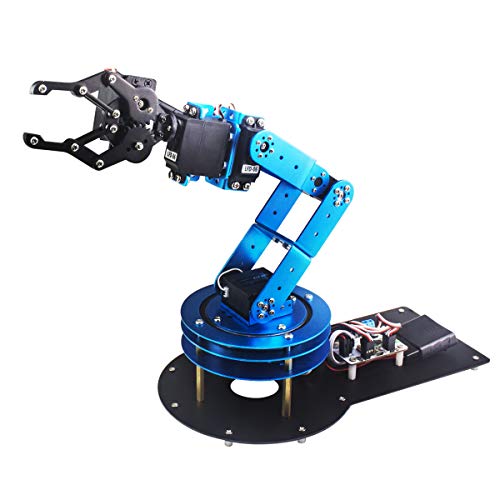
- Six degrees of freedom for varied movements
- Four control methods, including PC and app
- Metal frame with anti-stall servo protection
Best For: Classroom projects and hands-on robotics learning
Best for Guided Coding
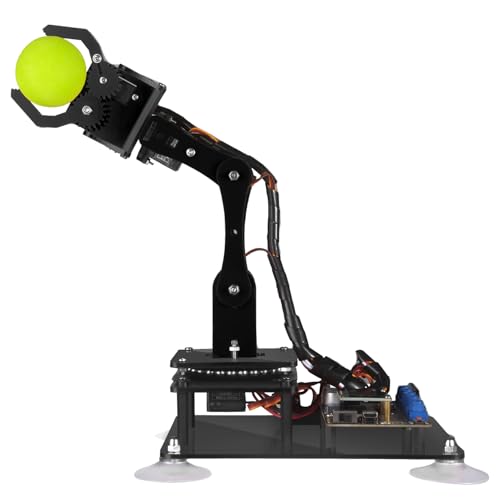
- Works with the Arduino IDE
- Includes PDF guides and code routines
- Supports knob and graphical PC control
Best For: Older students learning Arduino and robotics
Best Beginner Kit

- Guided assembly and programming tutorials
- Records and repeats up to 170 actions
- Joystick control with flexible 4-axis movement
Best For: Beginners and teens learning basic robotics
Best Hands-On Hydraulic Pick
PATHFINDERS Hydraulic Robotic Arm
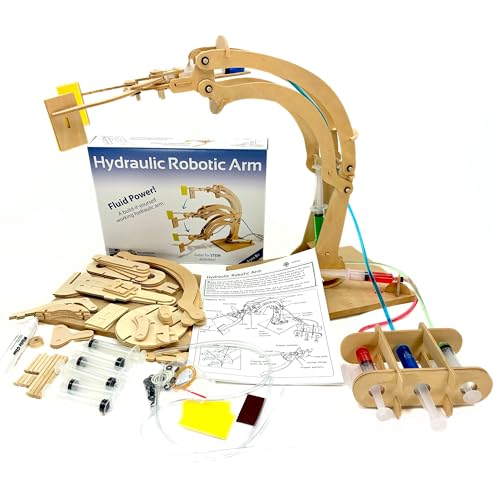
- Builds a functional wooden arm in about 45–60 minutes
- Uses syringes and water to demonstrate hydraulics
- Designed for ages 8+ with FSC wood and ASTM compliance
Best For: Younger students learning mechanical engineering and fluid dynamics
Best Programmable Learning Platform

- Supports Python and Arduino programming
- Adds WiFi, Bluetooth, and sensor expansion
- Uses inverse kinematics and trajectory planning
Best For: Older students practicing robotics programming and motion control
Best Electronics Introduction

- Combines wooden construction with motors and a PCB
- No soldering is required during assembly
- Introduces circuits and mechanical movement for ages 8+
Best For: Beginners exploring robotics, electronics, and hands-on STEM building
Best Beginner Build
SIYEENOVE 4DOF ESP32 Robot Arm
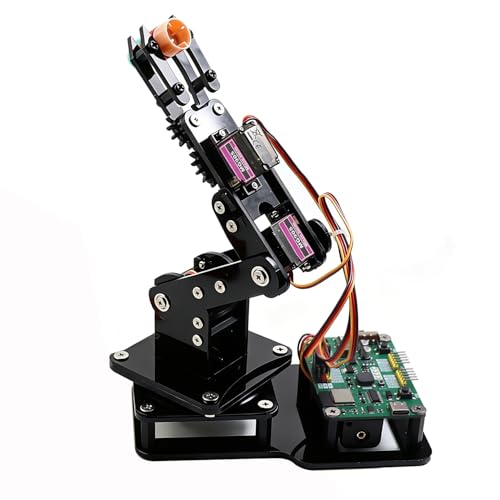
- Pre-programmed ESP32-C3 board
- Joystick and web-app control
- Arduino and MicroPython support
Best For: Teens and beginners learning robotics
Best Heavy-Duty Platform
Hiwonder xArm1S 6DOF Robot Arm
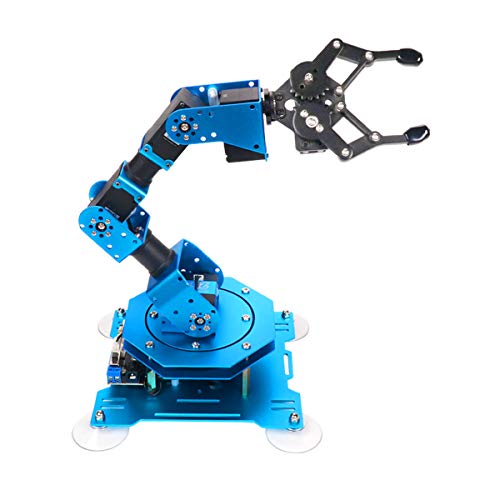
- Full-metal 6DOF construction
- Multiple PC, app, and controller options
- Servos support loads up to 500g
Best For: Older students and advanced tabletop projects
Best for Advanced Coding
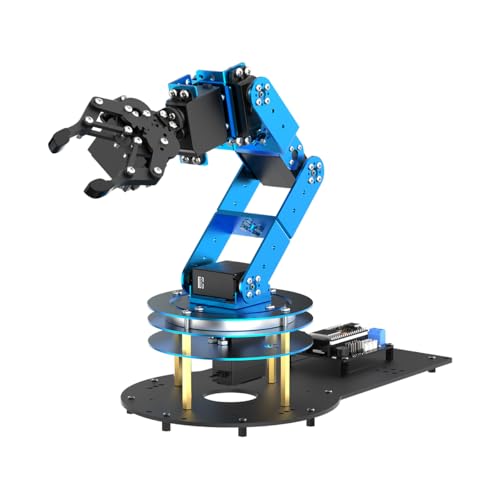
- ESP32 and Arduino-compatible platform
- Inverse kinematics with six smart servos
- 200+ tutorials and sensor expansion
Best For: University students and engineering learners
Best Open-Source Pick – miniArm 5DOF Arduino Robot Arm
For students seeking robot arms for students with room to experiment, the miniArm combines Arduino compatibility, open-source examples, and multiple sensor expansion ports. Its digital servos, Bluetooth module, and knob controller support both hands-on operation and programming projects.
Best For: Older students and adult learners interested in Arduino programming, open-source development, and sensor-based robotics projects.
Pros:
- Compatible with Arduino programming and open-source tutorials.
- Supports app control, knob control, and offline action editing.
- Provides expansion ports for sensors and modules such as ESP32 Cam and accelerometers.
- Uses an aluminum structure with high-precision digital servos.
Cons:
- The manufacturer recommends it for ages 17 and up.
- The Starter Kit does not include the listed optional sensors and modules.
- Its expanded capabilities may require additional parts and development work.
The miniArm is a strong choice when the goal is learning beyond basic assembly. It is best suited to students ready to program, modify, and expand a robot arm rather than simply operate one.
Best All-Around Build – LeArm 6DOF Programmable Robot Arm
Among robot arms for students, the LeArm stands out for combining assembly, programming, and several control methods in a sturdy desktop design. Its six degrees of freedom, metal brackets, and guided software make it suitable for classroom demonstrations and creative projects.
Best For: Students, university courses, and beginners who want a durable desktop arm with PC, app, mouse, and wireless handle control.
Pros:
- Six-degree-of-freedom movement supports grasping, transport, and custom actions.
- Offers PC, app, mouse, and wireless handle control.
- Metal construction, high-torque servos, and industrial-grade bearings support stability.
- Includes tutorials and simple graphical programming software.
Cons:
- The manufacturer lists different age guidance, including 14 years and up and 16 years up.
- It requires an AC power adapter and does not use batteries.
- The larger desktop footprint may need dedicated workspace.
The LeArm is a versatile teaching platform for learners who want both direct control and introductory programming. Its reinforced construction also makes it a practical option for repeated demonstrations and building activities.
Best for Guided Coding – Adeept 5DOF Arduino Arm
The Adeept 5DOF arm is a practical option for students comparing robot arms for students that emphasize coding and structured learning. It works with the Arduino IDE and includes a PDF manual, code routines, assembly guidance, and technical support.
Best For: Students ages 16 and up who want a compact Arduino-compatible kit for programming, assembly, and creative robotics exercises.
Pros:
- Compatible with the Arduino IDE and supplied code routines.
- Supports potentiometer control and graphical PC software.
- Includes digital assembly guides and a range of learning examples.
- Supports projects such as self-learning, drawing, and imitation.
Cons:
- Tutorials are digital rather than paper-based.
- The manufacturer recommends it for ages 16 and up.
- Its polycarbonate construction may be less substantial than a metal-framed arm.
With its compact size and learning-oriented documentation, the Adeept is well matched to students who want a clear path from assembly to Arduino coding. The included support and one-year parts warranty add reassurance during projects.
Best Beginner Kit – 4-Axis Memorizing Robot Arm
For beginners looking at robot arms for students, this 4-axis kit focuses on step-by-step building, straightforward controls, and repeatable movements. Its joystick operation and ability to record up to 170 actions make lessons easy to demonstrate.
Best For: Beginners, teens, and adults learning basic electronics, programming, math, and science through a compact DIY project.
Pros:
- Includes hardware and tools for a guided robot-building experience.
- Records up to 170 actions and can repeat them once.
- Offers joystick control with flexible 4-axis movement.
- Provides assembly and programming tutorials plus technical support.
Cons:
- Two batteries must be prepared separately.
- It has four axes rather than the greater movement range of some six-axis kits.
- The listed warranty is 30 days.
This kit is a sensible starting point for learners who value visible, repeatable results over advanced expansion. Its recording feature can make early programming concepts more approachable while the assembly process introduces core components.
Best Hands-On Hydraulic Pick – PATHFINDERS Hydraulic Robotic Arm
For students seeking an accessible introduction to robot arms for students, this wooden hydraulic kit focuses on building, mechanics, and fluid dynamics rather than coding. Assembly takes about 45–60 minutes and results in an arm that can lift, manipulate, and rotate objects up to 90 degrees.
Best For: Kids ages 8–14 who want a guided mechanical engineering and hydraulics project.
Pros:
- Demonstrates how water-powered hydraulics can move a machine.
- Includes wooden pieces, syringes, tubing, and clear instructions.
- Made from FSC natural untreated wood and designed to meet ASTM toy safety standards.
- Offers a relatively quick 45–60-minute build.
Cons:
- It is a manual hydraulic arm, not a programmable robot.
- Recommended for ages 8 and up, so it may be too simple for advanced robotics students.
This is a strong starting point for younger learners who need a tangible explanation of force, motion, and mechanical assembly. Choose it for foundational STEM learning rather than electronic or software development.
Best Programmable Learning Platform – MaxArm ESP32 Robotic Arm Kit
For advanced robot arms for students, the MaxArm offers a development-focused platform built around Arduino, Python, and an ESP32 controller. It supports inverse kinematics, wireless connectivity, sensor expansion, and programmed trajectory control, making it better suited to structured robotics and programming practice.
Best For: Students age 16 and up who want to explore programming, motion planning, sensors, and wireless control.
Pros:
- Supports both Python and Arduino programming.
- Provides WiFi and Bluetooth through the ESP32-based controller.
- Includes expansion interfaces for sensors and additional modules.
- Uses smart bus servos and trajectory planning for programmed movement.
Cons:
- The manufacturer recommends it for ages 16 and up.
- Its programming and inverse-kinematics features may be demanding for beginners.
- It is a starter development kit rather than a simple ready-to-play toy.
The MaxArm is the most technically oriented option in this roundup. Its open, expandable design gives older students room to move from basic control into sensors, wireless projects, and robotic motion algorithms.
Best Electronics Introduction – DIY Wooden Robot Arm Kit
This DIY kit gives students a bridge between construction and basic electronics. Its wooden arm combines motors, a PCB microcontroller board, and wiring, allowing learners to assemble a mechanical project and see how circuits control movement without soldering.
Best For: Kids, teens, and families looking for an introductory robotics and electronics build for ages 8 and up.
Pros:
- Combines a 3D-style wooden puzzle with motors and electronic circuits.
- Introduces how a controller and wiring operate mechanical movement.
- Requires no soldering and includes the listed assembly accessories.
- Can support school science classes, STEM activities, and family projects.
Cons:
- Six AA batteries are required but not included.
- The small wooden build may be less suitable for advanced programming work.
- Assembly is described as challenging, so younger builders may need assistance.
Among these robot arms for students, this model is a practical middle ground: more hands-on and electronic than a purely hydraulic kit, but less advanced than an open programming platform. It suits learners who want the satisfaction of building a moving mechanism while learning basic circuits.
Best Beginner Build – SIYEENOVE 4DOF ESP32 Robot Arm
For students beginning with robot arms for students, the SIYEENOVE 4DOF kit offers a hands-on introduction to assembly, joystick control, and programming. Its pre-programmed ESP32-C3 board lets learners start experimenting without uploading code first, while Arduino and MicroPython support provides room to advance.
Best For: Teens, beginners, classroom demonstrations, and tabletop coding projects.
Pros:
- Includes hardware for a DIY 4DOF robot arm build.
- Supports joystick and browser-based web-app control.
- Motion recording and loop playback encourage experimentation.
- Open-source code and expandable hardware support longer-term learning.
Cons:
- Batteries are not included.
- The 4DOF design is intended for lightweight objects rather than heavier lifting.
This is a practical entry point for students who want to build and operate a programmable arm before tackling more advanced robotics. The combination of simple controls and open-source programming makes it especially approachable.
Best Heavy-Duty Platform – Hiwonder xArm1S 6DOF Robot Arm
Students who need more movement and stronger hardware may prefer the Hiwonder xArm1S. This 6DOF metal arm combines intelligent servo feedback with PC, app, mouse, and wireless-controller operation, making it a capable platform for robotics demonstrations and coding projects.
Best For: Older students and makers exploring multi-axis control, action editing, and object handling.
Pros:
- Six-axis design provides more movement flexibility than simpler arms.
- Metal construction, bearings, and reinforced base support stability.
- Intelligent servos provide position, voltage, and temperature feedback.
- Can grasp objects weighing up to 500g, according to the supplied notes.
Cons:
- Its advanced 6DOF setup may be more than beginners need.
- It is a larger, heavier tabletop kit than a basic student arm.
- The supplied age details are inconsistent, so buyers should verify suitability.
The xArm1S is a strong choice when a student needs a more substantial physical platform for programming and manipulation experiments. Its several control methods also make it useful for demonstrations before moving into custom action editing.
Best for Advanced Coding – LeArm Open Source 6DOF Kit
For advanced robot arms for students, the LeArm Open Source kit is built around deeper programming and expansion work. Its ESP32 controller, Arduino compatibility, inverse-kinematics features, sensor ports, and extensive learning materials give students a path from assembly to more complex robotics experiments.
Best For: University students, engineering learners, and makers ready for AI, sensors, and secondary development.
Pros:
- Six smart PWM servos and inverse kinematics support precise movement experiments.
- ESP32, Bluetooth, Arduino compatibility, and expansion ports support customization.
- Accepts sensor expansions for vision, voice, ultrasonic, and acceleration projects.
- Includes more than 200 tutorials, sample experiments, schematics, and programs.
Cons:
- The 16-years-and-up recommendation makes it less suitable for younger beginners.
- Its broad expansion options may require more setup and programming time.
- The aluminum kit is heavier than a small introductory robot arm.
LeArm is the most development-focused option in this group. It makes sense for students who want structured resources now but also expect to add sensors, write Arduino code, and develop more ambitious robotic applications later.
How We Picked the Best Robot Arms for Students
We focused on educational value, compatibility, build quality, programming access, and the amount of support available to learners. The lineup includes hydraulic and mechanical kits as well as Arduino- and ESP32-based arms, so students with different ages and experience levels can find a suitable starting point.
We also considered practical details such as degrees of freedom, servo count, control options, software or app support, open-source documentation, and whether the kit encourages building, coding, testing, and modification rather than simple remote control.
Quick Comparison
| Kit type | Best for | Typical strengths | Watch for |
|---|---|---|---|
| Hydraulic wooden arm | Young beginners | Simple mechanics and hands-on assembly | Limited automation and programming |
| Arduino servo arm | Students learning coding and electronics | Large learning ecosystem and flexible projects | Assembly and calibration may take time |
| ESP32 smart arm | Intermediate and advanced learners | Wi-Fi, Bluetooth, web control, and Python options | More setup and troubleshooting |
| Six-axis metal arm | Experienced robotics learners | More movement range and durable construction | Higher cost and greater complexity |
Key Buying Factors for Robot Arms for Students
Age and Experience Level
Choose a mechanical or hydraulic kit for younger children and first projects. Arduino kits are a strong middle ground because students can begin with guided examples and progress to custom code. ESP32 and six-axis models are better for learners comfortable with programming, wiring, calibration, and debugging.
Degrees of Freedom and Movement
More axes generally provide more realistic positioning, but they also add motors, wiring, and programming complexity. A four- or five-axis arm is often sufficient for introductory projects, while six-axis models suit students studying advanced motion control.
Programming and Control
Check whether the kit supports Arduino IDE, Python, MicroPython, block-based tools, a PC application, a mobile app, joystick input, or web control. Open-source examples and clear tutorials can matter as much as the hardware, especially when students are working independently.
Build Quality and Project Scope
Metal frames can withstand repeated testing, while acrylic and wooden parts may be lighter or easier to assemble. Confirm what is included, including servos, controller boards, power supplies, grippers, cables, and software. Also check the arm’s payload and reach if students need to move objects.
Who Should Buy Which Robot Arms for Students?
For younger students or a first STEM activity, choose the hydraulic wooden arm or a clearly guided beginner kit. For coding classes and Arduino projects, a four- or five-axis programmable arm offers a useful balance of cost, flexibility, and manageable complexity.
Students interested in connected robotics should consider an ESP32 model with Wi-Fi, Bluetooth, web, or MicroPython support. Advanced learners, robotics clubs, and engineering students may prefer a six-axis full-metal arm with broader motion and more demanding programming opportunities.