Desktop robot arms make robotics more accessible by combining compact hardware with programmable motion, interchangeable end effectors, and open-source development tools. The 10 models in this roundup cover beginner STEM kits, Arduino and Python projects, ROS development, and advanced AI imitation-learning experiments.
Use the buying guide below to compare build quality, degrees of freedom, control options, software compatibility, and the level of assembly each arm requires before choosing a kit.
Best 10 Desktop Robot Arms Picks for 2026
Best Open-Source Learning Kit
MaxArm Arduino/Python Robotic Arm

- Arduino and Python programming support
- ESP32 Wi-Fi/Bluetooth and sensor expansion
- Inverse-kinematics movement on a compact aluminum frame
Best For: STEM learners and makers building programmable robotics projects
Best for Payload Handling
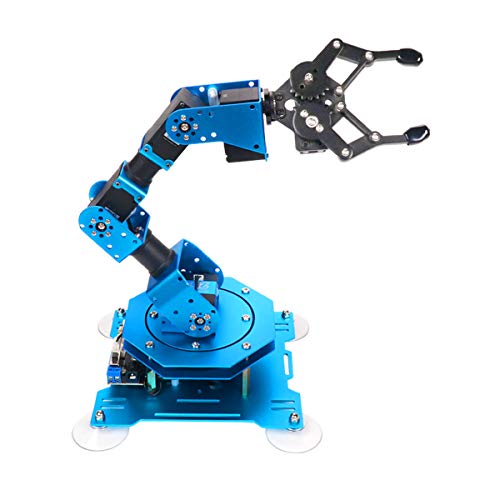
- Six feedback-enabled intelligent servos
- Specified grasping capacity up to 500g
- PC, app, mouse, and wireless-controller operation
Best For: Robotics learners handling objects and creating custom actions
Best for AI Robotics Development

- LeRobot and Hugging Face compatibility
- Leader-follower control for AI training
- NVIDIA Jetson-compatible open-source platform
Best For: Developers and researchers building learning-based robot applications
Best Ready-to-Use Option
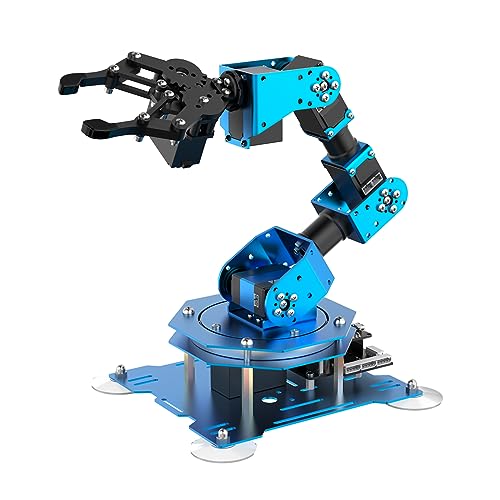
- Arrives in an assembled configuration
- Six-axis aluminum arm with intelligent servos
- Multiple control methods and up to 500g stated grasping
Best For: Learners who want to start coding without assembling the arm
AI Learning Pick
Hiwonder SO-ARM101 Advanced Kit

- Six-axis arm with dual-camera vision
- 12 high-torque bus servos with magnetic feedback
- Assembled and compatible with LeRobot
Best For: AI imitation learning and robotics research
Learning and Building Pick
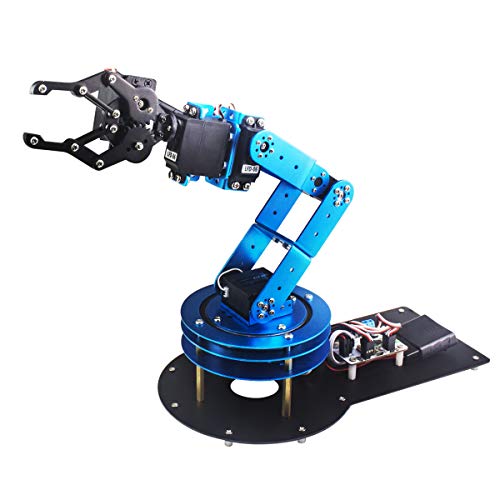
- Six-degree-of-freedom tabletop design
- PC, app, mouse, and wireless handle control
- Metal structure with anti-stall protection
Best For: Students and hands-on robotics projects
Open-Source Development Pick

- Assembled 6+1 DoF arm with gripper
- Python SDK plus ROS1/ROS2 support
- Leader-follower tracking for AI training
Best For: AI robotics development and research
Best for Embodied AI

- Six-axis full-metal arm with 500mm reach and 500g payload
- LeRobot-compatible for imitation learning and VLA development
- K230 vision module supports recognition, sorting, and voice interaction
Best For: Advanced AI education, university labs, and robotics developers
Best Starter Desktop Arm

- Arduino-compatible five-axis platform for programming practice
- Bluetooth, app, knob, and offline action-editing controls
- Expansion ports support cameras and multiple optional sensors
Best For: STEM education, Arduino learners, and maker projects
Best for Imitation Learning

- Leader and follower arms support synchronous teleoperation
- Dual cameras capture manipulation and environmental views
- LeRobot-compatible six-axis system for vision-action datasets
Best For: AI researchers, imitation-learning projects, and university labs
Best Open-Source Learning Kit – MaxArm Arduino/Python Robotic Arm
For shoppers comparing desktop robot arms for programming practice, the MaxArm offers a flexible ESP32-based platform with Arduino and Python support. Its aluminum construction, bus servos, wireless connectivity, and sensor expansion options make it suited to hands-on robotics learning.
Best For: STEM learners and makers who want a programmable arm with wireless control and room for sensor-based expansion.
Pros:
- Supports Arduino and Python programming across multiple control methods.
- ESP32 controller includes Wi-Fi, Bluetooth, sensor ports, buzzer, LED, and USB interfaces.
- Link mechanism and inverse kinematics support movement across the X, Y, and Z axes.
- Three precision smart bus servos support programmed trajectory control.
Cons:
- Recommended for users age 16 and up, so it may be advanced for younger learners.
- The compact tabletop design may limit larger-object handling compared with bigger arms.
The MaxArm is a practical choice when programmability and expandability matter more than a ready-to-use consumer appliance. Its combination of wireless control, coding support, and open expansion makes it a strong starter platform for desktop robotics projects.
Best for Payload Handling – Hiwonder xArm1S 6DOF Kit
Among desktop robot arms for coding and object handling, the Hiwonder-xArm1S stands out for its six-axis layout, full-metal structure, and torque-focused intelligent servos. It also offers several ways to control and edit actions, from a PC or app to a mouse or wireless controller.
Best For: Robotics students and makers who want stronger grasping capability and multiple control options.
Pros:
- Six intelligent serial bus servos provide position, voltage, and temperature feedback.
- Specified grasping capacity reaches up to 500g.
- Aluminum-alloy construction, high-torque servos, and industrial-grade bearings support stability.
- Supports PC, phone app, mouse, wireless PS2 controller, and offline action editing.
Cons:
- The kit format may require more setup than an assembled version.
- Its larger tabletop footprint may need more workspace than compact desktop robot arms.
This xArm1S is a well-rounded option for learning programming while experimenting with grasping and object transportation. Choose it when feedback-enabled servos and a 500g stated payload are more important than minimal size.
Best for AI Robotics Development – LeRobot SO-ARM101 Pro
For buyers seeking desktop robot arms aimed at AI development, the LeRobot SO-ARM101 Pro is an open-source servo motor kit built around LeRobot and Hugging Face workflows. It supports imitation learning, reinforcement learning, leader-follower operation, and NVIDIA Jetson compatibility, but 3D-printed parts are not included.
Best For: Developers and researchers building AI robotics prototypes with open-source tools and Jetson edge devices.
Pros:
- Designed for LeRobot and Hugging Face projects, including imitation and reinforcement learning.
- Real-time leader-follower functionality supports human intervention during training.
- Improved wiring and revised gear ratios are intended to improve motion and reduce joint limitations.
- Includes assembly, calibration, testing, and deployment resources and supports compatible NVIDIA Jetson hardware.
Cons:
- 3D-printed structural parts are not included.
- Its development-focused design is better suited to experienced builders than plug-and-play users.
- Additional compatible computing hardware may be needed for Jetson-based projects.
The SO-ARM101 Pro is less of a conventional educational arm and more of an AI robotics platform. It makes the most sense for users prepared to assemble hardware, work with open-source software, and develop training-based applications.
Best Ready-to-Use Option – Assembled Hiwonder xArm1S
If you want desktop robot arms for STEM projects without starting from a kit assembly process, this assembled Hiwonder-xArm1S provides the same six-axis educational platform in a ready-assembled format. It combines a full-metal aluminum structure, intelligent servos, and PC, app, mouse, and wireless control.
Best For: Students, educators, and makers who want to begin coding and experimenting with grasping quickly.
Pros:
- Assembled version reduces the initial build work compared with an unassembled kit.
- Six high-precision intelligent servos provide position, voltage, and temperature feedback.
- Specified grasping capacity reaches up to 500g.
- Supports PC, phone app, mouse, PS2 wireless control, and offline action editing.
Cons:
- The assembled format offers less hands-on building practice than a kit version.
- It requires a DC power supply and is intended for indoor tabletop use.
- Its metal construction and six-axis design may take more desk space than smaller arms.
This is the convenient choice for users who want to focus on programming, action editing, and object handling rather than mechanical assembly. It retains the xArm1S learning features while making the starting point more accessible.
AI Learning Pick – Hiwonder SO-ARM101 Advanced Kit
For desktop robot arms focused on modern AI experimentation, the Hiwonder SO-ARM101 Advanced Kit combines six-axis movement, dual-camera vision, and open-source compatibility. Its assembled design and included 3D-printed parts make it a practical starting point for developers, researchers, and advanced hobbyists.
Best For: Imitation-learning projects, AI robotics research, and users who want integrated vision and LeRobot compatibility.
Pros:
- Supports the LeRobot open-source framework and pre-trained-model workflows.
- Uses gripper-mounted and external cameras for manipulation and environmental awareness.
- Includes 12 high-torque bus servos with magnetic feedback for smoother motion.
- Comes assembled with 3D-printed parts and a BusLinker debugging board.
Cons:
- Recommended for ages 16 and up, so it may be too advanced for younger learners.
- The feature set is geared toward AI development rather than simple manual operation.
This is the most research-oriented option in the group, especially if camera-based imitation learning and detailed servo diagnostics are priorities. Its assembled format reduces setup work while preserving access to open-source development tools.
Learning and Building Pick – LeArm 6DOF Programming Arm
The LeArm is a hands-on desktop robot arm for learning robotics, programming, and mechanical design. With six degrees of freedom, multiple control methods, a metal structure, and beginner-friendly tutorials, it suits classroom projects and creative tabletop builds.
Best For: Students, university courses, hobbyists, and beginners exploring manual control and graphical programming.
Pros:
- Offers six degrees of freedom for object grasping, transport, and custom actions.
- Supports PC, app, mouse, and wireless handle control.
- Metal brackets, high-torque base servos, and industrial-grade bearings support stability.
- Includes tutorials, simple programming software, and Arduino compatibility.
Cons:
- It is designed primarily for educational and creative projects rather than advanced AI research.
- It requires an AC adapter and does not use batteries.
Choose this model when the learning experience matters as much as the arm’s movement capabilities. Its range of controls and protective servo features make it approachable for building and demonstrating robotics projects.
Open-Source Development Pick – reBot B601-DM AI Arm
For desktop robot arms aimed at software development, the reBot B601-DM provides an assembled 6+1 DoF platform with a gripper, Python SDK, and ROS1/ROS2 compatibility. Its leader-follower tracking and LeRobot integration make it especially relevant to AI training, experimentation, and research workflows.
Best For: Developers and researchers building Python, ROS, imitation-learning, or reinforcement-learning applications.
Pros:
- Supports LeRobot, Hugging Face projects, Python, ROS1, and ROS2.
- Offers real-time leader-follower functionality for human intervention during training.
- Improved wiring and optimized gear-ratio motors are designed for smoother operation.
- Compatible with Nvidia Jetson edge devices and multiple operating systems.
Cons:
- 3D-printed parts are not included.
- The software and AI-focused feature set may be more than casual users need.
This is the strongest choice for users who want an open development platform rather than a simple educational arm. Its broad software compatibility and leader-follower workflow support more involved AI robotics projects, though setup is best suited to technically comfortable users.
Best for Embodied AI – NexArm Standard Kit
For advanced desktop robot arms focused on AI development, the Hiwonder NexArm Standard Kit combines a full-metal six-axis design with magnetic encoder servos, inverse kinematics, and open-source programming support. Its 500mm reach, 500g payload, and stated ±2mm repeatability make it suited to hands-on robotics and embodied-AI projects.
Best For: University labs, advanced learners, and developers building imitation-learning or vision-action projects.
Pros:
- ESP32 and AT32 dual-chip architecture with magnetic encoder servos.
- LeRobot compatibility supports community models, datasets, and simulations.
- K230 vision module offers 30+ AI vision features plus voice interaction.
- Includes open-source code, schematics, PC/app/remote control, and tutorials.
Cons:
- Its advanced AI and programming features may be more than beginners need.
- The Standard Kit is a substantial desktop setup at 24.4 inches in its longest listed dimension.
This is a strong choice when your desktop robot arm needs to serve as an extensible AI research platform rather than a basic coding kit. The vision and multimodal expansion options provide room for more complex projects.
Best Starter Desktop Arm – miniArm Starter Kit
The miniArm Starter Kit is a compact desktop robot arm for learning Arduino programming, robotics, and basic secondary development. Its five-axis platform uses an Atmega328 controller and includes app, Bluetooth, knob, and offline action-editing control options.
Best For: STEM learners and makers who want an approachable Arduino-compatible arm with room for sensor expansion.
Pros:
- Open-source programs, tutorials, and development examples support learning.
- Six-channel knob controller, Bluetooth, and digital servos provide flexible control.
- Expansion ports support optional camera, accelerometer, touch, and ultrasonic sensors.
- Aluminum construction keeps the listed unit relatively compact at 13 x 5 x 8 inches.
Cons:
- The Starter Kit does not include the ultrasonic, touch, acceleration, or ESP32-CAM modules.
- It has five axes, making it less capable than six-axis alternatives for advanced motion projects.
- The manufacturer recommends it for ages 17 and up.
Choose this desktop robot arm if learning Arduino and adding sensors over time matter more than built-in AI features. Buyers should verify the kit contents carefully, since the included accessories differ from the Standard Kit.
Best for Imitation Learning – NexArm IL Standard Kit
The NexArm IL Standard Kit is a specialized desktop robot arm system for collecting demonstrations and developing imitation-learning models. It includes leader and follower arms, dual-camera vision, LeRobot compatibility, and synchronous teleoperation for capturing video alongside movement data.
Best For: Researchers and advanced students creating vision-action datasets or studying hand-eye coordination.
Pros:
- Leader-follower teleoperation helps record synchronized demonstrations.
- Dual cameras combine gripper-level manipulation views with broader environmental awareness.
- Six-axis, full-metal construction offers a 500mm reach, 500g payload, and stated ±2mm repeatability.
- Includes open-source code, schematics, remote control, and tutorials.
Cons:
- This research-oriented system may be unnecessarily complex for basic robotics instruction.
- Its two-arm configuration requires more tabletop space than a single desktop arm.
- The listed size is 11 x 8 x 19 inches, so workspace planning is important.
For imitation learning, this is the most purpose-built option in the group. The paired arms and dual-camera setup directly support demonstration capture, while LeRobot integration gives developers a path toward ACT and related model workflows.
How We Picked These Desktop Robot Arms
We selected these Desktop Robot Arms based on the features that matter most for hands-on learning and development: mechanical construction, degrees of freedom, payload potential, programming support, connectivity, included accessories, and upgrade flexibility. We also considered whether each kit supports common platforms such as Arduino, Python, ESP32, ROS, or open-source AI frameworks.
Because these products target different users, the list includes both approachable educational kits and more capable platforms designed for computer vision, imitation learning, and robotics research. Assembly requirements are also important: some arms are ready to use, while others may require significant building, calibration, or 3D-printed components.
Quick Comparison
| Best For | Look For | Typical Advantage |
|---|---|---|
| Beginners and students | Clear tutorials, simple control software, included parts | Faster setup and easier experimentation |
| Arduino and ESP32 projects | Open interfaces, compatible servos, example code | Flexible hardware tinkering |
| Python and ROS developers | SDK support, documented APIs, ROS compatibility | More advanced automation workflows |
| AI and imitation learning | Camera support, bus servos, open-source models | Training and reproducing manipulation tasks |
| Mechanical engineering projects | Metal construction, modular joints, replaceable grippers | Greater durability and customization |
Key Buying Factors for Desktop Robot Arms
Degrees of Freedom and Movement
A 5DOF arm can handle many basic pick-and-place exercises, while 6DOF designs provide better wrist orientation and positioning. Additional axes can improve flexibility, but they may also increase programming complexity and calibration time.
Materials, Motors, and Payload
Metal frames generally offer better rigidity than lightweight plastic, especially when the arm is moving near its stated capacity. Check the motor type, gear durability, joint backlash, and realistic payload at full extension. A gripper’s maximum opening and grip strength are just as important as the arm’s headline specifications.
Software and Connectivity
Choose a platform that matches your preferred workflow. Arduino and ESP32 support suits embedded projects, while Python SDKs are useful for scripting and computer vision. ROS1 or ROS2 compatibility is valuable for research and integration with larger robotics systems. Wi-Fi and Bluetooth add convenience, but wired connections can be more reliable during development.
Assembly and Expansion
Confirm whether the kit arrives assembled, partially assembled, or without 3D-printed parts. Also check what is included: power supply, controller, gripper, suction nozzle, cables, mounting hardware, and software. Modular end effectors and accessible replacement parts make a kit more useful over time.
Who Should Buy Which Desktop Robot Arms?
Choose a straightforward Arduino-compatible kit if you are new to robotic arms or buying for a classroom. Makers who want to build custom controllers should prioritize open-source documentation, ESP32 support, and accessible servo wiring. Python and ROS users should choose an arm with a maintained SDK and clear integration examples.
For AI development, look for bus servos, camera compatibility, imitation-learning support, and an active open-source community. If durability and repeatable motion matter most, favor a full-metal arm with stronger joints and a stable base. Finally, budget for accessories, replacement parts, and time for calibration—these often determine the real ownership experience more than the arm alone.