The best enclosed laser cutting machines combine focused cutting power with built-in safety features, ventilation options, and convenient controls for home workshops, classrooms, and small businesses.
This roundup compares 10 notable models across laser power, work-area size, speed, cameras, software, and ease of use so you can choose a machine that fits your materials and workflow.
Best 10 Enclosed Laser Cutting Machines Picks for 2026
Best Overall Enclosed Laser Cutting Machine

- 40W cutting power and a spacious 23.93-by-15.16-inch bed
- 600mm/s engraving with AutoPassthrough for extra-long projects
- Class 1 enclosure with rotary bundle and guided XCS software
Best For: Large projects, batch work, and curved-item engraving
Best Portable Enclosed Laser Engraver

- Compact 19.8-pound design for mobile crafting
- Four-in-one rotary kit for tumblers, rings, glasses, and spheres
- Fine laser spot and Class 1 enclosed safety design
Best For: Small personalized items and portable engraving
Best Smart Enclosed Laser Cutter

- Large 26-by-21-inch bed for batch production
- Dual 8MP cameras and precision positioning features
- Touchscreen and offline operation eliminate the need for a PC
Best For: Small businesses and large-format batch work
Most Versatile
xTool M2 20W Color Laser Engraver
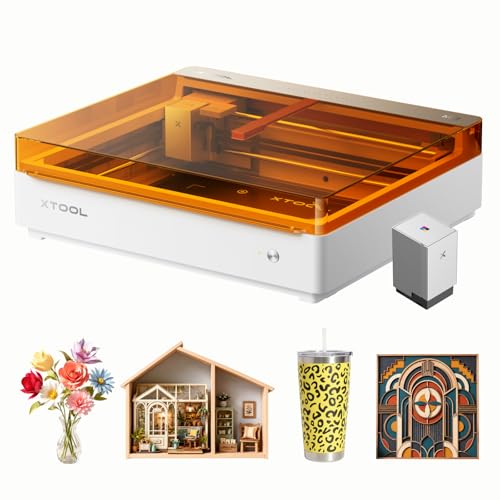
- Combines 20W laser engraving with CMYK inkjet printing
- Works with 300+ materials for varied craft projects
- Class 1 enclosure and dual cameras support safer, easier use
Best For: Home crafters wanting printing, cutting, and engraving in one machine
Fastest Workflow
Creality Falcon A1 10W Laser Engraver

- Reaches engraving speeds up to 600mm/s
- Pre-calibrated camera simplifies object positioning
- Class 1 enclosure includes auto-lock and emergency stop
Best For: Makers seeking fast, guided engraving on compatible materials
Best Expandable Option

- Class 1 enclosure with dual-camera placement assistance
- Supports more than 300 craft materials
- Optional modules add color printing and IR engraving
Best For: Beginners wanting a modular enclosed laser setup
Best Overall
TOOCAA 20W Enclosed Laser Engraver

- Class 1 enclosure with smoke exhaust and interlocks
- Large bed and 20W cutting performance
- Supports TOOCAA Studio, LightBurn, and LaserGRBL
Best For: Makers and small customization businesses needing space and safety
Best for Small-Business Batches

- 300 x 300mm work area for larger designs and batches
- 20,000mm/min speed with 0.01mm focus
- Multiple control options and enclosed safety features
Best For: Small businesses handling personalized orders and repeat production
Best Overall Enclosed Laser Cutting Machine – xTool S1 40W Rotary Bundle
For shoppers seeking enclosed laser cutting machines with substantial cutting power and room for larger projects, the xTool S1 combines a 40W laser, a 23.93-by-15.16-inch bed, and speeds up to 600mm/s. Its included rotary bundle also expands its usefulness for curved items.
Best For: Large projects, batch engraving, and users who want an enclosed machine with rotary capabilities and guided software.
Pros:
- 40W laser can cut 18mm cherry wood in a single pass, according to the supplied specifications.
- Large work area and AutoPassthrough support projects up to 118 inches long.
- Class 1 enclosed design includes smoke and noise blocking, flame sensors, emergency stop, and lid-open safety features.
- Auto-focus, camera-free Pin-point Positioning, and XCS software support easier setup.
Cons:
- At 86.8 pounds, it is substantially less portable than compact enclosed models.
- The large bed and high output may be more capability than occasional hobbyists need.
The S1 is a strong choice when cutting capacity, workspace, and safety matter more than portability. The rotary bundle is particularly useful for makers working with tumblers, plates, and other curved projects.
Best Portable Enclosed Laser Engraver – Twotrees TS5 7W
The Twotrees TS5 is a compact option among enclosed laser cutting machines, emphasizing detailed engraving, portability, and flexible rotary work. Its enclosed workspace supports items such as tumblers, cups, gift boxes, and other small projects.
Best For: Portable engraving, personalized gifts, tumblers, rings, glassware, and makers who need multiple rotary modes.
Pros:
- Ultra-fine 0.035-by-0.1mm laser spot is designed for detailed, photo-realistic engraving.
- Four-in-one rotary kit supports chuck, ring, roller, and sphere engraving.
- Class 1 enclosure filters 99% of laser light and helps block smoke and noise.
- At 19.8 pounds, it is easier to move to craft fairs, parties, or other workspaces.
Cons:
- The 7W output and 9.8-by-4.8-by-4.8-inch workspace are less suited to large cutting jobs.
- Its compact work area limits the size of flat projects and cylindrical items.
The TS5 prioritizes detail and versatility over raw cutting capacity. It is a practical fit for makers who regularly personalize small objects and value a lighter, enclosed machine.
Best Value Enclosed Laser Cutter – VEVOR 20W Laser Engraver
For buyers comparing enclosed laser cutting machines on features and price, the VEVOR 20W model offers a 15.7-by-15.7-inch working area, speeds up to 30,000mm/min, and an integrated enclosure with camera-based positioning. It supports common craft materials while clearly identifying materials it cannot cut.
Best For: Home workshops and hobbyists engraving or cutting wood, leather, paper, and suitable acrylic projects.
Pros:
- 20W output and a spacious square work area support medium-sized projects.
- Auto positioning, a 32-bit control board, and a 0.12-by-0.15mm spot are designed for accurate results.
- Class 1 enclosure includes emergency stop, tilt stop, limit switches, and a security lock.
- Supports LightBurn, LaserGRBL, and CutLabX, with Wi-Fi and offline engraving through stated options.
Cons:
- It cannot cut metal or engrave transparent, reflective, or translucent materials without appropriate treatment, and some metals remain unsuitable.
- LightBurn is a paid option, while LaserGRBL is specified for Windows and low-speed devices only.
- Its 33.7-pound size is less portable than the TS5.
The VEVOR balances useful power, a generous work area, and broad software compatibility. It makes the most sense for users working primarily with approved opaque craft materials rather than metal or clear substrates.
Best Smart Enclosed Laser Cutter – Aliencell X1 40W
The Aliencell X1 stands out among enclosed laser cutting machines for its large 26-by-21-inch bed, high-speed motion system, dual cameras, and standalone touchscreen. It is designed for users who want a more self-contained workflow for large projects and repeat production.
Best For: Small businesses, batch production, large-format projects, and users who prefer offline control without a PC.
Pros:
- Large 26-by-21-inch bed provides room for large-scale and batch projects.
- 40W laser, 600mm/s speed, and 20,000mm/s² acceleration target high productivity.
- Dual 8MP cameras, cross-laser positioning, and automatic distortion correction support accurate placement.
- 6.86-inch touchscreen and onboard storage allow offline operation without a PC.
Cons:
- At 104.8 pounds, it is the heaviest option in this roundup and needs a dedicated workspace.
- The large footprint may be excessive for occasional users or small craft projects.
- The supplied notes describe supported materials broadly but do not specify cut thickness for individual materials.
The X1 is geared toward throughput and workflow convenience rather than portability. Its large bed, camera system, and PC-free controls make it compelling for production-minded users who can accommodate its size and weight.
Most Versatile – xTool M2 20W Color Laser Engraver
For shoppers comparing enclosed laser cutting machines, the xTool M2 stands out by combining a 20W diode laser with a CMYK inkjet printer. It supports printing, cutting, and engraving across more than 300 materials, while dual cameras help simplify placement and alignment.
Best For: Home crafters who want one enclosed machine for full-color printing, engraving, and cutting projects.
Pros:
- Combines a 20W laser and CMYK inkjet module in one setup.
- Supports materials including cardstock, felt, leather, wood, and fabric.
- Class 1 enclosed design with dual-camera positioning assistance.
- xTool Studio includes templates and an AI image generator.
Cons:
- The 43.9-pound machine takes up substantial workspace.
- Its broader feature set may be more than needed for basic engraving.
The M2 is a strong choice when creative flexibility matters more than a minimalist setup. Its integrated color-printing workflow and camera-assisted placement make it particularly appealing for personalized gifts, home décor, and small craft businesses.
Fastest Workflow – Creality Falcon A1 10W Laser Engraver
Among enclosed laser cutting machines, the Creality Falcon A1 focuses on speed and streamlined setup. Its CoreXY motion system reaches up to 600mm/s, while the pre-calibrated camera, material recognition, and preset parameters reduce manual preparation.
Best For: Makers who prioritize fast engraving, camera-guided positioning, and a ready-to-use enclosed design.
Pros:
- Engraving and cutting speeds reach up to 600mm/s.
- Pre-calibrated HD camera provides a full-frame workspace view.
- Class 1 dual-door enclosure includes auto-lock and emergency stop features.
- Supports Falcon software, LightBurn, LaserGRBL, and Cutlabx.
Cons:
- The working area is 381 × 305mm and is not compatible with a 500 × 500mm honeycomb panel.
- Cutting acrylic is not supported, and coated acrylic is required for engraving.
- Highly reflective materials, including mirror-finished metals, are prohibited.
The Falcon A1 is a practical pick for users who want speed without a complicated initial setup. Its material restrictions are important to note, but the camera positioning, enclosure, and software compatibility make it well suited to routine wood and nonreflective-material projects.
Best Expandable Option – xTool M2 10W Laser Engraver
The xTool M2 10W is a flexible option for shoppers evaluating enclosed laser cutting machines for home crafts. It provides a Class 1 enclosed workspace, dual-camera placement, and support for more than 300 materials, with optional modules available as your projects grow.
Best For: Beginners and DIY makers who want a capable standalone engraver with room to add color printing or specialized engraving later.
Pros:
- Dual cameras and motion control support accurate “Place & Go” workflows.
- Works with cardstock, felt, leather, wood, fabric, and other materials.
- xTool Studio offers templates and an integrated AI image generator.
- Optional CMYK inkjet and 3W IR modules expand its capabilities.
Cons:
- The CMYK inkjet and 3W IR modules are sold separately.
- The 10W laser has less output power than the 20W M2 version.
- The machine weighs 36.2 pounds and requires dedicated workspace.
This M2 is a sensible starting point when you want an enclosed, beginner-friendly laser and may add functionality later. Choose the 20W model instead if higher laser output and included color printing are more important than the lower-entry configuration.
Best Overall – TOOCAA 20W Enclosed Laser Engraver
For shoppers comparing enclosed laser cutting machines, the TOOCAA L2 stands out with a large bed, strong 20W output, and a broad set of built-in safety features. Its Class 1 enclosure, high engraving speed, and support for popular software make it suitable for both creative projects and regular production work.
Best For: Makers, designers, and small customization businesses that need a spacious work area and advanced safety features.
Pros:
- Class 1 enclosure filters 99% of laser emissions and includes smoke exhaust and safety interlocks.
- Large 22.05 x 21.65-inch bed with a 16.34 x 15.55-inch engraving area.
- 20W laser cuts up to 8mm pinewood in one pass and reaches 40,000mm/min engraving speed.
- Supports TOOCAA Studio, LightBurn, and LaserGRBL with multiple connection and file options.
Cons:
- The large feature set may be more than beginners need for occasional projects.
- The supplied notes do not specify supported operating systems or warranty coverage.
The TOOCAA offers the strongest combination of workspace, speed, software flexibility, and safety in this group. Its enclosed rail system, child lock, flame detection, and status lighting further support a controlled home or workshop setup.
Best Compact Value – VEVOR 20W Enclosed Laser Engraver
The VEVOR is one of the more compact enclosed laser cutting machines for buyers who want Class 1 protection without committing to a large work area. It combines a 20W diode laser, an 11.8 x 11.8-inch working area, and straightforward software compatibility for common craft materials.
Best For: Home users and hobbyists working on smaller wood, leather, paper, and acrylic projects.
Pros:
- Class 1 enclosure filters laser light and helps block smoke and noise.
- 20W output cuts 0.3-inch basswood in a single pass, according to the supplied notes.
- 455nm laser and 0.12 x 0.15mm spot size support detailed engraving.
- Works with LaserGRBL, LightBurn, and CutLabX, with Wi-Fi available through the CutLabX app.
Cons:
- The 11.8 x 11.8-inch working area is smaller than the other listed options.
- It cannot cut metal and is not suitable for transparent or reflective materials without black coating.
- LaserGRBL support is limited to Windows and low-speed devices, per the notes.
Choose the VEVOR when footprint and basic enclosed safety matter more than maximum production capacity. Its material restrictions and smaller workspace make it better suited to focused hobby work than larger batch projects.
Best for Small-Business Batches – 20W 300mm Laser Cutter
For small businesses comparing enclosed laser cutting machines, this 20W model emphasizes throughput and design capacity. Its 300 x 300mm work area, claimed 20,000mm/min speed, and 0.01mm focus are suited to personalized products, signs, ornaments, and other repeatable custom orders.
Best For: Small-business owners and makers producing larger designs or multiple customized pieces.
Pros:
- 300 x 300mm work area supports larger designs and batch production.
- 20W laser is designed for thicker wood, including denser materials such as oak and plywood.
- 0.01mm square focus supports detailed logos, names, text, and patterns.
- Enclosed operation includes flame detection, tilt protection, automatic shutdown, and emergency stop.
Cons:
- The supplied notes do not identify the exact metal, glass, or acrylic limitations.
- Its 16-pound weight and approximately 21.5-inch length still require dedicated workspace.
This model is a practical fit for users prioritizing production speed and a larger work area. Its broad control options—including LightBurn, LaserGRBL, CutLabX, Wi-Fi, USB, an app, and TF card—also give businesses flexibility when organizing workflows.
How We Picked the Best Enclosed Laser Cutting Machines
We focused on machines that provide a genuinely enclosed working area and evaluated the features that most affect everyday use: laser output, usable bed size, stated speed, camera or positioning systems, air-assist support, software, ventilation, and safety design. We also considered whether each model is better suited to occasional DIY projects, detailed craft work, or repeated production.
Specifications can vary by material, thickness, settings, and manufacturer testing conditions. Treat maximum speed and cutting depth as reference points rather than guaranteed results for every project.
Quick Comparison
| Priority | What to look for | Best fit |
|---|---|---|
| Large projects | At least a 300 × 300mm working area | Signs, panels, and batch work |
| Thicker materials | Higher optical power and air assist | Wood, acrylic, and repeated cutting |
| Easy positioning | Built-in camera or smart alignment | Beginners and irregular blanks |
| Color projects | Inkjet or specialized color workflow | Decorative craft products |
| Safer indoor use | Class 1 enclosure, filtration, and ventilation plan | Homes, studios, and classrooms |
Key Buying Factors for Enclosed Laser Cutting Machines
Laser Power and Materials
Higher wattage generally improves cutting capability, but it does not automatically make a machine better for every job. A 10W unit can handle many engraving and light-cutting tasks, while 20W and 40W models are more practical for thicker wood, faster passes, and production work. Check the manufacturer’s approved material list, especially for plastics and coated products.
Work Area and Machine Footprint
Measure both the advertised bed and the complete machine. A larger bed reduces repositioning for signs and batches, but it also requires more bench space. Confirm that the lid can open fully and that you have room for cables, exhaust tubing, and accessories.
Safety, Ventilation, and Fire Control
An enclosure helps contain light and smoke, but laser cutting still produces fumes and can present a fire risk. Look for interlocks, emergency stops, flame detection where available, and a clear ventilation or filtration solution. Never cut unknown materials, PVC, vinyl, or other chlorine-containing products.
Camera Alignment and Software
Built-in cameras can simplify placement on tumblers, scraps, and irregular blanks. Compare compatibility with your computer or mobile devices, supported file formats, design software, and whether offline or no-PC operation matters to you.
Who Should Buy Which Enclosed Laser Cutting Machines?
Choose a compact 10W machine if you mainly engrave wood, leather, felt, and coated items or are learning the workflow. A 20W model is a balanced choice for mixed DIY work, moderate cutting, and small-business orders. Move to 40W when thicker materials, faster production, or larger batch workloads justify the higher cost and power requirements.
Prioritize camera alignment and simple software if convenience matters more than maximum output. Choose a larger bed for signs and batch layouts, and consider models with air assist when clean edges and repeated cutting are important. For indoor use, favor a well-sealed Class 1 design and plan ventilation before comparing speed claims.