Building a dependable multi-camera livestream starts with choosing an encoder that can handle your sources, network, and delivery platform without adding unnecessary complexity. The right unit can turn HDMI or SDI feeds into stable streams for YouTube, Facebook, IPTV, and other services.
We compared 10 options across input formats, resolution, protocol support, recording features, portability, and production flexibility to help you match your workflow with the right hardware.
Best 10 Streaming Encoders for Multi Camera Setups Picks for 2026
Best All-in-One 4K Encoder

- HDMI and SDI inputs with PIP and side-by-side mixing
- Streams to up to six destinations using numerous protocols
- Records while streaming with extensive processing and overlays
Best For: Professional HDMI/SDI productions requiring flexible routing and recording
Best Hardware Switcher for Events

- Four HDMI inputs plus dual HDMI outputs for multiview
- Streams to three platforms and records to SD or USB SSD
- Physical controls, audio processing, overlays, and auto-switching
Best For: Hands-on HDMI productions for events, education, and worship
Best Portable Multiformat Studio

- All-in-one 4K switcher, encoder, recorder, and touchscreen
- Supports four HDMI inputs, vertical and horizontal streaming
- Adds cellular bonding, NDI/SRT, and ISO recording
Best For: Portable productions serving both social and traditional video platforms
Best Multi-Protocol SDI Encoder
URayCoder 4K SDI to IP Encoder

- Accepts 4K SDI and supports H.264/H.265 encoding
- Outputs up to four streams using varied IP protocols
- Adds captions, logos, timestamps, and adjustable parameters
Best For: SDI network workflows needing multiple simultaneous protocol outputs
Flexible HDMI-IP Workhorse
Magewell Ultra Encode HDMI Plus

- 4K30 HDMI encoding with loop-through
- Multi-protocol and multi-destination streaming
- Simultaneous recording with NDI|HX support
Best For: HDMI-based multi-camera productions and IP workflows
Broadcast-Ready SDI Encoder
Blackmagic Streaming Encoder 4K
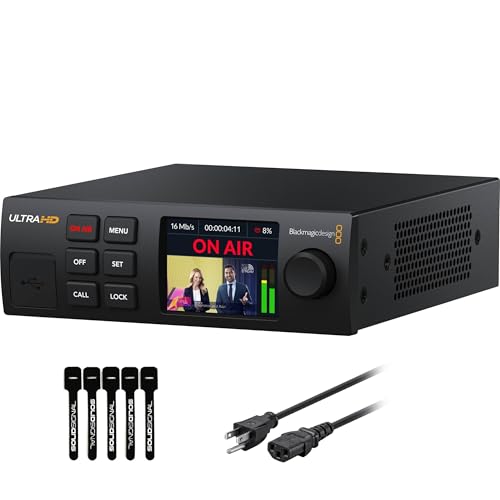
- 12G-SDI encoding up to 4K60
- H.264/H.265 streaming via SRT or RTMP
- Ethernet and mobile auto-failover
Best For: SDI broadcast and remote-production workflows
Budget Multi-Stream Option
URayCoder UHE265-8 HDMI Encoder

- Eight-port HDMI encoding up to 1080p
- Dual streams per HDMI input
- Broad protocol and overlay support
Best For: Multi-input HDMI streaming, IPTV, and NVR setups
Best 4K Multi-Platform Encoder

- 4K input/output at up to 30fps
- Four simultaneous streams with varied protocols
- Custom overlays and lifetime support
Best For: 4K HDMI sources and multi-platform live streaming
Best Protocol Flexibility
URayCoder 4K HDMI Network Encoder

- Broad protocol support including ONVIF
- 4K encoding up to 30fps
- Four simultaneous stream outputs
Best For: Mixed streaming, IPTV, OBS, and NVR workflows
Best 1080p Value Choice

- 1080p input/output up to 60fps
- H.265, H.264, and MJPEG support
- Multiple protocols plus HDMI or line-in audio
Best For: Full HD multi-camera streaming and IPTV setups
Best All-in-One 4K Encoder – Magewell Ultra Encode AIO
The Magewell Ultra Encode AIO is a strong choice among streaming encoders for multi camera setups when your production mixes HDMI and SDI sources. It combines 4K encoding, input mixing, multistreaming, recording, and onboard overlays in a rack-mountable unit.
Best For: Broadcast-style productions needing HDMI/SDI flexibility, multistreaming, and simultaneous recording.
Pros:
- Accepts HDMI and SDI, with picture-in-picture and side-by-side layouts.
- Supports 4K encoding, multiple streaming protocols, and up to six destinations.
- Streams and records at the same time to SD cards, USB storage, or network drives.
- Includes scaling, cropping, de-interlacing, and up to eight overlays.
Cons:
- Its rack-mountable 3.6-pound design may be more equipment than casual creators need.
- SDI 4K input is limited to 30p, while HDMI supports up to 60p.
Choose this model when connection flexibility and production control matter more than a compact, minimal setup. PoE, Wi-Fi, optional 4G modem support, web control, and API access add useful deployment options.
Best Hardware Switcher for Events – Osee GoStream Deck HDMI Pro
The Osee GoStream Deck is a practical option among streaming encoders for multi camera setups built around HDMI cameras. Its physical control surface, four HDMI inputs, audio controls, recording, and direct streaming features make it suited to live events and presentations.
Best For: Conferences, worship services, weddings, podcasts, and other HDMI-based productions needing hands-on switching.
Pros:
- Connects four HDMI sources and two HDMI displays for switching and multiview monitoring.
- Streams to three platforms simultaneously through Ethernet or outputs to PC software through USB.
- Provides a T-bar, PVW/PGM buses, macros, audio effects, and hardware controls.
- Supports portrait and landscape streaming, overlays, chroma key, and picture-in-picture.
Cons:
- It is centered on HDMI inputs and does not list SDI connectivity.
- Its one-year manufacturer warranty is shorter than some competing options.
The GoStream Deck is especially appealing if you prefer operating a production from a dedicated panel rather than relying entirely on a computer. Built-in recording, playback, and auto-switching further support live workflows.
Best Portable Multiformat Studio – YoloLiv YoloBox Ultra
The YoloLiv YoloBox Ultra combines a switcher, 4K encoder, recorder, and touchscreen monitor in one portable unit. For streaming encoders for multi camera setups, it stands out with four HDMI inputs, vertical and horizontal output options, cellular bonding, and ISO recording.
Best For: Mobile creators, churches, schools, sports teams, and productions targeting both landscape and vertical platforms.
Pros:
- Includes an 8-inch touchscreen, 4K encoder, switcher, and recorder without requiring a laptop.
- Connects four HDMI sources plus USB devices for more than 10 possible sources.
- Supports simultaneous horizontal or vertical platform streaming.
- Offers NDI, SRT, ISO recordings, overlays, instant replay, and auto-switching.
Cons:
- Its advanced cellular-bonding configuration uses multiple connections and may involve additional charges.
- The supplied specifications list a one-year manufacturer warranty.
This is a convenient fit when portability and platform flexibility are priorities. Its battery-powered design and built-in screen simplify field production, while ISO recording preserves individual inputs for later editing.
Best Multi-Protocol SDI Encoder – URayCoder 4K SDI to IP Encoder
The URayCoder multi-channel encoder is designed for SDI-based streaming encoders for multi camera setups that need broad IP protocol support. It handles 4K input, can output multiple streams, and provides browser-based management with configurable video and audio settings.
Best For: SDI installations sending feeds to multiple streaming servers, platforms, or multicast destinations.
Pros:
- Supports 4K input at up to 30 fps and lower-resolution rates up to 120 fps.
- Works with HTTP, RTSP, RTMP(S), SRT, HLS, UDP/RTP multicast, ONVIF, and other formats.
- Can output four video streams with different protocols simultaneously.
- Provides text, scrolling captions, logos, timestamps, cropping, and audio-source controls.
Cons:
- The supplied model information describes SDI connectivity rather than HDMI camera inputs.
- 4K frame rate is limited to 30 fps.
- It is an encoder rather than a full hardware camera switcher, so switching features are limited compared with production mixers.
This model makes the most sense in a network-centric SDI workflow where protocol compatibility and simultaneous outputs are more important than an integrated touchscreen or physical switching panel. Lifetime technical support and customization options may also appeal to installation-focused users.
Flexible HDMI-IP Workhorse – Magewell Ultra Encode HDMI Plus
For streaming encoders for multi camera setups built around HDMI sources, the Magewell Ultra Encode HDMI Plus offers a versatile standalone workflow. It supports up to 4K30 input, loop-through monitoring, multiple protocols, and simultaneous streaming and recording.
Best For: HDMI camera systems, events, education, corporate AV, and productions that need local monitoring plus flexible IP delivery.
Pros:
- Encodes HDMI video up to 4096×2160p30 with HDMI loop-through.
- Supports RTMP, RTMPS, SRT, NDI|HX, HLS, and TS over UDP/RTP.
- Can stream and record simultaneously to internal, USB, or network storage.
- Includes overlays, scaling, cropping, PoE, Wi-Fi, and optional USB modem support.
Cons:
- HDMI input limits compatibility with SDI-native camera systems.
- 4K encoding is specified up to 30 frames per second.
- 4G/5G USB modems are not included.
Its combination of NDI|HX, recording, overlays, and network flexibility makes it a strong choice when a multi-camera HDMI setup needs more than basic RTMP streaming.
Broadcast-Ready SDI Encoder – Blackmagic Streaming Encoder 4K
For streaming encoders for multi camera setups using SDI cameras, the Blackmagic Design Streaming Encoder 4K combines 12G-SDI input, 4K60 H.264/H.265 encoding, and standards conversion. Ethernet and USB-C mobile connectivity add useful resilience for live productions.
Best For: SDI-based broadcast, remote production, events, and workflows needing camera control, tally, talkback, or connection failover.
Pros:
- Supports HD and Ultra HD streaming up to 2160p60 in H.264 or H.265.
- 12G-SDI input and loop output handle sources up to DCI 4K60.
- Automatic failover can switch between Gigabit Ethernet and tethered mobile data.
- Provides SDI/HDMI monitoring, REST API control, captions, timecode, and webcam output.
Cons:
- Designed for SDI devices rather than direct HDMI camera inputs.
- Remote camera features depend on compatible Blackmagic Design cameras.
- Mobile connectivity requires a tethered smartphone and service.
This is the most production-oriented option of the group, particularly for SDI multi-camera systems where reliability, standards conversion, and control-room features matter.
Budget Multi-Stream Option – URayCoder UHE265-8 HDMI Encoder
For budget-conscious streaming encoders for multi camera setups with HDMI outputs, the URayCoder UHE265-8 provides dual streams per HDMI input and a broad selection of delivery protocols. Its configuration options also support branding and basic video adjustments.
Best For: HDMI live streaming, IPTV, NVR, and installations that need multiple independently configured streams.
Pros:
- Supports H.265 and H.264 encoding at up to 1080p HD.
- Can output two streams per HDMI input using different protocols.
- Offers RTMPS, RTSP, SRT, HLS, UDP, RTP, WebRTC, and other formats.
- Supports logos, text, time overlays, cropping, rotation, mirroring, and adjustable bitrate.
Cons:
- Maximum listed video resolution is 1080p rather than 4K.
- Its HDMI-focused design may not suit SDI camera systems.
- At 8 ports, setup and stream management may require more planning than a single-input encoder.
With eight HDMI ports and dual-stream output, this encoder is appealing for installations that prioritize protocol flexibility and simultaneous destinations over 4K resolution.
Best 4K Multi-Platform Encoder – URayCoder UHE265-1L-4K
For streaming encoders for multi camera setups, this URayCoder model is a flexible choice when each HDMI camera or source needs to be converted into network streams. It accepts 4K HDMI video, supports H.265 and H.264 encoding, and can output up to four streams using different protocols.
Best For: 4K HDMI sources, multi-platform live streaming, and setups needing RTMP, RTSP, SRT, HLS, or other network outputs.
Pros:
- Supports 4K input and output at up to 30fps, plus up to 120fps at 2K and lower resolutions.
- Can output four video streams simultaneously with different protocols.
- Offers overlays, cropping, rotation, mirroring, adjustable bitrate, and HDMI or line-in audio.
- Includes lifetime warranty and technical support.
Cons:
- Its single HDMI input means each camera requires its own encoder for a multi-camera system.
- 4K capture is limited to 30fps.
This is a strong option for a modular multi-camera workflow where 4K detail and broad protocol compatibility matter. Confirm that your cameras provide HDMI output and that your network can handle the selected stream settings.
Best Protocol Flexibility – URayCoder 4K HDMI Network Encoder
This URayCoder encoder suits streaming encoders for multi camera setups that need dependable HDMI-to-IP conversion and compatibility with production, streaming, and monitoring systems. It supports 4K video, dual H.265/H.264 encoding, and a wide range of network protocols, including ONVIF for NVR-oriented workflows.
Best For: Multi-camera installations combining live platforms, OBS, IPTV, and ONVIF/NVR equipment.
Pros:
- Supports 4K UHD input and output at up to 30fps.
- Handles RTSP, RTMPS, UDP, HLS, SRT, HTTP, WebRTC, ICECAST, and ONVIF.
- Can produce four streams simultaneously using different protocols.
- Includes configurable overlays, audio inputs, image adjustments, and lifetime technical support.
Cons:
- Only one HDMI input is provided, so multi-camera systems need multiple units.
- 4K output is limited to 30fps.
Choose this model when protocol coverage is more important than having multiple physical inputs on one box. Its ONVIF support may simplify integration with compatible NVR systems, while the streaming outputs support common broadcast and social platforms.
Best 1080p Value Choice – URayCoder UHE265-1S Encoder
For streaming encoders for multi camera setups built around 1080p cameras, the URayCoder UHE265-1S provides a practical HDMI-to-IP solution without requiring 4K capture. It supports H.265 and H.264 encoding, 1080p video at up to 60fps, and multiple streaming protocols.
Best For: Full HD multi-camera productions, IPTV, live streaming, OBS, and NVR applications.
Pros:
- Supports 1920×1080 input and output at up to 60fps.
- Encodes in H.265, H.264, or MJPEG.
- Supports RTSP, RTMPS, UDP, HLS, HTTP, ONVIF, FLV, and other listed protocols.
- Accepts HDMI audio or 3.5mm line-in audio and supports four simultaneous stream outputs.
Cons:
- Does not support 4K video input or output.
- Its single HDMI input requires one encoder per camera in a multi-camera setup.
This model is a sensible fit when your cameras and delivery platforms are already Full HD. The 60fps capability can benefit fast-moving content, while H.265 encoding may help manage network bandwidth compared with less efficient formats.
How We Picked the Best Streaming Encoders for Multi Camera Setups
We focused on the capabilities that matter when several cameras feed a live production workflow: input compatibility, encoding quality, supported streaming protocols, networking, monitoring, and ease of configuration. Models with HDMI inputs suit mirrorless cameras, camcorders, and switchers, while SDI support is generally preferable for longer cable runs and professional venues.
We also considered whether each encoder supports 4K, H.265/HEVC, SRT, RTMP or RTMPS, HLS, NDI, recording, loop-through, and multiple simultaneous outputs. These features can make a meaningful difference when you need a backup stream, local recording, remote contribution, or integration with production software.
Quick Comparison
| Best For | Look For | Why It Matters |
|---|---|---|
| Portable productions | Built-in controls, compact design, battery or mobile connectivity | Reduces the amount of equipment needed on location |
| Studio or venue systems | SDI, loop-through, PoE, reliable Ethernet | Supports longer cable runs and organized installations |
| 4K workflows | 4K input, HEVC, adequate bandwidth | Preserves detail while controlling stream size |
| Multiple destinations | Multi-protocol or simultaneous streaming | Helps deliver content to platforms and private servers |
Key Buying Factors for Streaming Encoders for Multi-Camera Setups
Inputs and Signal Routing
Confirm how many cameras the encoder accepts directly and whether you still need a hardware switcher. HDMI is common and affordable, but SDI is more robust for permanent installations. A loop-through output is useful for sending the same feed to a monitor, recorder, or switcher.
Resolution, Codecs, and Frame Rates
Choose 4K support if your cameras and production pipeline require it, but remember that your platform, internet connection, and storage must also support the higher data rate. H.265 can reduce bandwidth compared with H.264, while H.264 remains broadly compatible.
Protocols and Networking
RTMP or RTMPS is widely supported by social platforms. SRT is valuable for unstable networks and remote contribution because it is designed for reliable delivery over the public internet. NDI can simplify network-based production, but compatibility and bandwidth requirements should be checked in advance.
Reliability and Control
Look for wired Ethernet, stable power options, status monitoring, and straightforward configuration. Recording, automatic reconnect, and redundant streaming features are especially useful for events where a dropped broadcast is costly.
Who Should Buy Which Streaming Encoders for Multi Camera Setups?
Choose a compact HDMI encoder for single-camera or small mobile productions where portability and simple setup matter most. A unit with built-in switching, display controls, or mobile connectivity is a better fit for solo creators and event operators who want fewer devices.
For studios, houses of worship, schools, and venues using several cameras, prioritize SDI, loop-through, reliable Ethernet, and integration with an existing switcher. Professional users should favor models with SRT, NDI, recording, and flexible output options. If your workflow centers on 4K cameras, select a 4K-capable encoder only after confirming that your network and streaming destination can handle the required bandwidth.