The best laser cutting machines can turn digital designs into detailed signs, gifts, décor, prototypes, and sellable products. The right choice depends on your materials, workspace, safety preferences, and production goals.
We compare 10 notable options across diode and CO2 platforms, power levels, work areas, automation features, and beginner-friendly controls so you can choose with confidence.
Best 10 Laser Cutting Machines Picks for 2026
Best Overall Power

- 40W cutting power and a spacious work bed
- Rotary engraving and AutoPassthrough support
- Enclosed Class 1 design with multiple safety features
Best For: Large projects, signage, tumblers, and growing small businesses
Best for Production Automation
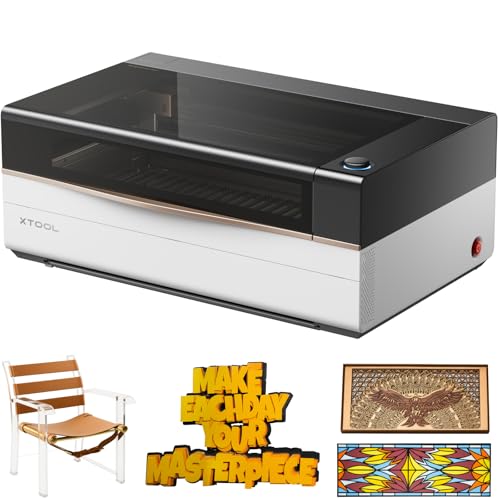
- 80W CO2 laser cuts wood and clear acrylic
- Large 36-by-18-inch workspace
- Automation and batch tools support production
Best For: Professional workshops and high-volume personalization
Best Midrange Hobby Engraver
Twotrees TTS-10 Pro Laser Engraver

- 10W diode laser for common craft materials
- 300-by-300mm work area for small projects
- Supports LightBurn, LaserGRBL, and offline TF-card use
Best For: Hobbyists and small projects such as coasters and keychains
Best Compact Starter

- 5.5W laser with 300 × 300mm workspace
- Supports wood, leather, acrylic, paper, and more
- Wi-Fi, TF-card, LaserGRBL, and LightBurn support
Best For: Hobbyists and makers handling compact engraving and light cutting projects
Best Enclosed 20W Option

- 20W laser for thicker wood and demanding cuts
- Fully enclosed 300 × 300mm workspace
- Safety features and multi-platform software support
Best For: Home workshops and small businesses making custom products
Best Expandable Detail Machine

- True 12W output with broad material compatibility
- 0.01mm positioning accuracy for detailed artwork
- Expandable with rotary, riser, and air-assist accessories
Best For: Makers and small businesses focused on detailed, expandable projects
Most Versatile
xTool M2 10W Color Craft Laser Engraver
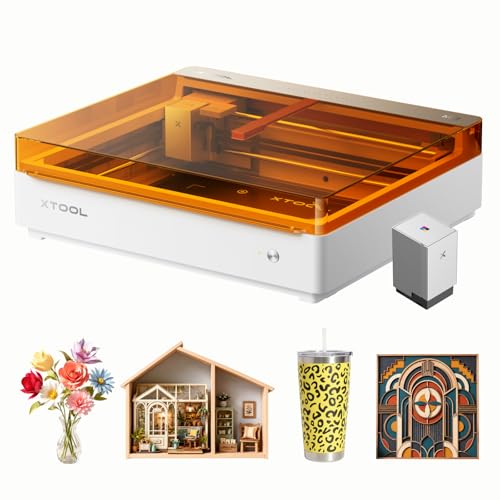
- Combines CMYK printing with laser cutting and engraving
- Dual cameras support accurate Place & Go positioning
- Class 1 enclosed design for home crafting
Best For: Colorful personalized crafts and home-based creative projects
Best for Rotary Projects
Creality Falcon 10W Laser Engraver

- Includes a versatile 4-in-1 rotary kit
- Air assist helps produce cleaner cuts
- Works with LightBurn and LaserGRBL
Best For: Tumblers, cylindrical objects, and detailed flat projects
Best Simple Pick

- Near-A4 work area fits common craft projects
- Quick assembly with app and offline controls
- Optional IR head supports future metal engraving
Best For: Beginners, home crafters, and small-business projects
Best Overall Power – xTool S1 40W Rotary Bundle
The xTool S1 40W is a strong all-around choice among laser cutting machines for makers who need substantial cutting power, a generous work area, and rotary capability. Its enclosed design, autofocus, and guided XCS software make it approachable while supporting larger projects.
Best For: Large craft projects, small businesses, tumblers, signage, and users who want an enclosed machine with room to grow.
Pros:
- 40W laser can cut up to 18mm cherry wood in a single pass, according to the supplied specifications.
- Large 23.93-by-15.16-inch bed and speeds up to 600mm/s support productive workflows.
- Includes rotary functionality, autofocus, positioning technology, and AutoPassthrough for projects up to 118 inches.
- Enclosed Class 1 design includes flame sensors, lid-open protection, and an emergency stop.
Cons:
- At 86.8 pounds, it is not especially portable.
- The feature-rich system may be more machine than casual hobbyists need.
The S1 stands out when cutting capacity, safety, and versatility matter more than a compact footprint. It is a practical premium option for frequent creators and expanding product businesses.
Best for Production Automation – xTool P3 80W CO2 Laser Cutter
The xTool P3 is a professional-grade option for buyers comparing high-output laser cutting machines. Its 80W CO2 laser, 36-by-18-inch workspace, automated setup features, and production-focused workflow are designed for demanding projects and repeatable output.
Best For: High-volume production, large-format work, clear acrylic, batch personalization, and professional workshops.
Pros:
- 80W CO2 power is specified to cut 20mm wood and 25mm acrylic, including clear acrylic applications.
- 1200mm/s maximum speed and a 36-by-18-inch work area support sizable jobs.
- LiDAR autofocus, dual HD cameras, and AutoLift Base streamline setup and positioning.
- Smart Nesting and Variable Batch Fill are useful for material efficiency and repeat orders.
Cons:
- At 317 pounds and nearly 50 inches wide, it requires substantial dedicated space.
- Many expansion accessories are sold separately unless included in a bundle.
- Its professional feature set may be excessive for occasional home use.
The P3 is aimed at users who value throughput, automation, and a large work envelope. It makes the most sense when production demands justify its size and higher-end positioning.
Best Midrange Hobby Engraver – Twotrees TTS-10 Pro Laser Engraver
The Twotrees TTS-10 Pro is a capable diode machine for shoppers seeking practical laser cutting machines for smaller projects. Its 10W optical output, 300-by-300mm work area, offline TF-card operation, and broad software compatibility suit hands-on hobby and light business use.
Best For: Coasters, keychains, phone cases, jewelry, small signs, and users who want flexible computer or offline control.
Pros:
- 10W blue diode laser supports engraving on wood, bamboo, acrylic, leather, dark glass, and coated or anodized metal.
- 300-by-300mm work area fits many common small craft projects.
- Supports LightBurn and LaserGRBL, plus mobile, web, and TF-card offline workflows.
- Metal-framed construction, dual Y-axis motors, and included assembly tools provide a practical setup.
Cons:
- The work area is limited for pieces larger than about 12 inches.
- Bare stainless steel and other uncoated metals are not recommended without surface preparation or marking spray.
The TTS-10 Pro offers useful control options and a manageable project size without requiring a fully enclosed professional system. Check the material limitations and dimensions before buying.
Best Compact Beginner Pick – ACMER S1 6W Laser Engraver
The ACMER S1 is a compact entry point for shoppers exploring laser cutting machines in a home workspace. It arrives 99% preassembled, weighs 4.2 pounds, and combines AI-assisted ACMER Studio software with LightBurn and LaserGRBL compatibility.
Best For: Beginners, portable home setups, small craft pieces, and users working within a 130-by-130mm area.
Pros:
- 99% preassembled design requires only about one minute to install the laser head.
- Compact 2kg-class aluminum-alloy construction is easy to carry and store.
- AI tools can create designs from text prompts or photos, while familiar software remains supported.
- Supports engraving on materials including wood, bamboo, leather, plastic, ceramics, and aluminum oxide.
Cons:
- The 130-by-130mm work area limits projects to relatively small pieces.
- Its 6W diode output is less suited to demanding cutting than higher-powered machines.
- Class 4 laser certification means buyers should follow appropriate laser-safety practices.
The ACMER S1 prioritizes simplicity, portability, and a low-friction start. It is a sensible fit for learning and small-format projects, but users planning larger cuts should choose a machine with a bigger bed and more power.
Best Compact Starter – Twotrees TTS-55 Pro
If you want an approachable entry point into laser cutting machines, the Twotrees TTS-55 Pro combines a compact 300 × 300mm work area with a 5.5W laser and wireless control. Its fine focus and support for common maker materials make it suitable for home projects, gifts, and small creative jobs.
Best For: Hobbyists, makers, and small-business users who need a compact machine for engraving and lighter cutting work.
Pros:
- 5.5W laser with support for an air-assist setup and a metal nozzle.
- Can engrave or cut wood, leather, acrylic, paper, stainless steel, and other compatible materials.
- Supports LaserGRBL, LightBurn, Wi-Fi control, TF-card offline engraving, and speeds up to 30,000mm/min.
Cons:
- The 300 × 300mm work area is better suited to smaller projects than oversized signs.
- Its 5.5W output is less suited to demanding cuts than higher-powered machines.
The TTS-55 Pro is a practical choice when installation support, flexible software compatibility, and a small footprint matter more than maximum cutting depth. Air-assist compatibility also gives you room to improve cutting results later.
Best Enclosed 20W Option – L2 MAX Laser Cutter
Among laser cutting machines for small workshops, the L2 MAX stands out for pairing a 20W laser with a fully enclosed design and a 300 × 300mm workspace. It is built for thicker wood, detailed engraving, and repeatable custom-product work while adding features intended for a home creative environment.
Best For: Small businesses and home workshops producing signs, ornaments, gifts, and other customized items.
Pros:
- 20W output is suited to thicker wood, oak, plywood, and demanding cutting tasks.
- Fine 0.01mm square focus supports detailed text, logos, artwork, and patterns.
- Fully enclosed operation includes flame detection, tilt protection, automatic shutdown, and an emergency stop.
- Works with LightBurn, LaserGRBL, and CutLabX through Wi-Fi, USB, app, or TF card.
Cons:
- At 16 pounds and over 21 inches wide, it requires more dedicated space than compact open-frame machines.
- The 300 × 300mm work area may limit extra-large designs.
The L2 MAX is the strongest fit here for users who prioritize cutting power and an enclosed workspace. Its control options and safety features also make it a versatile platform for growing from personal projects into small-batch production.
Best Expandable Detail Machine – ACMER S2 12W
The ACMER S2 is one of the more flexible laser cutting machines for makers who want detailed engraving now and expansion options later. Its true 12W laser, 300 × 300mm workspace, broad material support, and compatibility with rotary and air-assist accessories give it room to grow with changing projects.
Best For: Detail-focused makers and small businesses creating personalized gifts, signs, ornaments, and layered artwork.
Pros:
- True 12W laser can work across more than 100 materials and cut paulownia wood or black acrylic with multiple passes.
- 0.08 × 0.08mm spot and up to 0.01mm positioning accuracy support fine text, photos, and intricate artwork.
- Compatible with ACMER Studio, LightBurn, and LaserGRBL on Windows, macOS, and Linux.
- Supports optional rotary modules, risers, and air assist for expanded applications.
Cons:
- Some deeper cuts, including the listed wood and acrylic capacities, require multiple passes.
- Rotary, riser, and air-assist capabilities require optional accessories.
The S2 balances precision with upgrade potential. It is a sensible pick if your projects may expand from flat materials to cylindrical objects or cleaner assisted cutting, while its included shield and goggles provide a more prepared starting setup.
Most Versatile – xTool M2 10W Color Craft Laser Engraver
The xTool M2 stands out among laser cutting machines by combining a 10W diode laser with a CMYK inkjet printer in one enclosed unit. It can print, cut, and engrave across more than 300 materials, while dual cameras support a more accurate “Place & Go” workflow.
Best For: Home crafters, DIY makers, and creators who want full-color printing alongside laser engraving and cutting.
Pros:
- Combines CMYK inkjet printing, laser cutting, and engraving in one machine.
- Built-in dual cameras provide workspace previews and help reduce placement errors.
- Class 1 enclosed design is suited to home crafting environments.
- xTool Studio includes templates and an AI image generator for easier project setup.
Cons:
- The 3W IR laser module is sold separately.
- At 43.3 pounds, it is less portable than smaller open-frame machines.
The M2 is a strong choice when creative flexibility matters more than a minimal setup. Its integrated color printing and enclosed Class 1 design make it particularly appealing for personalized gifts, stickers, decor, and small craft businesses.
Best for Rotary Projects – Creality Falcon 10W Laser Engraver
The Creality Falcon is a productivity-focused option among laser cutting machines, offering a 10W output, air assist, and a rotary roller for cylindrical and shaped objects. Its 0.06mm laser spot and speeds up to 10,000mm/min support detailed engraving and efficient cutting.
Best For: Makers who want to engrave tumblers, cylinders, spheres, rings, and flat wood or acrylic projects.
Pros:
- Includes a 4-in-1 rotary kit for cylindrical, spherical, and ring-shaped objects.
- Adjustable air assist helps clear smoke and dust and reduce excessive burning.
- Supports LaserGRBL and LightBurn on Windows and macOS.
- Emergency stop and active tilt, flip, or drop protection add practical safety features.
Cons:
- It is a Class 4 laser, so users need to follow the manual and appropriate safety practices.
- The rotary kit requires careful installation; its connection cable may be hidden in the packaging foam.
Choose the Falcon if rotary engraving is central to your projects. The included accessories and air-assist system give it a broader project range than a basic flatbed diode engraver, though its Class 4 design calls for a more safety-conscious workspace.
Best Simple Pick – K15 Pro 10W Laser Engraver
The K15 Pro is a compact 10W diode option for shoppers comparing laser cutting machines for home crafting or small-business work. Its near-A4 work area, wireless app control, offline operation, and one-touch focus are designed to simplify setup while retaining useful cutting and engraving capability.
Best For: Beginners and small-business creators making coasters, signs, tags, gifts, tumblers, and other compact projects.
Pros:
- Assembles with six screws in about three minutes and includes starter materials and tools.
- Near-A4 work area fits many everyday craft projects while remaining desk-friendly.
- Supports CutLabX, LightBurn, and LaserGRBL, with TF-card offline engraving.
- Optional 1W IR laser head allows a future upgrade for bare-metal work.
Cons:
- The 11.8 × 7.9-inch work area is smaller than larger-format machines.
- The IR laser head, rotary roller, air pump, and other accessories may require separate purchases.
The K15 Pro makes sense for users who want a straightforward, space-conscious entry into laser crafting. Its software flexibility, offline controls, and upgrade path add value, while the A4-sized bed keeps it focused on smaller projects rather than oversized signs.
How We Picked the Best Laser Cutting Machines
We evaluated these Laser Cutting Machines by comparing their laser type, rated power, usable work area, speed claims, enclosure and safety features, material compatibility, expansion options, and overall suitability for home workshops or small businesses. We also considered practical extras such as air assist, rotary support, cameras, offline operation, and software accessibility.
Laser wattage is only one part of performance. A machine’s optics, motion system, ventilation requirements, focus method, and included accessories can have just as much impact on finished results and day-to-day convenience.
Quick Comparison
| Best For | What to Look For |
|---|---|
| Beginners and casual crafters | Simple setup, clear focusing, safety features, and approachable software |
| Wood and acrylic projects | A suitable diode power rating, air assist, and a stable work area |
| Higher-volume production | Faster motion, larger capacity, reliable cooling, and automation |
| Detailed personalization | Camera alignment, fine positioning, and rotary compatibility |
| Mixed-material work | Broad material support, adjustable power, and strong ventilation |
Key Buying Factors for Laser Cutting Machines
Laser Type and Materials
Diode machines are often compact and cost-effective for wood, cardboard, leather, and some opaque acrylic. CO2 models generally offer stronger performance across thicker nonmetal materials and can be better suited to production, but they usually require more space, ventilation, and maintenance. Never assume a machine can cut a material safely; check its specifications and avoid hazardous plastics such as PVC or vinyl.
Power, Work Area, and Speed
Higher power can reduce the number of passes needed for thicker materials, while a larger bed lets you produce bigger signs or batch multiple pieces. Advertised speed does not guarantee faster finished projects, because cutting performance also depends on material density, focus, air assist, and design complexity.
Safety and Ventilation
Look for an enclosure, lid sensors, emergency stopping, flame detection, and dependable ventilation. Even enclosed machines need appropriate exhaust and should never be left operating unattended. Use suitable eye protection when required by the manufacturer and follow local fire-safety guidance.
Software and Expandability
Check whether the included software supports your operating system and preferred design workflow. Camera alignment, rotary attachments, air assist, honeycomb beds, and passthrough capability can make a meaningful difference as your projects become more ambitious.
Who Should Buy Which Laser Cutting Machines?
Choose a compact, lower-power diode model if you are learning the basics, making occasional crafts, or working with smaller wood and acrylic pieces. A mid-power diode machine is a stronger fit for frequent hobby projects, personalized gifts, and a wider range of cutting tasks.
For larger workpieces, faster production, or demanding small-business use, prioritize a larger bed, higher power, dependable cooling, air assist, and automation features. If precision personalization is your priority, favor models with cameras, rotary support, and accurate positioning. Before buying, measure your available space, plan your exhaust route, confirm material compatibility, and budget for consumables and accessories.