The best laser cutting machine for hobbyists should match your materials, workspace, safety requirements, and expected project volume—not simply offer the highest wattage. This roundup compares 10 options spanning compact open-frame engravers, enclosed Class 1 systems, and faster machines designed for larger projects.
Before buying, consider working area, laser power, ventilation, software compatibility, camera alignment, air assist, and the materials you plan to cut. Those details have a greater effect on everyday usability than headline specifications alone.
Best 10 Laser Cutting Machine for Hobbyists Picks for 2026
Best Premium Pick

- 40W power and a spacious 23.93-by-15.16-inch bed
- Enclosed Class 1 safety design with flame sensors
- Auto-focus, rotary capability, and guided XCS software
Best For: Large projects and serious hobbyists wanting a powerful, beginner-friendly machine
Best Value Starter
Twotrees TTS-10 Pro 10W Engraver

- 10W diode laser with a 300-by-300mm work area
- Supports LightBurn, LaserGRBL, web, mobile, and TF-card workflows
- Includes tools, TF card, card reader, and one-year warranty
Best For: Small craft projects and beginners seeking flexible controls
Best Enclosed Design

- Fully enclosed Class 1 design for household crafting
- Pre-assembled with HD camera and touchscreen
- 20W module with Wi-Fi, USB, app, and TF-card control
Best For: Home crafters wanting simple, enclosed, offline-capable operation
Best Compact Cutting Value

- 5.5W laser cuts specified plywood, acrylic, and leather thicknesses
- Fine-focus optics and stated accuracy up to 0.1mm
- LightBurn, LaserGRBL, Wi-Fi, and TF-card support
Best For: Detailed small projects and thinner-material cutting
Best Smart Enclosed Pick
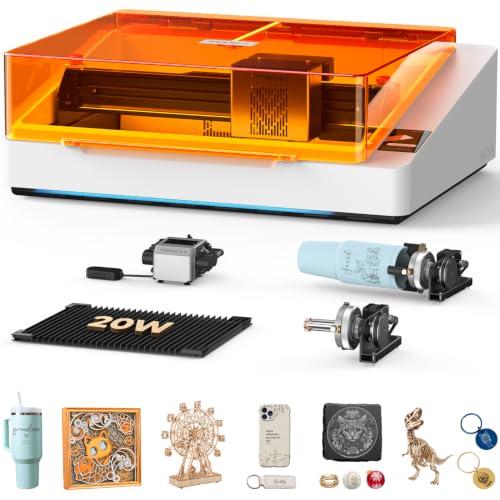
- 5MP AI camera for live positioning
- Enclosed Class 1 safety design
- Includes 360-degree rotary capability
Best For: Beginners and indoor hobby crafters
Best Expandable Starter

- 300 × 300mm workspace
- Supports LightBurn and LaserGRBL
- Expandable with rotary and air-assist accessories
Best For: DIY makers wanting a flexible entry machine
Best High-Power Open-Frame Pick

- Switchable 24W and 48W output
- 385 × 400mm work area
- Auto air assist and up to 500mm/s speed
Best For: Experienced makers and small businesses needing strong cutting power
Precision Value Pick
ATOMSTACK A20 Pro V2 20W Laser Engraver

- Up to 400 mm/s engraving speed
- 20W laser output
- USB, Type-C, and software control
Best For: Fast, flexible personalization projects
Fine-Detail Budget Pick
Creality Falcon 5W Laser Engraver
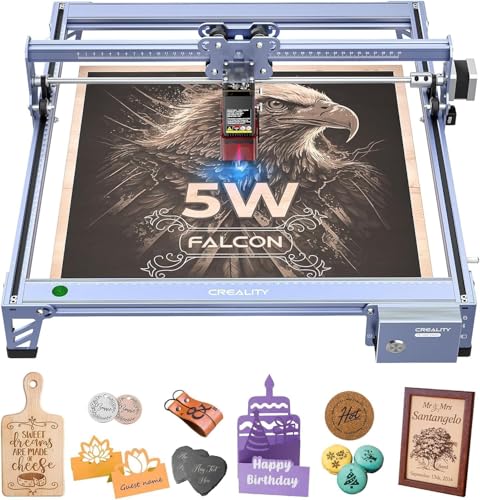
- 0.06 x 0.06 mm compression spot
- 400 x 415 mm work area
- Supports offline use and 200+ materials
Best For: Detailed engraving on larger craft pieces
Best Premium Pick – xTool S1 40W Rotary Bundle
For hobbyists who want a laser cutting machine for hobbyists that can handle ambitious projects, the xTool S1 combines a powerful 40W laser with a large 23.93-by-15.16-inch bed. Its enclosed design, automatic focusing, rotary bundle, and beginner-oriented software make it a versatile choice for both cutting and engraving.
Best For: Large projects, frequent makers, and hobbyists who want high power with guided software.
Pros:
- 40W laser can cut up to 18mm cherry wood in a single pass.
- Large work area and AutoPassthrough support projects up to 118 inches long.
- Enclosed Class 1 design includes flame sensors, lid-open protection, and an emergency stop.
- Auto-focus, material settings, tutorials, and AI-assisted design simplify setup.
Cons:
- At 86.8 pounds, it is substantially heavier than the open-frame options here.
- The larger, more powerful setup may be more than casual engravers need.
The xTool S1 is the strongest all-around option in this group for makers who value cutting capacity, safety, and ease of use. Its premium capabilities are especially useful for large signs, batches of smaller items, and curved projects using the rotary accessory.
Best Value Starter – Twotrees TTS-10 Pro 10W Engraver
The Twotrees TTS-10 Pro is a practical laser cutting machine for hobbyists focused on smaller projects. Its 10W blue diode laser, 300-by-300mm work area, offline TF-card operation, and compatibility with LightBurn and LaserGRBL give beginners several ways to get started.
Best For: Coasters, keychains, jewelry, phone cases, and other projects up to about 12 inches.
Pros:
- 10W optical output supports engraving on wood, bamboo, acrylic, leather, dark glass, and coated metal.
- 300-by-300mm work area suits common small craft projects.
- Supports computer, web, mobile-app, and TF-card offline operation.
- Includes assembly tools, a TF card, card reader, manual, and a one-year warranty.
Cons:
- Bare stainless steel and uncoated metal require marking spray or surface preparation.
- The work area is not suitable for pieces larger than roughly 12 inches.
- Unlike the enclosed options, this product’s supplied notes do not describe a fully enclosed Class 1 housing.
Choose the TTS-10 Pro if you want a flexible, compact platform for everyday personalized crafts without moving into high-power equipment. Confirm your material list and project dimensions first, particularly if metal marking or larger signs are priorities.
Best Enclosed Design – ORTUR R2 20W Class 1 Engraver
For home crafters prioritizing convenience and protection, the ORTUR R2 is a laser cutting machine for hobbyists with a fully enclosed Class 1 design. It arrives pre-assembled and pairs a 20W module with a camera, touchscreen, offline operation, and a 300-by-190mm working area.
Best For: Home craft rooms, beginners, and users who want visual alignment and computer-free operation.
Pros:
- Fully enclosed Class 1 construction is designed for household use.
- Pre-assembled body reduces initial setup work.
- HD camera and touchscreen support visual positioning and offline engraving.
- Wi-Fi, mobile app, USB, and TF-card connections provide flexible control options.
Cons:
- The 300-by-190mm work area is narrower than the 300-by-300mm Twotrees machines.
- Its stated maximum speed of 20,000mm/min is lower than the Twotrees models’ 30,000mm/min rating.
- The enclosed body may be less convenient for unusually large workpieces.
The R2 stands out when a tidy, safety-focused home setup matters more than maximum work area or speed. Its pre-assembled construction, camera alignment, and standalone controls make it particularly approachable for new hobbyists.
Best Compact Cutting Value – Twotrees TTS-55 Pro 5.5W
The Twotrees TTS-55 Pro is a compact laser cutting machine for hobbyists who want detailed engraving and modest cutting capability at a smaller scale. Its 5.5W laser, 300-by-300mm work area, air-assist-ready nozzle, and wireless or offline controls suit hands-on maker projects.
Best For: Hobbyists making plywood signs, acrylic pieces, leather goods, and detailed small-batch projects.
Pros:
- Can cut up to 5mm plywood, 3mm acrylic, and 0.7mm leather according to the supplied notes.
- Fine-focus optics support detailed engraving with stated accuracy up to 0.1mm.
- Supports LightBurn, LaserGRBL, Wi-Fi, web control, and TF-card offline engraving.
- Includes an air-assist-compatible nozzle and red laser shield.
Cons:
- Its 5.5W output offers less cutting power than the 10W, 20W, and 40W alternatives.
- The 300-by-300mm work area limits larger projects.
- Assembly is required, unlike the pre-assembled ORTUR R2.
The TTS-55 Pro makes sense for makers who value a fine spot, broad software compatibility, and a standard 300-by-300mm workspace. It is best suited to thinner materials and detailed craft work rather than heavy-duty cutting.
Best Smart Enclosed Pick – TOOCAA NOVA 20W
For hobbyists who want a laser cutting machine for hobbyists that is easy to position and operate indoors, the TOOCAA NOVA 20W emphasizes automation, safety, and broad material compatibility. Its built-in camera, autofocus, enclosed design, and guided software reduce much of the guesswork associated with starting laser projects.
Best For: Beginners, home crafters, classrooms, and makers who want camera-assisted engraving, enclosed operation, and rotary tumbler capability.
Pros:
- 5MP AI camera provides live previews, one-click calibration, and visual placement of designs.
- Fully assembled workflow includes three-second autofocus and AI material recognition.
- Class 1 enclosure includes flame detection, emergency stop, lid-open stop, tilt protection, and child lock.
- 360-degree rotary kit supports tumblers, bottles, rings, and other cylindrical projects.
Cons:
- Its 33.3-pound weight and roughly 27-by-19-by-9-inch package make it less portable than a compact open-frame machine.
- The supplied notes emphasize engraving across many materials but do not specify maximum cutting thickness.
The NOVA is a convenience-focused choice for hobbyists who value guided setup and indoor-friendly safety features. The camera and template-driven software are especially useful when accurate placement matters more than manual control.
Best Expandable Starter – ACMER S2 12W
The ACMER S2 is a flexible laser cutting machine for hobbyists who want a manageable entry point with room to expand. Its 300-by-300mm workspace, multi-platform software support, and compatibility with optional accessories make it suitable for learning while accommodating more involved craft projects.
Best For: DIY makers creating signs, ornaments, gifts, and detailed artwork who want software flexibility and an expandable work area.
Pros:
- True 12W laser handles engraving and cutting across more than 100 materials.
- 300-by-300mm work area supports signs, layered designs, and multi-piece layouts.
- Up to 0.01mm positioning accuracy and a 0.08 × 0.08mm spot are suited to fine text and detailed artwork.
- Works with ACMER Studio, LightBurn, and LaserGRBL on Windows, macOS, and Linux.
Cons:
- Optional rotary modules, risers, and air assist are needed for expanded cylindrical or cleaner cutting applications.
- The open-frame design relies on an anti-UV shield and included safety goggles rather than a fully enclosed cabinet.
The S2 balances affordability-oriented simplicity with useful upgrade potential. It is a practical pick when software choice and workspace size matter, though buyers should plan their ventilation and safety setup around its open-frame format.
Best High-Power Open-Frame Pick – ATOMSTACK A40 PRO V2
For hobbyists prioritizing cutting power and production speed, the ATOMSTACK A40 PRO V2 is a laser cutting machine for hobbyists with selectable 24W and 48W output modes. Its aluminum-alloy frame, 385-by-400mm work area, and automatic air assist are aimed at larger and more demanding home or small-business projects.
Best For: Experienced makers and small businesses needing stronger cutting performance for wood, MDF, acrylic, and similar materials.
Pros:
- One-key switching between 24W engraving mode and 48W cutting mode provides project flexibility.
- Rated for single-pass cutting through up to 18mm wood, 9mm MDF, and 7mm acrylic according to the supplied notes.
- Supports speeds up to 500mm/s and includes auto air assist for cutting workflows.
- Quick-install aluminum-alloy structure is designed for durability and accuracy.
Cons:
- Class IV operation requires careful use of the protective glass, safety glasses, and safety guidance.
- Its open-frame format means users must keep flammable materials away and remain present during operation.
- The higher-power design may be more machine than beginners need for light engraving projects.
The A40 PRO V2 stands out when cutting capacity is more important than enclosed convenience. Its dual-power control and larger work area offer room to grow, but the Class IV open-frame setup demands disciplined safety practices.
Enclosed Speed Pick – VEVOR 20W Enclosed Laser Engraver
For hobbyists seeking a laser cutting machine for hobbyists, the VEVOR 20W model combines a large 15.7 x 15.7-inch work area with speeds up to 30,000 mm/min. Its enclosure, camera, and automatic positioning features make it a practical choice for projects involving wood, leather, paper, and other compatible materials.
Best For: Hobbyists who want enclosed Class 1 operation, a spacious work area, and fast cutting for larger craft projects.
Pros:
- 20W output and speeds up to 30,000 mm/min support productive engraving and cutting.
- Large 15.7 x 15.7-inch working area accommodates sizable projects.
- Enclosure includes smoke and laser-light protection, emergency stop, tilt stop, limit switches, and a security lock.
- Supports LightBurn, LaserGRBL, and CutLabX, with Wi-Fi through the CutLabX app.
Cons:
- Cannot cut metal or transparent, reflective, and translucent materials.
- LightBurn is paid, and LaserGRBL is intended for Windows low-speed devices only.
- Its 33.7-pound weight and roughly 24-inch footprint require dedicated workspace.
The VEVOR stands out when enclosure safety, working space, and speed matter most. It is less suitable for users specifically seeking direct metal cutting or a compact machine.
Precision Value Pick – ATOMSTACK A20 Pro V2 20W Laser Engraver
The ATOMSTACK A20 Pro V2 is a strong laser cutting machine for hobbyists who want high output in a relatively lightweight frame. Its 20W laser, up to 400 mm/s engraving speed, modular construction, and broad software support suit personalized gifts, signs, and small business projects.
Best For: Hobbyists and creators who prioritize fast engraving, precise motion, and flexible USB or software control.
Pros:
- 20W output and speeds up to 400 mm/s support efficient engraving and cutting.
- Integrated linear guides, a 32-bit control system, and cross-line light are designed for accurate positioning.
- Includes a removable magnetic protective cover, safety glasses, limit switches, and tilt-angle safety alert.
- Works with ATOMSTACK software, LightBurn, and LaserGRBL, with Type-C and USB-stick control options.
Cons:
- The supplied notes do not specify a cutting thickness or detailed material limitations.
- The protective cover is removable, so setup and operation still require careful safety practices.
- LightBurn and some computer-based workflows may add software costs or setup time.
With its fast 400 mm/s rating, compact 13.67-pound build, and multiple control methods, the A20 Pro V2 is appealing for flexible home workshops. Confirm the included setup and material requirements before tackling specialized projects.
Fine-Detail Budget Pick – Creality Falcon 5W Laser Engraver
For hobbyists focused on detail rather than maximum power, the Creality Falcon 5W is a practical laser cutting machine for hobbyists. Its 0.06 x 0.06 mm compression spot, 400 x 415 mm work area, offline use, and support for more than 200 materials make it suited to detailed craft work and larger layouts.
Best For: Detail-oriented hobbyists working on wood, leather, acrylic, glass, and other compatible materials across a broad work area.
Pros:
- Ultra-fine 0.06 x 0.06 mm spot supports intricate engraving.
- 400 x 415 mm working area handles larger materials in one pass.
- 10,000 mm/min maximum speed and a 32-bit chip support productive workflows.
- Eye-protective cover, active stop function, and offline usage add convenience and safety features.
Cons:
- Its 5W output is lower than the 20W machines in this roundup.
- Rotary roller and raisers for cylindrical or taller objects are optional extras.
- It is a Class 4 laser, so careful operating precautions remain important.
The Falcon 5W favors fine engraving and generous material coverage over high-power cutting. It is a good fit for detailed hobby projects, but users planning thicker cuts may prefer a higher-output model.
How We Picked the Best Laser Cutting Machine for Hobbyists
We compared these machines using the specifications and features most relevant to home makers, DIY users, small businesses, and creative workshops. Our evaluation focused on laser power, usable work area, enclosure and safety design, cutting and engraving speed, camera or positioning features, air assist, controls, material compatibility, and likely learning curve.
Power ratings are not directly interchangeable across brands, and real-world results depend on lens focus, passes, material type, ventilation, and settings. Treat advertised speeds and cutting depths as starting points rather than guaranteed outcomes.
Quick Comparison
- Best overall flexibility: xTool S1 40W
- Best enclosed, camera-equipped options: TOOCAA NOVA 20W and ORTUR R2 20W
- Best for higher-power cutting: ATOMSTACK A40 PRO V2 48W and ACMER S2 12W
- Best budget-oriented choices: Twotrees TTS-10 Pro, TTS-55 Pro, and ATOMSTACK A20 PRO V2
- Best compact entry point: Creality Falcon 5W
- Best value with a larger enclosed workspace: VEVOR 20W
Key Buying Factors for a Laser Cutting Machine for Hobbyists
Laser Power and Materials
Higher optical power generally improves cutting capability and reduces the number of passes, especially with thicker wood, leather, and some acrylics. A lower-power diode can still be excellent for engraving, thin plywood, paper, cardboard, coated metal, and beginner projects. Verify the manufacturer’s approved material list before cutting anything unfamiliar.
Enclosure, Ventilation, and Eye Safety
An enclosed Class 1 design is often the easiest choice for a home, classroom, or shared workshop because it helps contain laser light and smoke. You still need appropriate ventilation, fire awareness, and supervision. Open-frame machines require especially careful placement, protective eyewear where appropriate, and restricted access during operation.
Work Area and Positioning
Measure your typical blanks before choosing a machine. A larger bed is useful for signs, batches, and flat panels, while a smaller footprint may be preferable for occasional projects. Cameras, live previews, and automatic positioning can reduce setup errors, but they do not replace accurate focusing and material testing.
Software and Convenience Features
Check compatibility with your preferred design software and operating system. Air assist, emergency stops, limit switches, autofocus, touchscreen controls, rotary support, and replaceable lenses can make regular use safer and more efficient.
Who Should Buy Which Laser Cutting Machine for Hobbyists?
Choose an enclosed model such as the TOOCAA NOVA, ORTUR R2, or VEVOR if safety containment and simpler placement are priorities. Pick a higher-power ATOMSTACK or ACMER model if you regularly cut thicker stock or run batches. The xTool S1 is a strong all-around choice for users who want broad capability and a polished workflow. Budget-conscious beginners can start with a Twotrees, ATOMSTACK A20, or Creality Falcon, provided the open-frame safety and ventilation requirements fit their workspace.