The best robot arms for teaching turn abstract coding, electronics, and robotics concepts into hands-on projects. This roundup compares ten options spanning beginner-friendly kits, ESP32 platforms, AI-enabled arms, and ROS-compatible systems.
Use the guide below to match the arm’s degrees of freedom, programming support, construction, and expansion options to your classroom, lab, or home learning goals.
Best 10 Robot Arms for Teaching Picks for 2026
Best Open-Source Starter
MaxArm Arduino/Python Robot Arm

- Arduino and Python support
- Inverse kinematics with trajectory planning
- ESP32 WiFi, Bluetooth, and sensor expansion
Best For: Older students and beginners learning programming and robotics
Best for Embodied AI
NexArm 6DOF AI Vision Robot Arm

- LeRobot and VLA model compatibility
- K230 vision and voice interaction
- 500mm reach with 500g payload
Best For: University labs and advanced embodied-AI education
Best Arduino Learning Kit

- Open-source Arduino-compatible platform
- Knob, app, and Bluetooth control
- Expansion ports for optional sensors
Best For: Arduino learners and makers practicing servo and sensor control
Best for Flexible Expansion
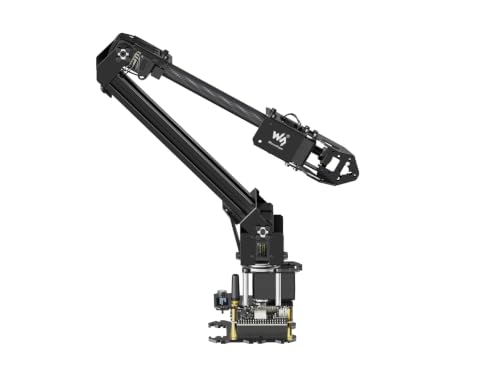
- Visual web-based coordinate control
- Open source with ROS2 compatibility
- 360° workspace and expansion plate
Best For: STEM learners and developers exploring ROS2 and custom tools
Hands-On Metal Kit

- Six-axis arm for motion and gripping demonstrations
- Metal brackets with six MG996 servos
- Designed for college teaching and maker education
Best For: Classroom demonstrations and hands-on mechanical learning
Accessible STEM Platform

- ESP32 kit with 16 guided tutorials
- App and IR remote control
- Mecanum wheels support omnidirectional movement
Best For: Beginner coding classes and family STEM projects
Embodied AI Lab Platform

- 500mm reach and 500g payload
- LeRobot and imitation-learning compatibility
- K230 vision module with 30+ AI features
Best For: University AI labs and advanced robotics education
Best Budget STEM Pick
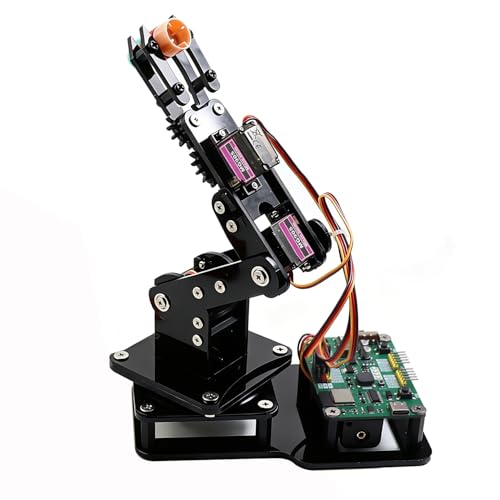
- Arduino and MicroPython support
- Joystick and web-app control
- Motion recording with loop playback
Best For: Teens, students, classrooms, and beginner makers
Best for AI Learning

- LeRobot-compatible imitation learning
- Dual-camera vision system
- 12 high-torque bus servos
Best For: Advanced students, developers, and robotics researchers
Best for ROS Projects

- 6+1 DoF arm with gripper
- Python SDK and ROS1/ROS2 support
- Leader-follower AI training features
Best For: Advanced STEM programs, labs, and robotics developers
Best Open-Source Starter – MaxArm Arduino/Python Robot Arm
For learners comparing robot arms for teaching, the MaxArm is a practical starter kit built around Arduino and Python programming. Its inverse-kinematics features, wireless connectivity, and expansion ports support hands-on lessons in motion control, mechanics, and introductory robotics.
Best For: Older students, hobbyists, and classrooms teaching programming, inverse kinematics, and sensor-based robotics.
Pros:
- Supports Arduino and Python programming with app, PC, mouse, and wireless-controller operation.
- Uses inverse kinematics and trajectory planning for movement along the x, y, and z axes.
- ESP32 controller offers WiFi, Bluetooth, sensor ports, LEDs, a buzzer, and other expansion interfaces.
- Aluminum construction and smart bus servos provide a durable platform for programming practice.
Cons:
- Recommended for ages 16 and up, so it may be too advanced for younger learners.
- The starter kit does not specify included sensors beyond the robotic arm components.
MaxArm offers a strong balance of accessible programming and room for secondary development. It is especially useful when the goal is to connect software concepts with physical robotic movement.
Best for Embodied AI – NexArm 6DOF AI Vision Robot Arm
For advanced robot arms for teaching, NexArm provides a hardware platform for imitation learning, computer vision, voice interaction, and multimodal AI. Its 6DOF metal arm works with the LeRobot ecosystem and includes a K230 vision module for more ambitious lab and university projects.
Best For: University AI labs, advanced robotics courses, and developers studying imitation learning, vision-guided grasping, and embodied AI.
Pros:
- Supports LeRobot, community datasets, simulations, and end-to-end ACT and VLA models.
- K230 vision module provides more than 30 built-in features, including object, color, gesture, and face recognition.
- Combines voice control, AI vision, hand-eye coordination, and multimodal model integration.
- Offers a 500mm reach, 500g payload, and claimed ±2mm repeatability.
Cons:
- Its advanced AI feature set may be excessive for introductory robotics lessons.
- The manufacturer recommends it for ages 15 and up.
NexArm is the most development-focused option in this group. Choose it when teaching objectives extend beyond basic arm motion into datasets, models, perception, and real-world AI task execution.
Best Arduino Learning Kit – miniArm 5DOF STEM Robot
The miniArm is a straightforward choice for robot arms for teaching Arduino programming and hands-on engineering. Its open-source platform, knob controller, Bluetooth module, and sensor expansion ports give learners several ways to experiment with motion, inputs, and custom robotic behaviors.
Best For: Students and makers learning Arduino coding, servo control, offline action editing, and sensor integration.
Pros:
- Built on Atmega328 and compatible with Arduino programming and open-source examples.
- Provides app control, Bluetooth connectivity, and real-time knob-based control.
- Includes expansion ports for optional sensors and modules such as ESP32-CAM, touch, acceleration, and ultrasonic sensors.
- High-precision digital servos support practical motion-control exercises.
Cons:
- The Starter Kit does not include the listed ultrasonic, touch, acceleration, or ESP32-CAM accessories.
- Recommended for ages 17 and up, limiting its fit for younger classes.
miniArm makes sense for courses that prioritize Arduino fundamentals and secondary development. Be sure to check the kit version if your lessons require the additional sensors and accessories.
Best for Flexible Expansion – Waveshare RoArm-M2-S 4DOF Kit
Waveshare’s RoArm-M2-S is a compact option for robot arms for teaching that emphasizes visual control, wireless communication, and customization. Its web application, open-source interfaces, ROS2 compatibility, and expansion plate make it suitable for lessons that move from basic operation into broader robotic systems.
Best For: STEM classrooms, makers, and developers exploring ROS2, custom end-effectors, and mobile-platform robotics.
Pros:
- Web application offers visual coordinate control and is supported by graphic and video tutorials.
- Open-source control code and communication documentation support secondary development.
- ESP32 enables multiple wired and wireless communication modes.
- 360° base and three flexible joints provide a workspace about 1 meter in diameter.
Cons:
- As a 4DOF arm, it provides fewer degrees of freedom than the 5DOF and 6DOF options here.
- The notes identify an expansion plate but do not list additional end-of-arm tools as included.
RoArm-M2-S is a flexible teaching platform when connectivity and customization matter more than maximum articulation. Its lightweight design also makes it practical for experiments involving mobile platforms.
Hands-On Metal Kit – 6DOF Mechanical Arm
For buyers seeking robot arms for teaching mechanical principles, this six-degree-of-freedom kit emphasizes hands-on assembly and manual control. Its aluminum construction, six MG996 servos, and articulated claw support demonstrations of movement, gripping, and carrying.
Best For: College teaching, maker projects, and classroom demonstrations of basic robotic motion and programming.
Pros:
- Six degrees of freedom demonstrate multiple axes of movement.
- Includes six MG996 servos and a broad selection of brackets, bearings, cables, and fittings.
- 2mm aluminum brackets and metal servo components are designed for added stability.
- Cup bearings and a disc-style chassis support smoother joint and base rotation.
Cons:
- Manual operation is listed, so advanced autonomous features are not specified.
- Assembly is required, and the listing does not describe a detailed curriculum or tutorial set.
- The included analog MG996 servos may offer less precision than higher-end digital alternatives.
This is a practical choice when the goal is to show how a multi-axis arm is built and operated. Choose it over a more child-focused kit when metal construction and mechanical demonstration matter most.
Accessible STEM Platform – 5DOF Robot Arm Car
This 5DOF robot arm car combines robotic-arm lessons with coding and mobile navigation, making it one of the more approachable robot arms for teaching younger learners. The ESP32-based kit includes 16 guided tutorials, a paper manual, app and remote control, and no-solder assembly.
Best For: Family STEM activities, school projects, and introductory coding classes for children roughly ages 8–12.
Pros:
- 16 guided projects introduce coding, robot control, and problem-solving.
- Supports Arduino, Blockly, and Python-related learning according to the listing.
- IR remote and iOS/Android app provide dual-control options.
- Mecanum wheels enable omnidirectional movement, including diagonal travel and turning.
Cons:
- Batteries are required but not included.
- The arm has five degrees of freedom rather than six.
- Optional expansion components such as cameras, tank tracks, and solar panels are sold separately.
Its combination of a mobile chassis, arm, and guided lessons gives learners several ways to practice programming beyond simple grasping. It is a strong fit for beginners who benefit from structured projects and app-based control.
Embodied AI Lab Platform – NexArm 6-Axis AI Robot Arm
For advanced robot arms for teaching, the NexArm Standard Kit is built around programming, machine vision, and imitation learning. Its full-metal six-axis design pairs magnetic encoder bus servos with ESP32 and AT32 processors, open-source resources, and compatibility with the LeRobot ecosystem.
Best For: University AI labs, advanced robotics courses, and developers exploring inverse kinematics, imitation learning, and embodied AI.
Pros:
- Provides a 500mm reach, 500g payload, and ±2mm repeatability according to the listing.
- Supports LeRobot, ACT, VLA, datasets, simulations, and end-to-end imitation-learning workflows.
- K230 vision hardware offers more than 30 listed AI vision features, including object, color, and gesture recognition.
- Includes open-source code, schematics, tutorials, and PC, app, remote, and Arduino control options.
Cons:
- Its advanced AI and programming focus may be excessive for beginners.
- The standard kit is aimed at users ages 15 and up and requires more specialized learning.
- Additional platforms such as a mobile chassis, conveyor, or slider are not part of the core arm description.
This is the most capable teaching platform in the group for learners moving from basic arm control into vision, multimodal interaction, and model deployment. It makes the most sense when a lab needs an open, extensible platform rather than a simple classroom toy.
Best Budget STEM Pick – ESP32 4DOF Robot Arm Kit
For beginners looking for robot arms for teaching, this 4DOF ESP32 kit offers a hands-on introduction to building, coding, and basic robotic control. It supports Arduino and MicroPython, while joystick and web-app controls let learners start experimenting without uploading code first.
Best For: Teens, students, classrooms, and makers learning electronics, robotics, and programming.
Pros:
- Includes the hardware needed to build a DIY 4DOF arm with a gripper for lightweight objects.
- Supports both Arduino and MicroPython programming.
- Offers joystick control, browser-based control, motion recording, and loop playback.
- Open-source code, tutorials, and expandable hardware support encourage continued learning.
Cons:
- Batteries are not included.
- Recommended for ages 13 and up, so younger learners may need supervision.
- The 4DOF design is intended for lightweight objects rather than advanced manipulation.
This is a practical entry-level choice for robot arms for teaching, especially when the goal is to connect physical assembly with beginner-friendly coding and repeatable motion experiments.
Best for AI Learning – Hiwonder SO-ARM101 Vision Arm
For advanced robot arms for teaching, the Hiwonder SO-ARM101 provides a more research-oriented platform for exploring imitation learning and AI-powered manipulation. Its assembled format, dual-camera vision system, and compatibility with the LeRobot open-source framework make it suitable for structured experimentation.
Best For: Adult learners, researchers, developers, and advanced robotics students studying AI and imitation learning.
Pros:
- Supports end-to-end imitation learning through compatibility with LeRobot.
- Uses a gripper-mounted camera and an external camera for manipulation and environmental awareness.
- Includes 12 high-torque bus servos with magnetic feedback for smooth, stable movement.
- Assembled advanced kit includes 3D-printed parts and professional servo debugging tools.
Cons:
- Recommended for ages 16 and up and may be too advanced for beginners.
- The advanced feature set is better suited to AI research than simple introductory lessons.
- Its 20 x 9 x 9-inch dimensions require a suitable workspace.
Choose this model when teaching goals extend beyond basic programming into computer vision, calibration, trajectory control, and shared AI frameworks. The assembled setup can also reduce the initial mechanical build burden.
Best for ROS Projects – reBot B601-DM Open-Source Arm
The reBot B601-DM is a strong option for robot arms for teaching when lessons involve Python, ROS, AI training, and real-world development workflows. Its 6+1 DoF assembled design, gripper, leader-follower tracking, and broad software compatibility support projects that progress from calibration to grasping and placing.
Best For: Robotics labs, developers, advanced STEM programs, and learners working with Python, ROS1, ROS2, or LeRobot.
Pros:
- Provides 6+1 DoF movement with an included gripper kit.
- Compatible with Python SDK, ROS1, ROS2, LeRobot, and Hugging Face projects.
- Leader-follower tracking supports human intervention and correction during reinforcement-learning training.
- Includes open-source guides covering assembly, calibration, testing, and deployment.
Cons:
- 3D-printed parts are not included.
- The software and AI workflow may be more complex than needed for basic classroom demonstrations.
- Its listed dimensions require substantial setup space.
This arm is best viewed as a development and research platform rather than a simple coding toy. Its operating-system, connectivity, and framework support make it useful for teaching complete AI robotics workflows.
How We Picked These Robot Arms for Teaching
We focused on the features that matter most in practical instruction: accessible programming, useful documentation, durable construction, expansion potential, and a clear path from simple motion experiments to more advanced robotics. The selection includes Arduino, ESP32, Python, MicroPython, app-controlled, AI, and ROS-compatible platforms so instructors can choose according to learner age and course objectives.
We also considered whether an arm encourages active building and troubleshooting or arrives assembled for faster deployment. A low-cost kit can be excellent for foundational lessons, while a full-metal or AI-ready platform may be better suited to engineering programs, research demonstrations, and advanced projects.
Quick Comparison
| Best for | Look for | Typical choice |
|---|---|---|
| Young beginners | Simple controls, guided assembly, safe operation | 5DOF kit with app or joystick control |
| Arduino and ESP32 lessons | Open documentation, accessible libraries, bus servos | 4DOF or 5DOF programmable arm |
| Mechanical engineering | Metal structure, stronger servos, modular gripper | 6DOF full-metal kit |
| AI and computer vision | Camera support, imitation learning, capable controller | AI-focused 6-axis platform |
| Advanced robotics courses | Python SDK, ROS1/ROS2 support, reliable interfaces | Assembled open-source arm |
Key Buying Factors for Robot Arms for Teaching
Degrees of Freedom and Reach
More degrees of freedom provide smoother, more natural positioning but add cost, setup time, and programming complexity. Four- and five-axis arms are often sufficient for introductory pick-and-place activities. Six-axis models are more appropriate when students need to study orientation, inverse kinematics, or industrial-style movement.
Programming and Connectivity
Check for support matching your curriculum. Arduino and block-style tools are approachable for beginners, while Python, MicroPython, and ROS enable deeper software work. Wi-Fi, Bluetooth, web interfaces, or app control can make demonstrations convenient, but wired control may be preferable when teaching low-level communication and debugging.
Build Quality and Safety
Metal frames and high-torque bus servos generally tolerate repeated classroom use better than lightweight hobby components. However, stronger motors also create more pinch and collision risk. Prioritize current limits, emergency stopping, guarded workspaces, stable bases, and clear operating instructions.
Expansion and Support
Look for replaceable grippers, suction tools, camera mounts, spare parts, open-source examples, and an active user community. Documentation often matters as much as the hardware, especially when several students must assemble, calibrate, and troubleshoot the same platform.
Who Should Buy Which Robot Arms for Teaching?
Choose a simpler Arduino or ESP32 arm for introductory coding, maker spaces, and younger learners. A 5DOF or 6DOF full-metal kit is a stronger fit for secondary, college, and engineering classes that require assembly, calibration, and motion planning. AI-oriented Hiwonder or SO-ARM101 platforms make sense for lessons involving imitation learning, vision, and embodied AI, provided the instructor can support the added software complexity. For advanced labs using established robotics frameworks, the reBot B601-DM’s Python and ROS compatibility may offer the most direct route into professional development workflows.